
Since 1 January 2026, you can't run a Romanian business on cash alone. Law no. 239/2025 scrapped the old RON 50,000 threshold, and now every registered trader has to accept cards or another electronic payment method, whatever your turnover.
So a lot of Romanian online store owners have spent an afternoon with five provider tabs open, five different percentages on screen, and no real way to tell which one actually costs less.
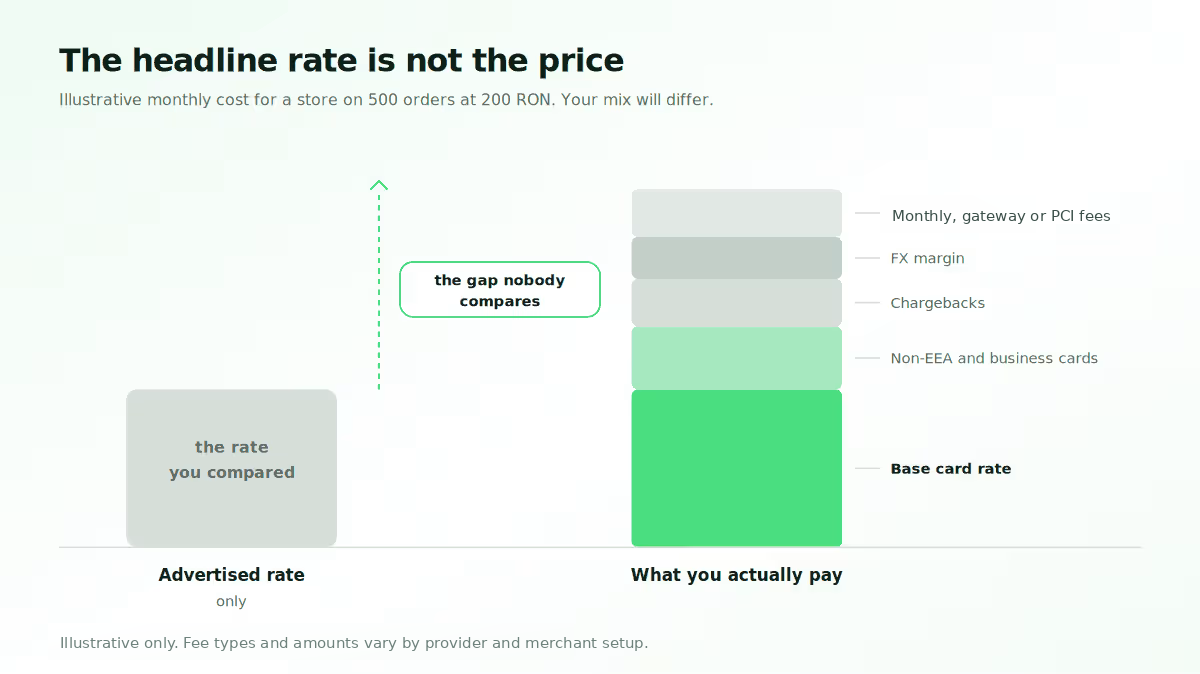
Here's the thing: that percentage is the least useful number on the page.
Two providers can quote you the same rate and still land hundreds of lei apart each month, once you count card mix, chargebacks, payout timing and the work of getting set up.
These are the seven things to compare instead.
Key takeaways
- The advertised rate isn't the price. Check the EEA vs non-EEA card split, chargeback and refund handling, FX margin, and any monthly or PCI fee.
- You're competing with cash on delivery, not with other gateways. COD still takes 51% to 65% of online orders, and every refused parcel costs you both delivery legs.
- Settlement timing can matter more than a small rate difference. Getting paid sooner changes what stock you can order.
- Paypercut is built for the CEE version of this problem. RON and EUR, plugins for the platforms Romanian stores run, published pricing, payouts to your existing bank.
What to compare in a payment gateway for ecommerce in Romania
1. The full fee stack, not the headline rate
Every provider leads with a percentage. What separates them is the small print underneath.
Start with the card split. Under Regulation (EU) 2015/751, interchange on consumer cards issued in the EEA is capped at 0.2% for debit and 0.3% for credit. Business cards and cards from outside the EEA don't fall under that cap, so nearly every provider charges a second, higher rate for them. If you only see one rate in a quote, ask for the other one.
Then there are the charges that turn up later:
- Chargeback fee per dispute, win or lose
- Refund treatment, meaning whether you pay a fee to refund, and whether the original transaction fee comes back to you. These are two different questions and providers answer them differently
- FX margin when a payment isn't in your settlement currency
- Monthly gateway, PCI or account maintenance fees
- Setup fees, still common with bank merchant accounts
Ask each provider to price your last month. Hand them your transaction count, average order value, refund rate and the share of foreign cards. If they won't run those numbers with you, that tells you plenty.
What good looks like: both rates, the chargeback fee and the list of what you're not charged for, on one pricing page you can read before you talk to anyone.
2. Whether the checkout matches how Romanians pay
This is where a lot of your conversion rate is won or lost, and most comparison guides skip straight past it.
Cash on delivery is still the habit here. ARMO puts COD at 60% to 65% of online orders; a 2025 peak-season read put it nearer 51%. Numbers move with the season and the method. Either way, the checkout you build is up against a customer who'd rather hand cash to the courier.
So your payment options need to remove every small reason to click away:
- Visa and Mastercard. National Bank of Romania data counted 28.63 million active cards at the end of 2025, up 10.07% in six months. Card ownership isn't your bottleneck.
- Apple Pay and Google Pay. They remove manual card entry for eligible mobile customers, which takes several steps out of the checkout. Check whether your provider prices wallet transactions above cards; some do.
- Buy Now, Pay Later. Earns its place on bigger baskets, where the customer is weighing the total.
- RoPay, the national instant transfer scheme from TRANSFOND and the Romanian banks. It moved from person-to-person payments into ecommerce over 2025 and 2026, and EuPlătesc connected straight to the RoPay infrastructure in August 2026.
RoPay support varies a lot between providers right now. Ask two questions: do you support it today, and if not, when? How straight an answer you get is a decent preview of how they'll handle roadmap questions later.
Our guide on how to accept payments in Romania goes deeper on which methods Romanian shoppers reach for.
What cash on delivery really costs you
COD gets listed as a payment method, but it behaves more like a credit line you hand every customer. Price it that way and different gateway features start to matter.
There are four costs to add up:
- Refused deliveries. The parcel goes out and comes back. You pay both legs plus handling, earn nothing, and the stock sits in a van for the round trip.
- The cash cycle. The courier collects, then pays you on their schedule. That sits on top of your card settlement delay.
- Reconciliation. Someone has to match courier reports against orders by hand, and that work grows with your volume.
- Returns. People commit less when they haven't paid yet, and it shows up in return rates. Fashion feels this most.
Say a provider helps you shift 10% of orders from COD to prepaid. That's worth more than one shaving 0.1% off your card rate, because you claw back the refusals and the cash delay together.
The fixes are simple enough. Add a wallet button so mobile buyers skip card entry. Offer BNPL on bigger baskets, so nobody needs COD just to spread the cost. Give a small reward for paying upfront, like free or faster delivery.
Reward prepaid rather than punishing COD. Charging extra for cash on delivery mostly sends price-sensitive buyers to a competitor.
3. Settlement timing and your cash flow
Payment methods bring the money in. Settlement decides when you can spend it.
Settlement is the gap between the customer paying and the money reaching your bank. Providers usually run it as a rolling schedule, and some also hold back a reserve for a set period. Both vary enough between providers that you need to ask rather than assume.
For you, that gap stacks on a delay you already have. COD money only arrives after the courier delivers and then pays you. If your card revenue is slow too, you're funding stock from two directions at once.
Three things to pin down before you sign:
- The standard schedule, as a number of days, in writing
- Whether a reserve applies to your type of business, and for how long
- What happens in your first month, in case the schedule differs at the start
One detail worth checking with any provider: whether payouts go to the bank account you already have, or whether you need to open a new one with them. It changes your reconciliation more than people expect.
4. Onboarding: when can you take a real payment
The rate you agreed means nothing until you're approved, and onboarding is where Romanian merchants lose the most time.
There are two routes. With a bank merchant account, the bank underwrites you, which usually means paperwork, a longer wait and a harder look at newer businesses. A modern payment platform puts you on its own setup instead, so identity checks are digital and you reach your first transaction sooner.
Either way, ask what you can do while verification runs. A sandbox lets you build and test the checkout before approval comes through, which turns a two-week wait into two weeks of work you'd have done anyway.
Law no. 406/2023 already required every business in the Trade Register to offer a non-cash payment option from 16 June 2024. Law 239/2025 then removed the turnover threshold from January 2026. A slow onboarding is now a compliance problem, not just a commercial one.
We make sure to run identity checks fully digitally, and open the dashboard and sandbox at signup, so you can build while verification runs.
5. How the integration actually happens
This is where a cheaper provider quietly turns into the expensive one.
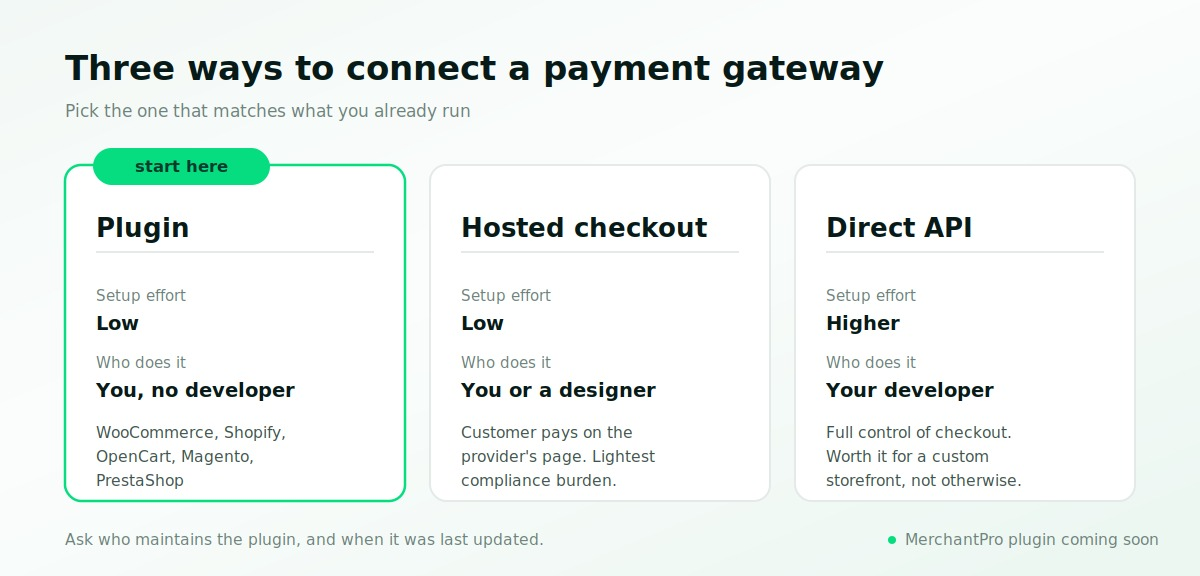
You have three realistic routes, and the right one depends on what you already run:
- A plugin. If your provider supports your platform, you install the plugin and enter your credentials. That can mean no developer work at all.
- Hosted or embedded checkout. Hosted sends the customer to a payment page the provider maintains, which is fastest and lightest on compliance. Embedded keeps the customer on your site and gives you more control over the checkout journey, at the cost of a bit more setup.
- A direct API build. Full control of the checkout, paid for in developer time. Worth it for a custom storefront, hard to justify otherwise.
The test is simple. Name your platform, ask if there's a supported plugin, and ask who maintains it. A plugin the provider updates with every platform release is a different thing from a community one nobody has touched in two years.
At Paypercut, we build plugins for WooCommerce, Shopify, OpenCart, Magento and PrestaShop, alongside hosted and embedded checkout and a documented API. MerchantPro support is coming soon. With a supported plugin, you can go live on hosted checkout without a developer.
See the checkout before you commit
Run a test payment through cards, wallets, payment links and QR in the demo. No account, no details.
6. Currencies and selling across borders
If you sell only in RON today, multi-currency support may not be a priority. It is still worth checking what your provider supports before you start taking orders from other European markets.
Two things matter here, and they're not the same:
What the customer sees at checkout. If your store charges in RON, the customer will still see the price in RON, even if they’re buying from Germany or another market. What can localise is the checkout language, which adapts based on the country the customer is purchasing from.
What lands in your account. This is where currency support matters more. Check which currencies you can collect and settle in, whether each settlement currency needs its own account, and what happens when conversion is required.
Lorem ipsum dolor sit amet, consectetur adipiscing elit, sed do eiusmod tempor incididunt ut labore et dolore magna aliqua. Ut enim ad minim veniam, quis nostrud exercitation ullamco laboris nisi ut aliquip ex ea commodo consequat. Duis aute irure dolor in reprehenderit in voluptate velit esse cillum dolore eu fugiat nulla pariatur.
One point gets misread often, so to be clear: settlement is one account per currency, not one account covering several. You pick your settlement currency when you activate. If you plan to hold money in more than one, raise it during onboarding rather than after.
Selling into more than one market?
See which currencies you can collect and settle in, and choose the setup that fits where you sell today.
7. Compliance, security and disputes
This is the part merchants think about least, right up until something goes wrong.
PCI DSS covers how card data is handled. With hosted or embedded checkout it never touches your server, so you're down to a self-assessment questionnaire. Build your own card form and the burden climbs fast. Ask which SAQ level your integration puts you in.
Strong Customer Authentication under PSD2 means two-factor verification on most EEA card payments online. Everyone compliant does it, but some do it better, and a clumsy 3D Secure step loses you sales.
Our guide on increasing checkout conversion covers where those losses happen.
Chargebacks land the admin on your desk. Check the fee per dispute, who puts the evidence together, and how you find out a dispute has been raised.
Any provider worth shortlisting will answer all three without hedging, and will tell you their PCI DSS level and who certified them. If you get vague answers here, that's your answer.
How to run this comparison in an afternoon
Score your three shortlisted providers against the seven points, weighted for the online store you actually run:
- New store, first gateway. Onboarding, integration, fee transparency. Settlement and currencies can wait.
- Established store thinking about switching. The full fee stack against your real volume, settlement speed, and what the move involves. Ask straight out whether there's any downtime.
- Already selling abroad. Currencies, cross-border charges and per-market payment methods come first.
You don't have to switch in one move. Most Romanian merchants who come to us don't cut their existing provider on day one. They add a second one, route some traffic to it, and compare the two on real transactions before deciding. It's slower, but it settles the question with your own data instead of a sales deck.
If two score close, go with whoever answered in plain numbers. A provider who gives you ranges now rarely gets more specific after you've signed.
There's no single best payment gateway for a Romanian online store, and anyone who tells you otherwise is selling something. The best one for you is whichever scores highest on the two or three points your business actually runs on.
Where Paypercut fits for your Romanian store
Plenty of global platforms work in Romania. Fewer are built around how Romanians pay, which is where we started.
Against the seven points above, here's where we land:
- Pricing. Published, not quoted: 0.99% + RON 0.25 on EEA consumer Visa and Mastercard, 2.69% + RON 0.25 on everything else. Wallets cost the same as cards
- What you don't pay. No activation fee, no monthly minimum, no PCI or gateway charge, no cross-border surcharge, and no fee to issue a refund
- Currencies. RON plus seven other European currencies, one settlement account per currency
- Integration. Plugins for MerchantPro (Coming soon!), WooCommerce, Shopify, OpenCart, Magento and PrestaShop, plus hosted checkout and a documented API
- Payouts. Straight to the business bank account you already use, no new account
- Onboarding. Fully digital, with the sandbox open on day one so you can build while verification runs
Compare Paypercut against your current setup
Register in a few minutes with fully digital onboarding, and test the whole checkout in the sandbox while your verification goes through.
FAQs
What fees should I expect when comparing payment gateways for ecommerce in Romania?
Expect at least two rates: one for EEA consumer Visa and Mastercard, and a higher one for business cards and cards issued outside the EEA. Then check chargeback fees, FX margins, and any monthly gateway, PCI or maintenance charge. Ask separately whether refunds carry a fee and whether the original transaction fee comes back, since providers answer those two differently.
Do I need a gateway that supports both local and international payment methods?
It depends where your customers are. For Romanian buyers, cards plus Apple Pay and Google Pay cover most online payments, with local instant methods like RoPay worth adding as they spread. If a real share of orders comes from abroad, you also need a provider that can price in the customer's currency and settle in yours.
How important is settlement speed when comparing providers?
Settlement speed sets your working capital cycle, so it often matters more than a small gap in transaction rate. Getting paid sooner means more usable cash on every order. It counts for more in Romania, where cash-on-delivery orders already hold up revenue until the courier delivers and pays you.
How much integration work is involved in switching payment gateways?
On a supported platform like MerchantPro (Coming soon!), WooCommerce, Shopify, OpenCart, Magento or PrestaShop, switching means installing a plugin and entering your credentials. A custom checkout built on a direct API takes longer and needs developer time. Ask any provider to describe their migration process and confirm in writing whether downtime is involved.
Do I need multi-currency support if I sell outside Romania?
Not necessarily. You can sell to customers abroad while charging in RON, and the checkout language can still localise based on the customer’s country. Multi-currency support becomes useful if you want to collect or settle in another supported currency. Check which currencies your provider supports and how settlement works for each one. You can always add another settlement account later if your needs change.