

Black Friday falls on 27 November 2026, and for online stores across Central and Eastern Europe, a payment problem during the rush can mean lost sales.
Most Black Friday ecommerce checklists cover promotions, stock and marketing. But what happens when customers reach the checkout and can't complete their payment?
A provider that wasn't properly tested, a wallet button that doesn't work on mobile, or a declined card with no clear way to try again. These are the kinds of problems you don't want to discover on your busiest sales day.
This checklist covers 10 payment mistakes worth fixing before Black Friday, from checkout testing and payment methods to transaction fees and failed-payment recovery.
Key takeaways
- Prepare payment providers early. Allow time for verification, setup and testing.
- Test your checkout before the rush. Check cards, wallets and failed payments.
- Know your real payment costs. Account for card types, currencies and fees.
- Plan for payment problems. Prepare backup options, refunds, chargebacks and payouts.
The Black Friday ecommerce checklist: 10 mistakes at a glance
1. Changing payment provider too late
A new provider isn't something you switch on the night before. Before your first live payment, the provider has to verify your business, someone has to install and configure the integration, and the checkout needs testing.
Verification can take several days or longer, depending on the provider and whether additional documents are needed.
So the useful question is whether you can add a provider and test it properly in the time left. Five or six weeks out, that is usually realistic. In the final fortnight, it is safer to stay with what you know, and many teams freeze their checkout in the last days before the sale.
Two things shorten the timeline. A ready-made plugin can reduce development work, although the integration still needs configuring and testing. And a sandbox that opens at signup lets you build while verification runs, so the two happen side by side rather than one after the other.
Black Friday falls on 27 November 2026 and Cyber Monday on 30 November. Many stores run offers across the whole week, so you may need to prepare for several days of increased payment activity rather than Black Friday alone.
2. Running the sale on one payment route
If your only card-payment provider has an incident during peak hours, customers may be unable to complete those payments until the issue is resolved. Full outages are rare, but partial problems hit the shoppers caught in them just as hard. One method can fail on one device type, or a large bank's authentication step can slow down.
A backup route doesn't mean redesigning your checkout. It means having a second provider configured and tested in your store, with a clear plan for switching payment routes if your primary provider runs into problems.
Where your platform supports multiple payment integrations, you can keep a second provider available and test it on real orders. If your platform limits you to one active card provider, prepare and test an alternative configuration so you know how to switch if needed.
Keep the methods your shoppers already rely on. If many of your Polish customers pay with BLIK, Poland's most popular payment method, or Hungarian shoppers use qvik, keep the provider that offers it. The second route then covers cards and wallets.
The same applies to cash on delivery in Bulgaria, where Econt's end of postal money transfers has already changed how COD money reaches merchants.
3. Building your own card form right before peak
Building your own card-entry form gives you more control over the checkout, but it can also increase your PCI DSS scope, depending on how card data is collected and handled. It adds technical work at a time when you'd rather avoid unnecessary changes.
With a hosted payment page, or payment fields served by the provider, card details go straight to the provider instead. Fully outsourced payment pages may qualify for SAQ A, the shortest PCI DSS self-assessment questionnaire published by the PCI Security Standards Council.
Eligibility depends on how the integration is implemented and whether the merchant meets the applicable requirements. If a custom form is on your roadmap, schedule it for January.
Under PSD2, strong customer authentication is required for many online card payments, although exemptions and exceptions apply, as set out in guidance from the European Banking Authority.
For card payments, this is commonly handled through 3D Secure, and a clumsy version is one of the quieter causes of checkout drop-off. Check how it looks on a phone and in your store's language.
4. Making mobile shoppers type in card details
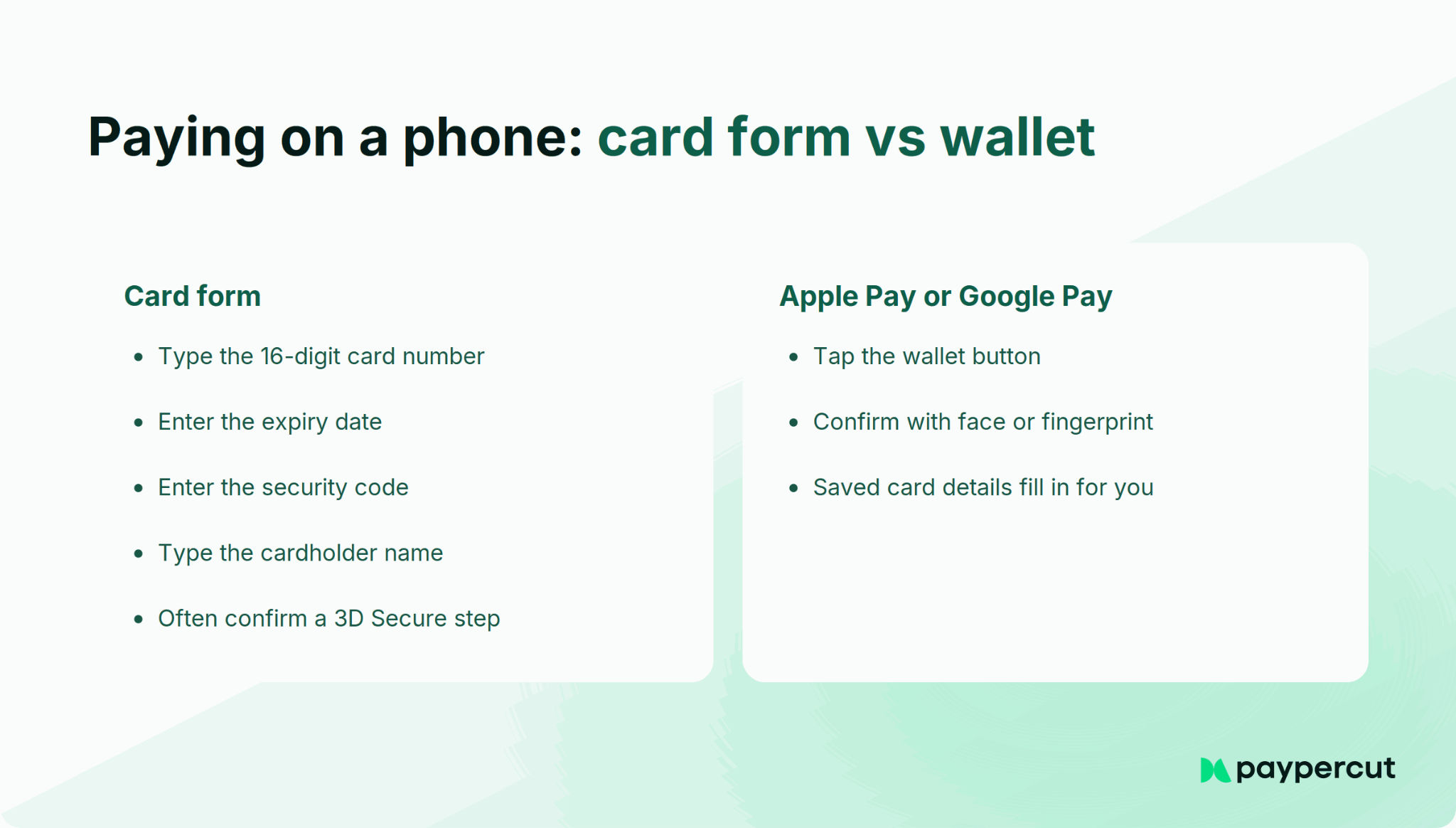
Typing a 16-digit card number, an expiry date and a security code on a phone is where many mobile checkouts lose people. On Black Friday, shoppers flick between tabs comparing offers, so every extra field is one more moment to give up.
Apple Pay and Google Pay let shoppers with an eligible saved card pay without typing their card details, using their device's supported authentication method. Express checkout goes further, putting the wallet button on the product or cart page.
The catch is setup. Apple Pay on the web only appears on domains that have been registered and verified with Apple, and depending on your integration, that verification may be your job rather than your provider's.
Wallet buttons also depend on the shopper's browser and device, so test on a real iPhone in Safari and a real Android phone in Chrome, on your live domain. A button that works in staging can quietly disappear in production if that domain was never verified.
On a hosted checkout page, the provider usually handles Apple Pay domain verification for you. With an embedded checkout or a plugin, you may need to host a verification file on your own domain. Ask your provider which applies to your setup before the sale week.
5. Showing foreign shoppers your home currency
Black Friday traffic doesn't stop at your border. A Romanian store's offers reach shoppers in Hungary, and a Polish one gets orders from Germany. If those shoppers only see prices in RON, HUF or PLN, they have to do the conversion themselves, and their bank may add a foreign-currency fee on top. On a discount day, that pause is often enough to lose the order.
There are three separate questions here: which currency shoppers see on your site, which currency they're actually charged in, and which currency you receive in settlement. If conversion happens between those steps, check the exchange rate and any additional fees.
Foreign shoppers also change your card mix. Cards issued outside the EEA, and business cards anywhere, aren't covered by the EU cap on interchange fees, so many providers price those cards separately. It is one of the wider changes that come with selling from CEE into other markets.
6. Not knowing your real cost per order
Black Friday margins are thin by design, so the real mix of cards, refunds and disputes matters more than usual.
Take 1,000 orders at a €40 average, priced at an illustrative 1.5% + €0.25 for EEA consumer cards and 2.9% + €0.25 for all other cards:
*Illustrative pricing only. Actual fees depend on your provider, card mix and agreement.
Same provider, same pricing structure, but a different card mix can increase total payment fees by almost a fifth. On top of that come the costs that arrive later: a fee per chargeback, possibly a fee per refund, and any conversion margin from mistake 5.
So factor your expected payment fees into your Black Friday margins alongside product, delivery and return costs. A promotion that looks profitable before transaction fees may leave less room than you expected.
7. Testing only the payment that succeeds
One successful test order isn't enough. The problems on the day tend to come from the other paths:
- A declined card. Does the shopper see a clear message and keep their basket, or land on an error page?
- A failed or abandoned 3D Secure step. Can they try again without re-entering everything?
- A wallet payment on a real phone. On the live domain, not only in staging.
- A refund. Does the money go back to the card, and does your order system update?
- A discount code. Does the amount charged match the discounted total?
- A successful payment with a missing order update. Does your store receive the payment confirmation and mark the order as paid?
Use your provider's sandbox and test cards for the failure cases, since you can trigger declines on purpose there without moving real money. If you're expecting a significant traffic increase, check that your checkout integration and order-processing systems can handle the expected volume.
After sandbox testing, place one low-value live order with a real card on your production site, then refund it. This helps confirm that your live credentials, payment page and refund flow work together.
See how a checkout handles cards, wallets and payment links
Try a test payment in the demo, with no account and no details needed.
8. Having no one to call when payments break
When something breaks at 8 p.m. on Black Friday, the cost is how long it takes to reach someone who can help. A queue that answers within days is a long wait on your busiest evening.
Before the sale week, find out:
- Who answers, and through which channel: chat, phone or email
- When they are available across the weekend, including Sunday and Monday
- Where incidents are announced, for example a status page or email alerts
- What to send them: order IDs, timestamps and error messages speed everything up
Inside your team, agree who watches payments at peak and who can switch the default provider. Responsiveness is one of the trust signals worth checking in a payment provider, and Black Friday tests it.
9. No plan for payments that fail during the rush
Some payments will fail whatever you do. Cards get declined for insufficient funds, banks flag unusual spending, and shoppers abandon 3D Secure halfway. The first step is checking whether the payment actually failed or its status is still pending, so you don't risk charging the customer twice. Then you need a recovery plan:
- A clear retry path. Keep the basket, say plainly what happened and offer another way to pay, such as a wallet or a different card.
- A quick follow-up. Where your consent and communication rules allow it, a cart-recovery email or SMS within the hour, while the offer is still live.
- A payment link. As a manual option for larger orders, or customers who contact you, send a link to a hosted payment page by email, SMS or chat, with an expiry that matches your offer.
Watch the pattern too. If declines suddenly spike for one bank, payment method or device type, investigate whether there's a shared technical or issuer-side problem. If your backup route is tested and available, you may be able to redirect affected payments.
10. Forgetting the money that moves after the weekend
Three things move Black Friday revenue in the weeks that follow:
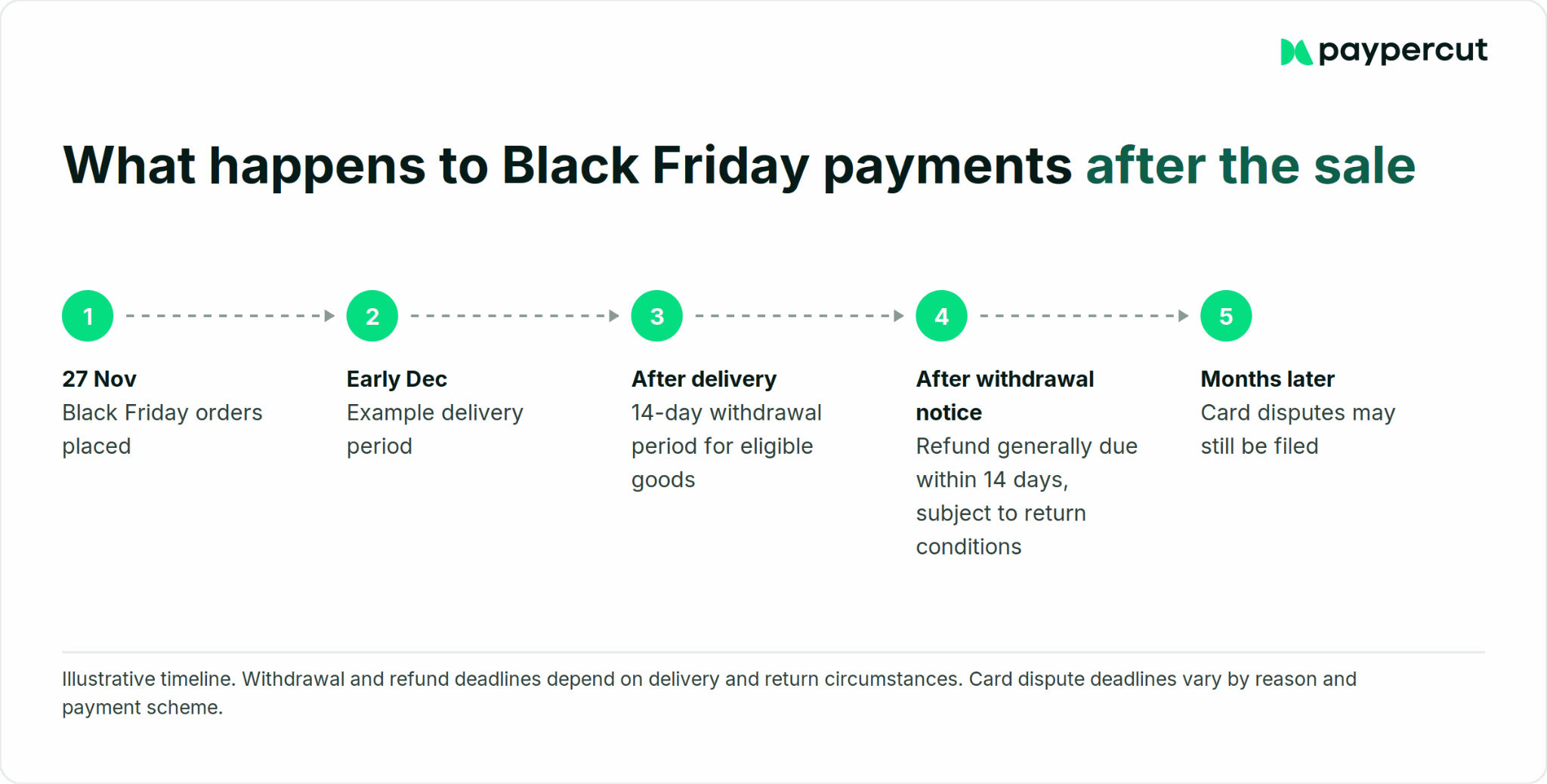
Refunds. For most goods bought online, EU consumers can withdraw from a purchase within 14 days of delivery without giving a reason, although exceptions apply. Merchants generally have 14 days from receiving the withdrawal notice to reimburse the customer, but may be allowed to wait until the goods are returned or proof of return is provided.
Chargebacks. Many Visa disputes have a 120-day filing window, but the deadline and starting point depend on the dispute reason and circumstances. A dispute over a Black Friday order can therefore arrive months after the sale. Providers may also charge a fee for each dispute.
Payouts. Know your payout schedule in days, and whether the money goes to your bank or sits in a provider balance. That decides whether Black Friday revenue can pay December's supplier invoices.
Also ask your provider whether a refund carries a fee and whether the original transaction fee comes back. Providers answer those differently.
Keep proof of delivery, order confirmations and customer communications for the period required by applicable dispute rules and record-retention obligations. You may need that evidence months after the sale.
Need a second payment route before Black Friday?
If your current provider works but you'd rather not rely on a single payment route, Paypercut can be added alongside your existing setup where your e-commerce platform supports multiple payment integrations. You can test it before deciding whether to make it your primary payment provider.
For Black Friday readiness, these are the parts that matter:
- Onboarding. Fully digital, with the sandbox open at signup, so you can build while we verify your business. Verification still takes time, so start weeks before the sale.
- Checkout integration. Hosted or embedded checkout, or plugins for Shopify, WooCommerce, OpenCart, Magento, and PrestaShop. A plugin still needs configuring and testing.
- Wallets. Apple Pay and Google Pay, including express checkout where supported. Paypercut handles Apple Pay setup for hosted checkout. Embedded checkout requires domain verification, while additional setup for plugins depends on the integration.
- Payment links. A manual recovery option: send a payment link by email, SMS or chat, with an expiry date, to a hosted page that accepts cards and wallets.
- Payouts. Straight to your existing eligible business bank account. Paypercut processes and settles payments in the same currency, with no conversion between them. Additional payout accounts may be required when accepting payments in multiple currencies, depending on your account configuration.
On fees, our published example rates are 1.29% + €0.10 for EEA consumer Visa and Mastercard and 2.69% + €0.10 for all other Visa and Mastercard cards, with a €15 fee per chargeback and no activation fee or monthly minimum.
Refunds carry no additional fee, although the original transaction fee is not returned.
*Pricing checked October 2026. Rates vary by merchant country, customer location, business model and negotiated agreement, so check the pricing for your market.
Prepare your checkout before Black Friday
Register in a few minutes and test the whole checkout in the sandbox while we verify your business.
FAQs
Can I switch payment provider before Black Friday?
Yes, if you start several weeks ahead, although no provider can guarantee a particular onboarding time. Verification can take several days or longer, and you need time to configure the integration and test failed payments as well as successful ones. With less than two weeks to go, keeping your existing provider and adding a tested second route may be less disruptive than a full switch, provided there's enough time to configure it properly.
How do I test my checkout without risking real orders?
Use your provider's sandbox and test cards to trigger declines, 3D Secure steps and refunds without moving real money. Then place one low-value live order with a real card on your production site and refund it straight away. That helps confirm your live setup works, but it can't reproduce every failure scenario, so keep the sandbox tests too.
Do Apple Pay and Google Pay need extra setup?
Often, yes, depending on your integration. Apple Pay on the web only appears on verified domains. Hosted checkout pages usually handle this for you, while embedded checkouts and plugins may need you to host a verification file on your own domain. Test both wallets on real phones, on your live domain, before the sale starts.
Can one integration cover several CEE markets?
It can, but check three things separately. Card and wallet acceptance can often cover shoppers across Europe through one integration. Local methods such as BLIK in Poland or qvik in Hungary depend on the provider and market. Settlement depends on which currencies the provider can pay out in, and whether each one needs its own account.
How can I recover payments that fail during the rush?
First check whether the payment actually failed or is still pending, so you don't charge the customer twice. Then keep the basket, show a clear message and offer another way to pay. Where your communication rules allow it, follow up within the hour. For larger orders, send a payment link manually. If declines spike for one bank or method, investigate and use a tested backup route if you have one.