
Klient, który dochodzi do kasy, podjął już decyzję o zakupie. W tym momencie nie należy mu w tym przeszkadzać.
Brzmi to prosto, a jednak według serwisu Statista siedem na dziesięć koszyków jest porzucanych przed dokonaniem zakupu. Większość z tych rezygnacji ma miejsce na ostatnim etapie, z powodu konkretnych szczegółów, które można łatwo naprawić.
Czym więc wyróżniają się firmy, które konsekwentnie osiągają wysoki współczynnik konwersji na etapie finalizacji transakcji?
Łączy je przemyślane podejście do tego, co widzą klienci, o co są proszeni i ile wysiłku wymaga każdy etap.
Poniżej przedstawiono siedem najlepszych przykładów procesów realizacji transakcji, obejmujących zarówno rozwiązania oferowane przez sprzedawców, jak i platformy płatnicze, które mają wpływ na przebieg tego procesu. Każdy z nich zawiera inną lekcję, którą firmy mogą wykorzystać w celu poprawy współczynnika konwersji.
Najważniejsze wnioski
- Większość przypadków porzucania koszyka na etapie płatności da się naprawić
Najczęstsze przyczyny rezygnacji z zakupu, takie jak obowiązkowa rejestracja, brak odpowiednich metod płatności oraz niejasne koszty, to często drobne problemy, które można rozwiązać bez konieczności przebudowywania całego procesu realizacji transakcji.
- Pokaż metody płatności przed przejściem do kasy
Klienci chcą mieć pewność, zanim podejmą decyzję o zakupie. Wyświetlaj akceptowane metody płatności na stronach produktów oraz w koszyku, a nie tylko na ekranie płatności.
- Poproś o utworzenie konta po dokonaniu zakupu
Klienci przyszli, aby dokonać zakupu, a nie założyć konto. Pozwól im najpierw sfinalizować transakcję, a dopiero potem zaproponuj utworzenie konta.
- Odpowiedz na zastrzeżenia przed dokonaniem płatności
Pytania dotyczące dostawy, rozliczeń, zwrotów lub anulowania zamówienia należy wyjaśnić, zanim klienci przejdą do etapu płatności.
- Lokalne metody płatności mają znaczenie
Klienci chętniej finalizują zakup, gdy widzą znane im i budzące ich zaufanie opcje płatności.
7 najlepszych doświadczeń związanych z realizacją transakcji – w skrócie
7 najlepszych przykładów obsługi klienta przy kasie, które warto przeanalizować (i jedna lekcja z każdego z nich)
Każdy z poniższych przykładów pokazuje jeden element procesu realizacji transakcji, który został zrealizowany szczególnie dobrze. Wykorzystaj je jako punkt odniesienia podczas analizy lub ulepszania własnego procesu realizacji transakcji.
1. Platforma płatnicza dostosowana do lokalnych preferencji rynkowych (Paypercut)
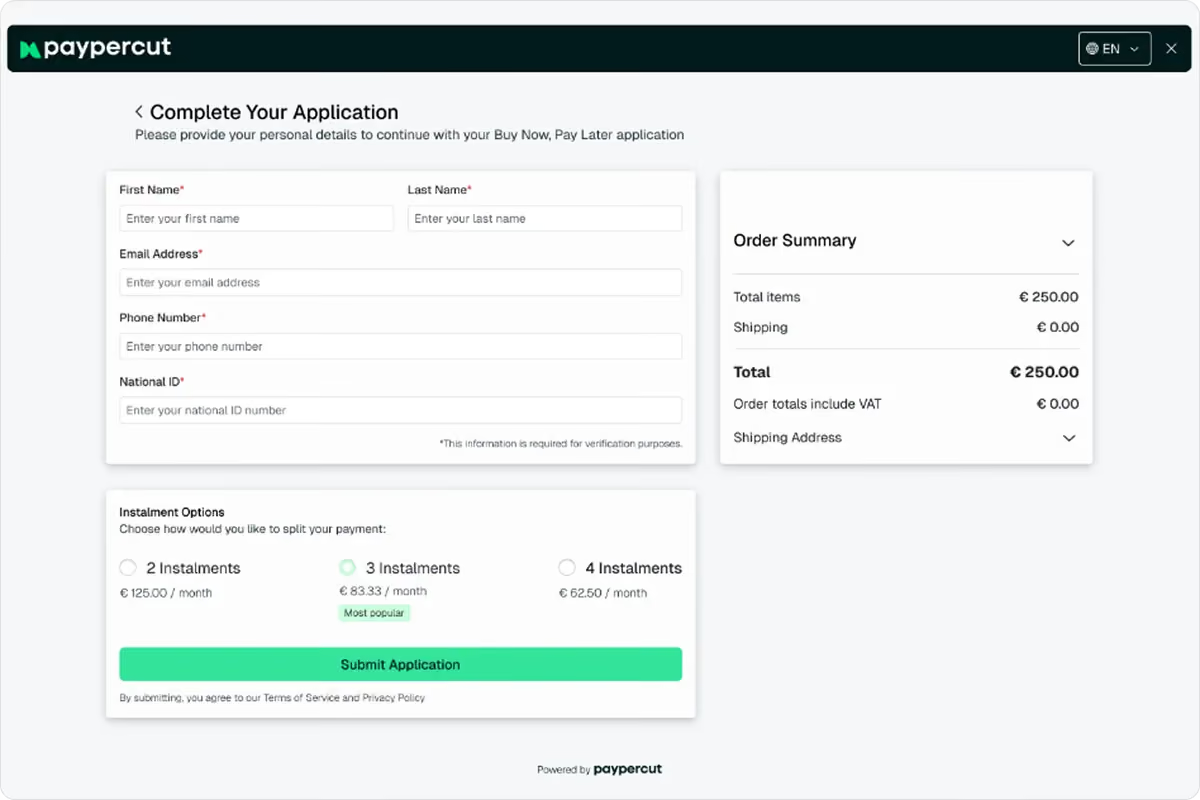
Paypercut to platforma płatnicza stworzona z myślą o firmach prowadzących sprzedaż w Europie Środkowej i Wschodniej.
Jego atutem jest możliwość oferowania klientom opcji płatności, które są im znane z ich rynku. Niezależnie od tego, czy chodzi o karty, portfele cyfrowe, lokalne metody płatności, czy opcje typu „Kup teraz, zapłać później” — cel pozostaje ten sam: zmniejszyć wahania przy finalizacji transakcji poprzez zaproponowanie klientom sposobów płatności, z których już chętnie korzystają.
W miarę jak sprzedawcy rozszerzają swoją działalność na nowe kraje, preferencje dotyczące płatności często ulegają zmianie. To, co sprawdza się na jednym rynku, może nie cieszyć się popularnością na innym.
Zamiast zarządzać oddzielnymi dostawcami i integracjami dla każdego kraju, sprzedawcy mogą zarządzać procesem realizacji transakcji za pośrednictwem jednej platformy, dostosowując jednocześnie strukturę metod płatności do lokalnych oczekiwań klientów.
Jednym z przykładów takiego podejścia jest model BNPL. Dzięki agregatorowi BNPL firmy Paypercut sprzedawcy mogą połączyć się z wieloma dostawcami za pomocą jednej integracji i oferować klientom opcje płatności ratalnych dostosowane do ich rynku, otrzymując jednocześnie z góry pełną kwotę transakcji.
Dlaczego to działa
Znajomość buduje zaufanie, zwłaszcza na rynkach, na których zwyczaje płatnicze znacznie się różnią w poszczególnych krajach.
Najbardziej efektywne procesy realizacji transakcji nie narzucają wszystkim klientom tego samego sposobu płatności. Dostosowują się one do lokalnych oczekiwań, jednocześnie ograniczając złożoność operacyjną sprzedawcy.
Lekcja
Rozwijając działalność na nowych rynkach, nie należy zakładać, że klienci będą płacić w taki sam sposób, jak w swoim kraju.
Na współczynnik konwersji wpływają lokalne metody płatności, portfele elektroniczne, karty oraz opcje płatności ratalnej. Im bardziej proces realizacji transakcji jest dostosowany do lokalnych preferencji klientów, tym większe jest prawdopodobieństwo, że klienci sfinalizują zakup.
2. Dobrze zaprojektowany proces realizacji zamówienia, który wzbudza zaufanie (ASOS)
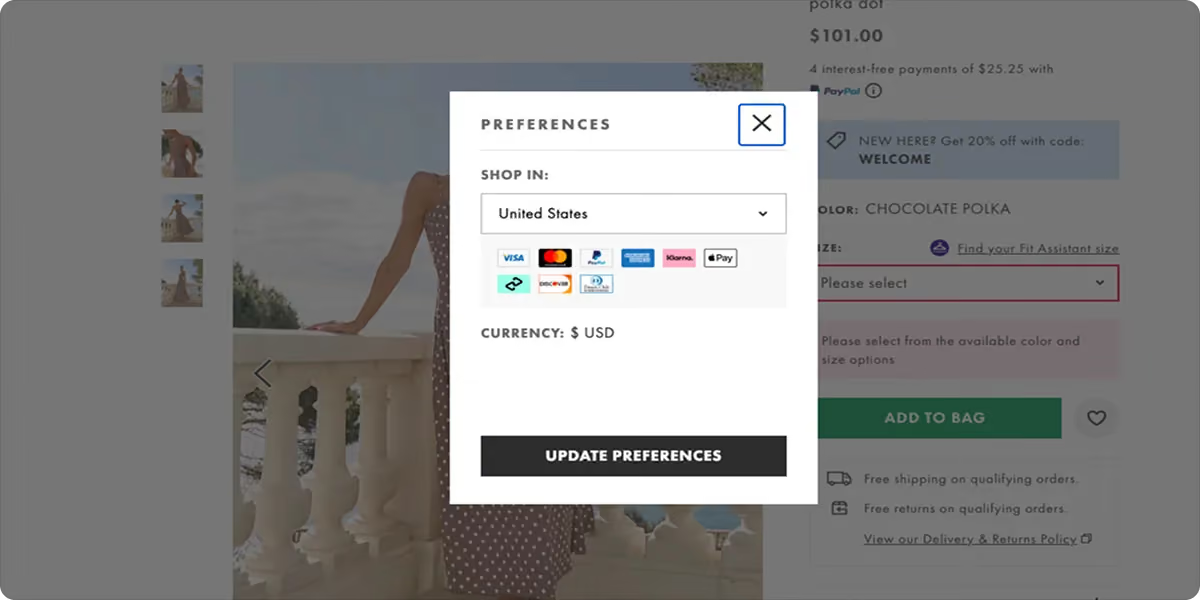
Jedną rzeczą jest wiedzieć, jakie opcje płatności należy zaoferować. Zupełnie inną sprawą jest to, jak je zaprezentować w procesie realizacji transakcji.
ASOS przedstawia opcje płatności (karty, PayPal, Klarna) w przejrzysty sposób, zanim klienci wprowadzą jakiekolwiek dane. Sama strona realizacji zamówienia jest przejrzysta: po prawej stronie znajduje się stałe podsumowanie zamówienia, nie ma elementów odwracających uwagę, a formularz zawiera tylko te pola, które są niezbędne do realizacji zamówienia. Żaden element projektu nie budzi wątpliwości w momencie, gdy klienci mają dokonać płatności.
Dlaczego to działa
Strona finalizacji zamówienia, która jest trudna do odczytania lub przeładowana elementami wizualnymi, sprawia, że klienci mają powody do wahania się. Gdy opcje płatności są dobrze widoczne, a strona łatwa do przeglądania, klienci przechodzą do etapu płatności, wiedząc już, czego mogą się spodziewać. To właśnie ta przewidywalność sprawia, że kontynuują proces.
Lekcja
Ważne jest nie tylko to, co pokazujesz i gdzie, ale także to, w jaki sposób to robisz. Jest kilka kwestii, na które warto zwrócić uwagę:
- W przypadku standardowych metod płatności wystarczą logo.
- W przypadku modelu BNPL przedstawienie podziału rat obok ceny ma większe znaczenie niż samo logo. Eliminuje to barierę cenową w momencie, gdy klienci wciąż się wahają.
- Upewnij się, że podane przez Ciebie metody płatności są faktycznie dostępne podczas finalizacji zamówienia.
3. Prawidłowo zrealizowana procedura realizacji zamówienia przez gościa (LEGO)
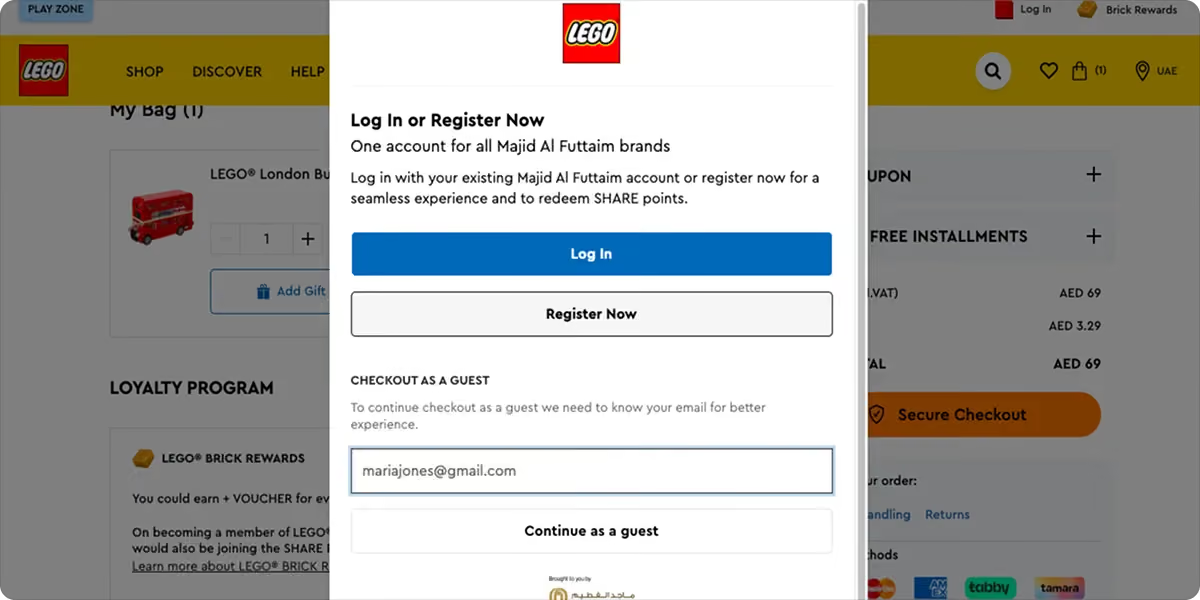
System płatności LEGO od samego początku daje klientom jasny wybór: kontynuować jako gość lub zalogować się, aby uzyskać dostęp do zapisanych danych i punktów Insiders. Obie opcje są równie dobrze widoczne.
Tekst wyjaśnia, jakie korzyści czekają na zarejestrowanych klientów (historia zamówień, zapisane adresy, punkty lojalnościowe), nie sprawiając jednak, by rejestracja wydawała się obowiązkowa. Goście mogą przejść dalej bez rejestracji, a stali klienci otrzymują prawdziwy powód, by się zalogować.
Dlaczego to działa
Wymuszone zakładanie konta jest jedną z najczęściej wskazywanych przyczyn rezygnacji z zakupów w trakcie realizacji zamówienia. Około 26% klientów rezygnuje z zakupu właśnie dlatego, że musieli założyć konto. Opcja zakupu jako gość nie oznacza utraty danych klienta. Każdy, kto chce założyć konto, nadal może to zrobić; po prostu nie jest to już warunkiem dokonania zakupu.
Lekcja
Odpowiednim momentem na poproszenie o rejestrację jest moment po dokonaniu zakupu, a nie przed nim. W tym momencie klient podjął już decyzję, by powierzyć Ci swoje dane płatnicze.
4. Teksty pomocnicze, które pomagają, a nie dezorientują (IKEA)
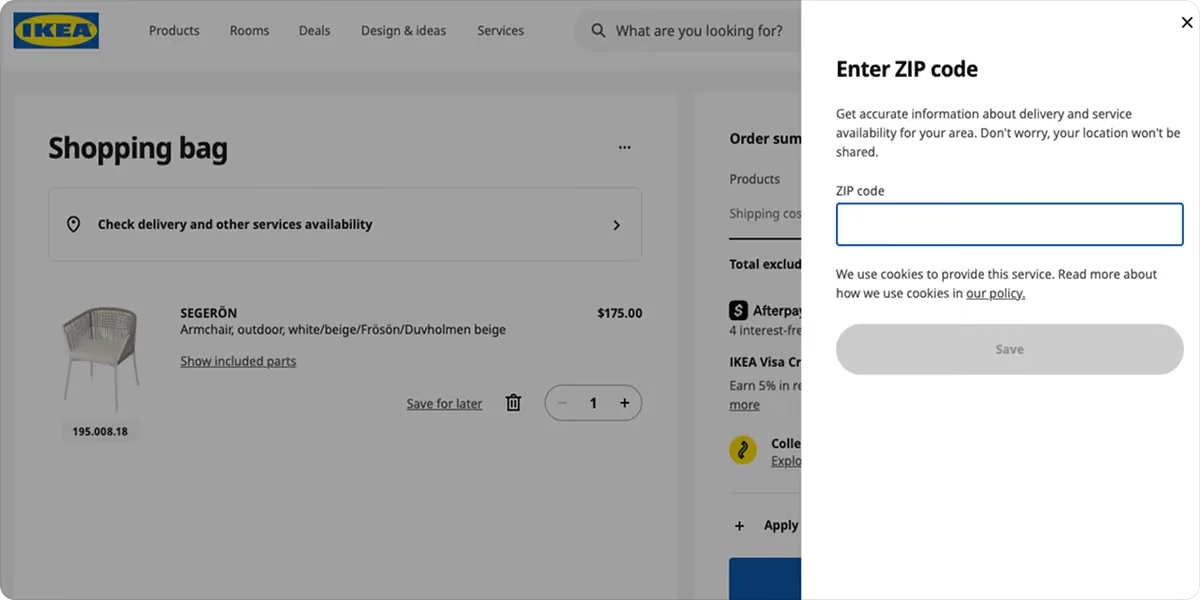
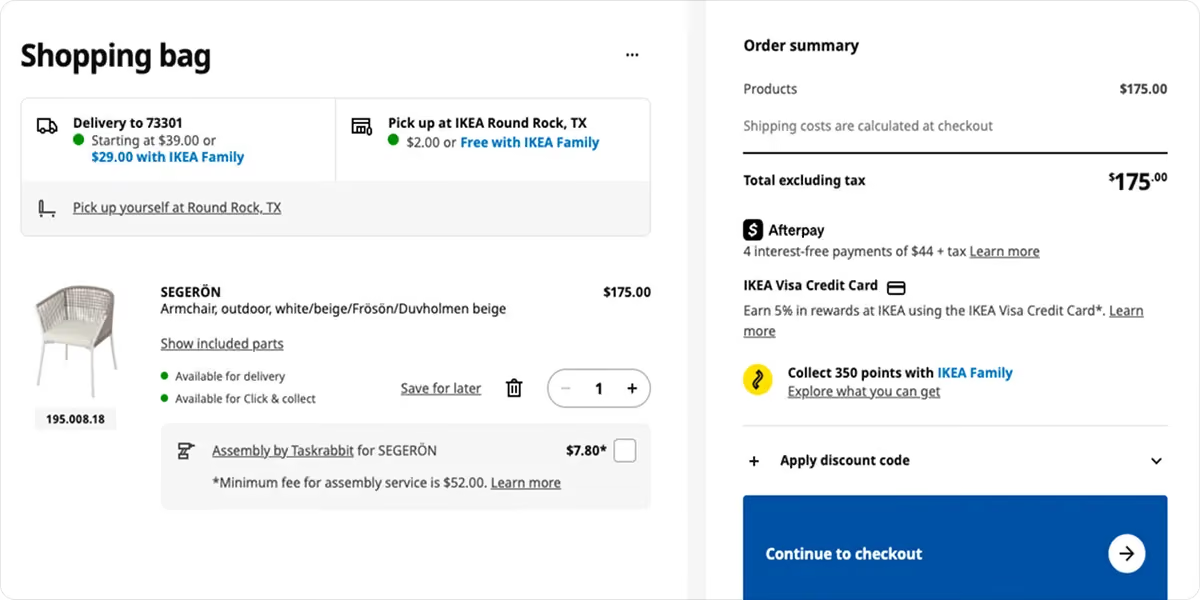
Przykłady z kas w IKEA pokazują, jak duże znaczenie mają słowa umieszczone wokół formularza.
Kiedy klienci wybierają między dostawą a odbiorem osobistym, IKEA nie wyświetla od razu wszystkich opcji. Zaczyna od prostego pola wprowadzania danych (Twojej lokalizacji), a następnie zawęża dostępne opcje.
Każda opcja dostawy lub odbioru zawiera konkretną przewidywaną datę, koszt oraz krótki opis.
Podsumowanie zamówienia opiera się na tej samej logice – przed potwierdzeniem zakupu klient widzi zestawienie rat w ramach opcji „kup teraz, zapłać później” (BNPL), punkty lojalnościowe zdobyte za to zamówienie oraz opcjonalne usługi, takie jak montaż.
Dlaczego to działa
Na etapach realizacji zamówienia i płatności klienci podejmują decyzję o zakupie, niezależnie od tego, czy jest to duży, czy mały zakup. Każde pytanie, na które w tym momencie nie ma odpowiedzi, stanowi potencjalny powód do rezygnacji z zamówienia.
Teksty reklamowe IKEA nie czekają, aż klienci zaczną szukać odpowiedzi— pojawiają się tam, gdzie klienci już ich szukają.
Lekcja
Przyporządkuj każdy etap procesu realizacji zamówienia do pytania, które mógłby zadać sobie klient kupujący po raz pierwszy na danym etapie:
- Jeśli chodzi o opcje dostawy, to pytanie zazwyczaj brzmi: „Kiedy to dotrze i ile to będzie kosztować?”.
- Jeśli chodzi o podsumowanie zamówienia, to pytanie brzmi: „Czy widzę wszystkie niezbędne informacje przed potwierdzeniem?”.
Napisz tekst tak, aby bezpośrednio odpowiadał na te pytania w momencie, gdy się pojawiają.
5. Budowanie zaufania przed dokonaniem płatności (ClassPass)

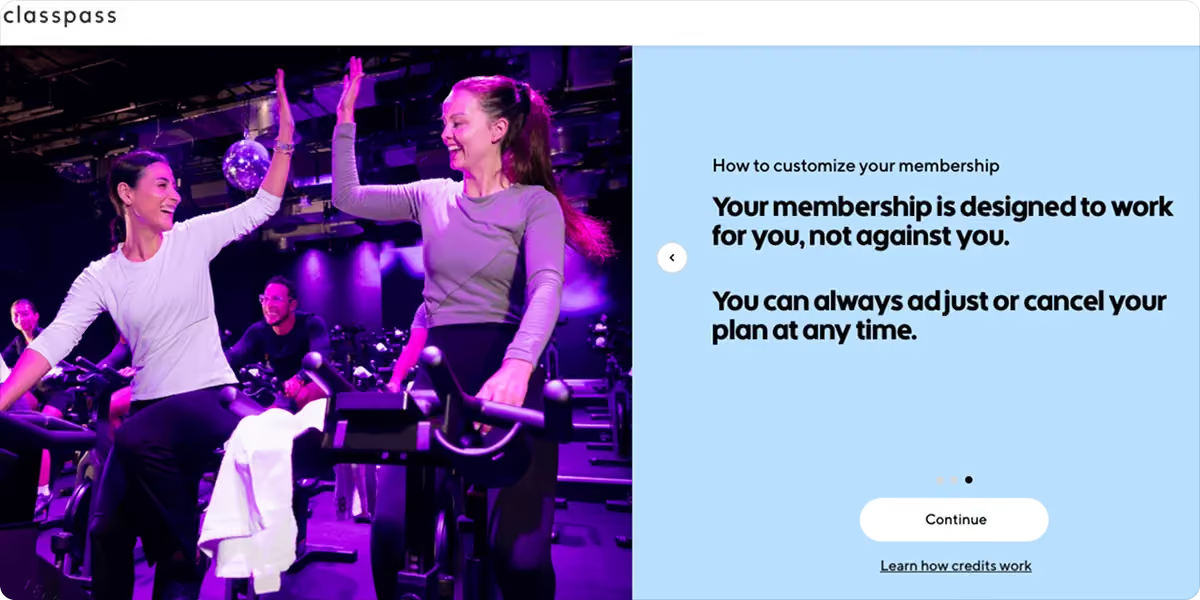
ClassPass, platforma oferująca członkostwo w zakresie fitnessu i wellness, nie przekierowuje klientów bezpośrednio do ekranu płatności.
Zanim wyświetli się formularz rejestracyjny, użytkownicy przechodzą przez trzy ekrany, które odpowiadają na najczęstsze zastrzeżenia związane z rejestracją:
- Wyjaśnia, co obejmuje 14-dniowy okres próbny
- Nie są naliczane żadne opłaty, chyba że zostanie naliczona opłata za późne anulowanie rezerwacji lub za niepojawienie się w miejscu rezerwacji
- Plan można w dowolnym momencie zmienić lub anulować
Dlaczego to działa
Większość sklepów czeka, aż klienci zgłoszą wątpliwości, zanim się nimi zajmie – zazwyczaj za pośrednictwem sekcji „Najczęściej zadawane pytania”, działu obsługi klienta lub zasad dotyczących zwrotów, ukrytych w stopce strony. W tym momencie większość klientów już podjęła decyzję o opuszczeniu strony.
Możliwość zapoznania się z jasnymi odpowiedziami przed etapem płatności zmniejsza obciążenie psychiczne związane z podjęciem decyzji o dokonaniu płatności. Gdy warunki są już zrozumiałe, podanie danych karty wydaje się raczej formalnością niż ryzykiem.
Lekcja
W przypadku większości produktów klienci zadają sobie dwa lub trzy pytania przed dokonaniem zakupu. Określ, jakie to pytania w przypadku Twojego produktu, i odpowiedz na nie jeszcze przed etapem płatności:
- Produkty oparte na subskrypcji często budzą wątpliwości dotyczące przejrzystości rozliczeń i warunków rezygnacji.
- W przypadku jednorazowych zakupów o wyższej wartości często pojawiają się pytania dotyczące terminów dostawy, zwrotów oraz tego, co się stanie, jeśli coś pójdzie nie tak.
Im szybciej na nie odpowiesz, tym mniej pracy będzie musiał wykonać ekran płatności.
6. Krótszy formularz, szybsza realizacja zamówienia (Amazon)
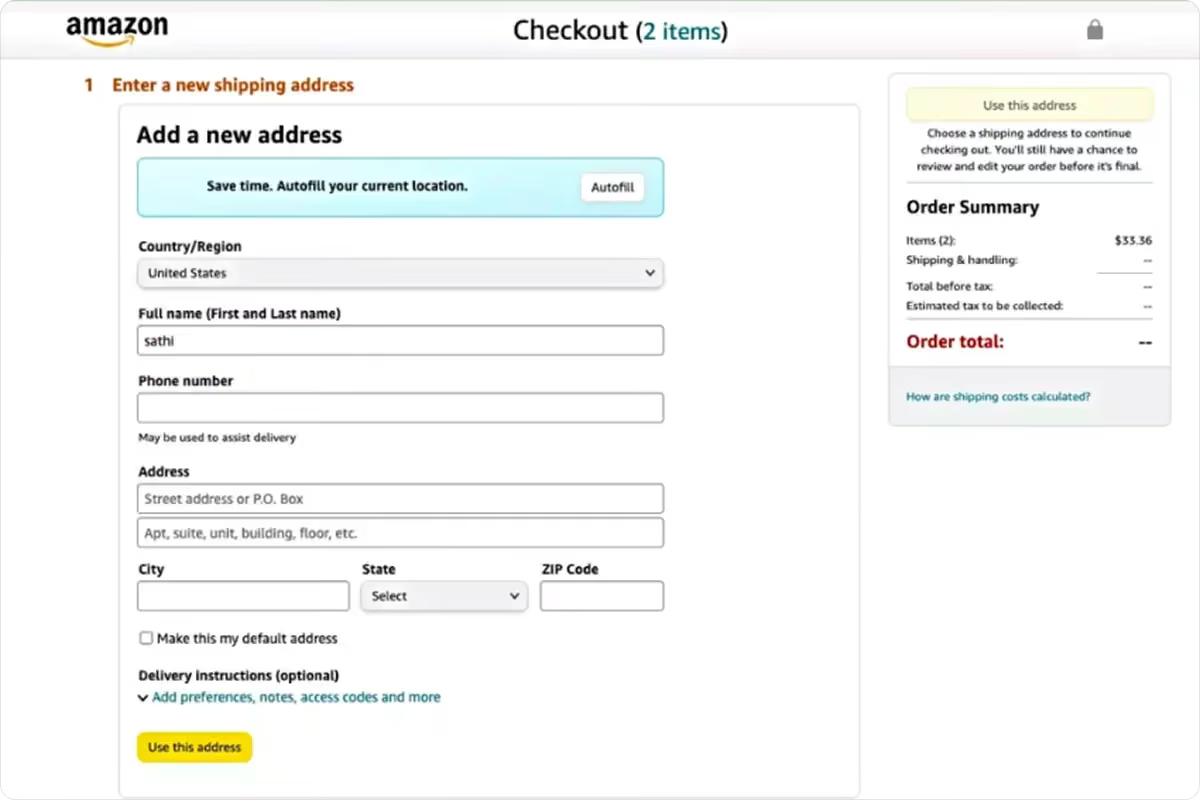
Proces realizacji zamówienia w serwisie Amazon to najlepszy przykład tego, co się dzieje, gdy wyeliminuje się wszystko, czego klient nie musi robić.
W przypadku stałych klientów adres, metoda płatności i preferencje dotyczące dostawy są już zapisane. Cały proces realizacji zamówienia zajmuje zaledwie kilka sekund.
Dla nowych klientów formularz jest krótki i zaprojektowany tak, aby od samego początku ograniczyć nakład pracy związany z wprowadzaniem danych:
- Autouzupełnianie u góry
- Nazwa jako jedno połączone pole
- Pola opcjonalne są wyraźnie oznaczone
Podsumowanie zamówienia jest widoczne przez cały czas, dzięki czemu klienci zawsze wiedzą, ile płacą.
Dlaczego to działa
Każde zbędne pole to mała decyzja, a każda taka decyzja sprawia, że klienci są o krok bliżej do rezygnacji z zakupu. Badania przeprowadzone przez Baymard Institute wykazały, że przeciętny proces realizacji zamówienia zawiera 23,48 pól formularza, podczas gdy do sfinalizowania większości zakupów wystarcza zaledwie 12–14 pól.
Lekcja
Sprawdź formularz płatności, kierując się tą samą logiką. Oto kilka konkretnych elementów, na które warto zwrócić uwagę:
- Czy dostępna jest funkcja autouzupełniania, czy też klienci muszą wpisywać wszystko od początku?
- Czy imię i nazwisko są gromadzone jako jedno pole czy jako dwa?
- Czy pola opcjonalne są wyraźnie oznaczone, aby klienci nie tracili na nie czasu?
- Czy podsumowanie zamówienia jest widoczne przez cały czas, czy też znika, gdy klienci przejdą dalej od koszyka?
Cel jest ten sam na każdym etapie: im mniej wysiłku musi włożyć klient, tym większe jest prawdopodobieństwo, że sfinalizuje zamówienie.
7. Proces realizacji zamówienia, który aktualizuje się na bieżąco (Holzweiler)
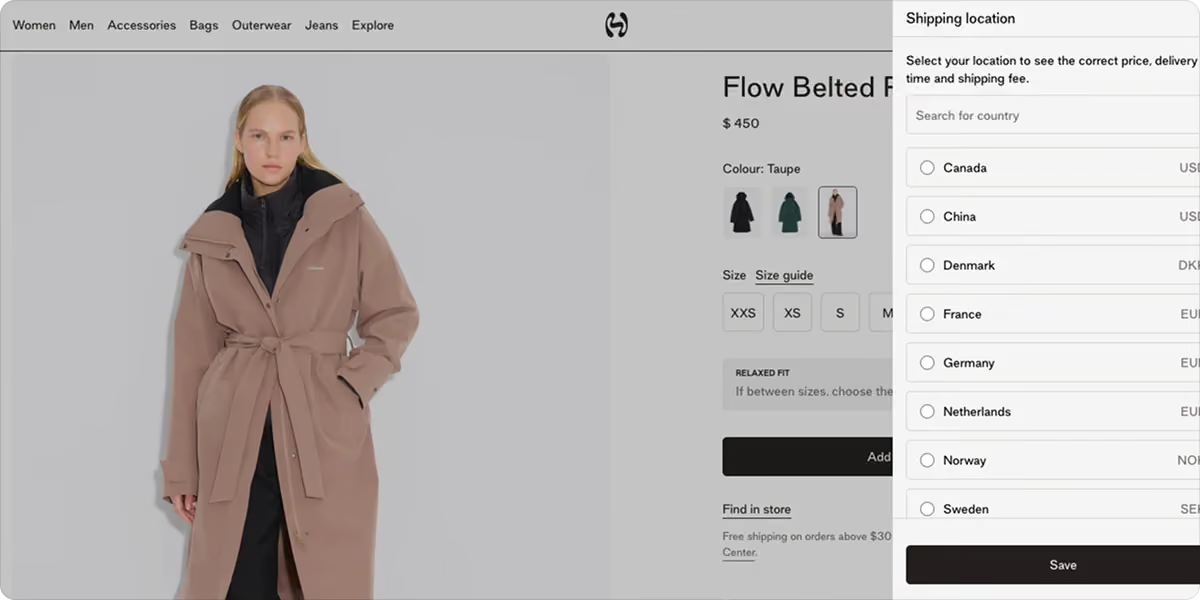
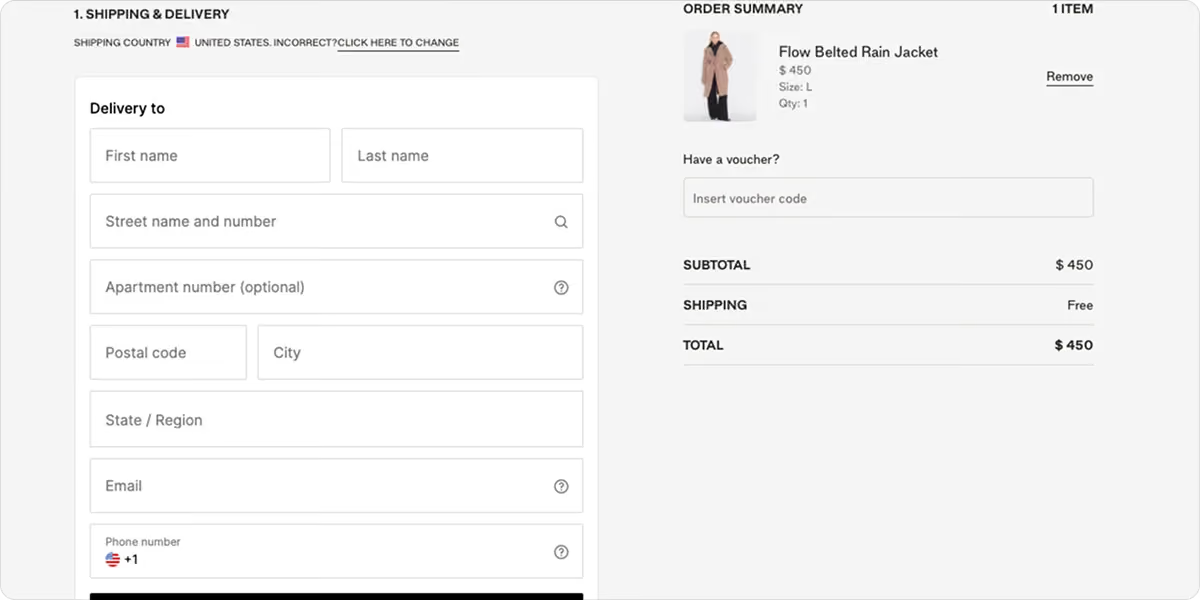
Holzweiler to norweska marka modowa obecna na 20 rynkach na całym świecie.
Podczas finalizacji zamówienia kraj dostawy jest wykrywany automatycznie i wyświetlany u góry strony. Jeśli jest nieprawidłowy, klienci mogą go zmienić jednym kliknięciem, a po dokonaniu zmiany opcje dostawy, koszty i szacowany czas dostawy są aktualizowane zgodnie z nowym miejscem przeznaczenia. Podsumowanie zamówienia zawiera pełny podział ceny, zanim klienci wypełnią choćby jedno pole.
Dlaczego to działa
Gdy po zmianie kraju dane dotyczące płatności nie są aktualizowane, klienci muszą sami obliczać kwotę — albo szukają odpowiedzi gdzie indziej i już nie wracają.
Wyświetlanie dokładnych, dostosowanych do lokalizacji informacji o dostawie w czasie rzeczywistym pozwala wyeliminować etap, który w przeciwnym razie spowalniałby obsługę klientów.
Lekcja
Jeśli prowadzisz sprzedaż w wielu krajach, sprawdź, co dzieje się w procesie realizacji zamówienia, gdy klient zmienia miejsce dostawy. Czy opcje dostawy, koszty i terminy są aktualizowane zgodnie z nowym krajem? Jeśli nie, jest to problem, który można rozwiązać i który warto potraktować priorytetowo.
Typowe błędy przy finalizacji zamówienia, których należy unikać
Nawet drobne niedopatrzenia w procesie realizacji transakcji mogą kosztować Cię utratę sprzedaży. Oto te, które pojawiają się najczęściej:
- Wymuszone zakładanie konta: Proszenie klientów o rejestrację przed dokonaniem zakupu przerywa proces zakupu w najgorszym możliwym momencie. Wielu z nich woli opuścić stronę, niż zatrzymać się, by wypełnić formularz.
- Długie formularze: Im więcej pól klienci muszą wypełnić, tym więcej okazji mają, by zrezygnować. Należy usunąć wszystkie pola, które nie są niezbędne do złożenia zamówienia.
- Brak możliwości realizacji zamówienia jako gość: Nawet jeśli utworzenie konta nie jest wymagane, brak wyraźnie widocznej opcji dla gości ma taki sam skutek jak wymuszona rejestracja. Opcja realizacji zamówienia jako gość powinna być łatwa do znalezienia, a nie tylko dodatkiem.
- Ukryte opłaty pojawiające się na ostatnim etapie: Koszty dostawy, podatki lub opłaty serwisowe, które pojawiają się dopiero na końcu, to jedna z najczęstszych przyczyn rezygnacji klientów z finalizacji zamówienia. Należy jak najwcześniej pokazać pełną kwotę do zapłaty.
- Niejasne koszty dostawy: Jeśli klienci nie są w stanie ustalić, ile będzie kosztowała wysyłka ani kiedy dotrze do nich zamówienie, prawdopodobnie zawahają się na ostatnim etapie.
- Ograniczone metody płatności: Klienci, którzy nie widzą znanej sobie opcji płatności, najprawdopodobniej nie sfinalizują zakupu. Oferta obejmująca karty, portfele elektroniczne oraz opcję „kup teraz, zapłać później” (BNPL) daje klientom powód do sfinalizowania transakcji.
- Brak optymalizacji pod kątem urządzeń mobilnych: Ponad połowa zakupów internetowych odbywa się obecnie na urządzeniach mobilnych. Proces realizacji zamówienia, który jest trudny w obsłudze na małym ekranie, powoduje utratę znacznej części klientów jeszcze przed potwierdzeniem zamówienia.
Co łączy najlepsze doświadczenia związane z procesem realizacji transakcji
Te siedem przykładów dotyczy różnych rodzajów działalności, różnych rynków oraz różnych etapów procesu realizacji transakcji online.
Najlepsze doświadczenia związane z realizacją transakcji niekoniecznie muszą robić największe wrażenie wizualne. To właśnie te, które eliminują utrudnienia, odpowiadają na pytania, zanim jeszcze zostaną zadane, i sprawiają, że płatność przebiega bez wysiłku.
Niezależnie od tego, czy analizujesz metody płatności, upraszczasz formularze, czy usprawniasz komunikację dotyczącą dostaw, nawet niewielkie zmiany mogą mieć wymierny wpływ na współczynnik konwersji.
W szczególności w przypadku sprzedawców z regionu Europy Środkowo-Wschodniej to właśnie na etapie płatności dochodzi często do największych strat w sprzedaży. Klienci oczekują, że znani im dostawcy będą oferować znane im metody płatności, lokalne waluty oraz opcje „kup teraz, zapłać później” (BNPL). Paypercut został stworzony, aby zaspokoić te potrzeby za pomocą jednej integracji:
- Karty (Visa, Mastercard)
- Portfele cyfrowe (Apple Pay, Google Pay)
- Agregacja usług „kup teraz, zapłać później” (BNPL ) oferowanych przez wielu dostawców z regionu Europy Środkowo-Wschodniej
- Rozliczenia wielowalutowe na rynkach Europy Środkowo-Wschodniej
- Realizacja transakcji w serwisie zewnętrznym z wykorzystaniem Twojej identyfikacji wizualnej
- Bez umów wiążących i opłat instalacyjnych
- Większość firm rozpoczyna działalność w ciągu 24 godzin od zakończenia cyfrowego procesu wdrażania
Jeśli chcesz sprawdzić, czy to rozwiązanie pasuje do Twojej konfiguracji, umów się na 30-minutową konsultację z naszym zespołem lub zarejestruj się od razu, aby rozpocząć.
Najczęściej zadawane pytania
Co powoduje porzucanie koszyka?
Najczęstszymi przyczynami są nieprzewidziane koszty, konieczność założenia konta, ograniczone metody płatności, długie formularze płatności, nieudane transakcje oraz obawy dotyczące bezpieczeństwa lub dostawy.
Czy proces realizacji zamówienia na jednej stronie jest lepszy niż wieloetapowy?
Żadna z tych opcji nie jest uniwersalnie lepsza. Jednostronicowe procesy realizacji zamówienia sprawdzają się dobrze w przypadku prostych zamówień z nieskomplikowaną dostawą. Wieloetapowe procesy z wyraźnym wskaźnikiem postępu zazwyczaj sprawdzają się lepiej w przypadku złożonych zamówień, w których klienci muszą podjąć kilka decyzji.
Format ma mniejsze znaczenie niż łączna liczba pól oraz to, jak jasno wyjaśniono przebieg procesu na każdym etapie.
Skąd mam wiedzieć, na którym etapie procesu realizacji zamówienia tracę klientów?
Przejrzyj w narzędziach analitycznych ścieżkę zakupową i znajdź etap, na którym odnotowuje się najwyższy wskaźnik rezygnacji. To właśnie na tym etapie powinieneś skupić się w pierwszej kolejności.
Większość platform pokazuje spadek liczby użytkowników na poszczególnych etapach (wysyłka, płatność, potwierdzenie), dzięki czemu można dokładnie ustalić, czy klienci rezygnują z zakupu z powodu formularza, opcji płatności czy nieoczekiwanych kosztów przy finalizacji zamówienia.
Skąd mam wiedzieć, czy zmiana w procesie realizacji zamówienia przyniosła oczekiwane rezultaty?
Śledź współczynnik konwersji w koszyku przed wprowadzeniem zmiany i po niej, zbierając dane porównawcze z co najmniej 2–3 tygodni. Wprowadzaj zmiany pojedynczo, aby wiedzieć, co faktycznie wpłynęło na wyniki.