

If your startup is registered in Hungary, your accountant thinks in forints. Your customers in Vienna, Bratislava and Zagreb, however, think in euros. And customers in the UK or the US pay in pounds and dollars.
Letting customers pay in a familiar currency doesn't mean you have to rethink your whole finance setup. But it does create one decision you can't ignore: what happens to that currency after the customer pays?
You may receive the same currency into a matching bank account, or use a setup that converts it before payout. The important part is knowing where the conversion happens, who sets the rate and what it costs you.
Key takeaways
- Accepting a currency and settling in it are two different decisions.
- FX costs depend on who converts the payment and when.
- Foreign-card pricing can matter just as much as the exchange rate.
- Keeping some revenue in EUR can avoid unnecessary conversion if you also spend in EUR.
- Compare currencies, payment methods, settlement and expansion costs before choosing a provider.
Why let international customers pay in their own currency
A shopper in Austria who has never heard of your brand is already taking a small leap by buying from a Hungarian site. An unfamiliar HUF price adds another thing for them to work out.
When they can pay in a familiar currency, they get:
- A price they can understand immediately. €49 is easier to evaluate than an unfamiliar HUF amount.
- Less uncertainty about conversion. If the payment currency matches their account currency, they are less likely to need an issuer-side currency conversion.
- A familiar way to pay. Cards, Apple Pay or Google Pay can keep the checkout experience closer to what they already use at home.
- Clearer refunds. Refunding in the original transaction currency avoids introducing another merchant-side currency change into the process.
If you only charge in forints, the customer's bank or card issuer may convert the payment and apply its own exchange rate or FX charge. The total on their statement may not match what they saw at your checkout.
And if you refund them, the refund can be converted again at a different rate. That can leave the customer asking why the refunded amount doesn't match what originally left their account.
For you, this means currency is part of the checkout experience, not just a finance setting.
How multi-currency payments work for a Hungarian startup
An international payment can involve three currencies:
- The currency displayed on your website
- The currency charged at checkout
- The currency received in your bank account
These can all be the same or differ depending on your payment provider and configuration. Showing a price in euros, for example, doesn’t necessarily mean you’ll receive euros in your bank account.
Say a customer in Germany sees €49 and pays €49 with Google Pay. From there, one of two things happens:
- Your payment provider converts the EUR proceeds into HUF before paying them into your bank account.
- Your provider pays out in EUR to a matching account, and you decide whether and when to convert the funds through your bank.
In either case, payment and payout fees may reduce the amount you receive.
If you need forints, the difference is who handles the conversion and what it costs. If you have expenses in euros, you may choose to keep some revenue in EUR.
What do FX conversion fees actually cost?
Getting foreign payments into forints always involves a conversion somewhere. "Supports multi-currency payments" tells you very little about what that costs. What matters is where the conversion happens.
There are three places it can happen:
- The customer's bank, if you charge in forints. There's no merchant-side conversion in this step, but the customer may pay for it.
- Your payment provider, if it converts before paying you out. Stripe's Hungarian pricing, for example, adds 2% to international card payments when currency conversion is needed.
- Your own bank, if the money arrives in euros and you convert it there.
Currency conversion usually has a cost, whether that's an explicit fee, an FX mark-up or a rate spread. So the real cost of a foreign payment is the card fee, plus any fixed fee, plus any extra charge for foreign cards, plus the conversion.
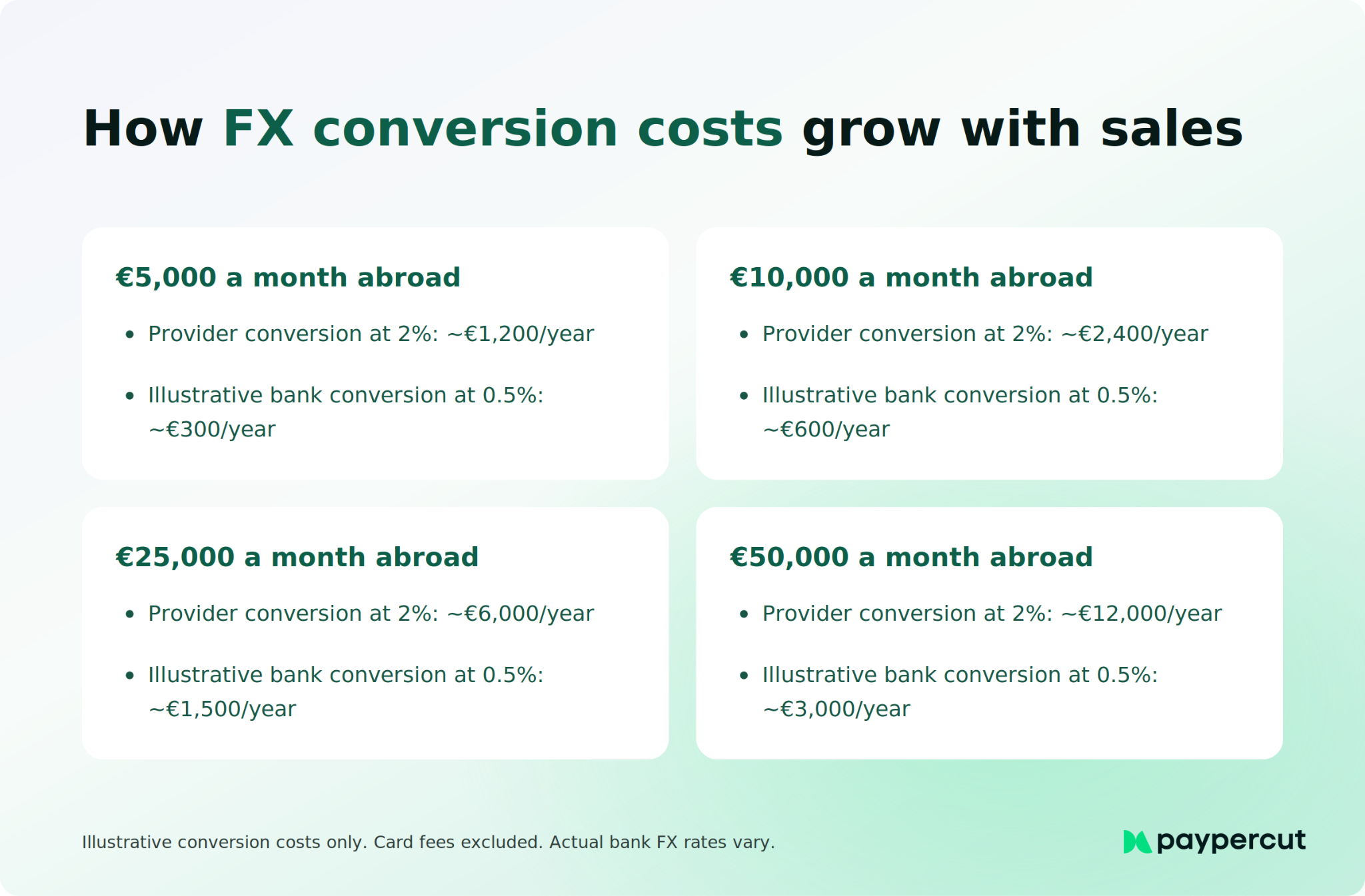
Here’s an illustrative comparison for €10,000 in monthly sales, assuming the EUR proceeds are converted into HUF in the second and third routes:
The 0.5% bank mark-up is an illustrative figure. Ask your own bank for its rate. Card fees are left out, as they apply on every route, and the comparison doesn't include differences in the underlying exchange rate.
The first route has no merchant-side FX conversion, but the customer may pay for the conversion instead and may have questions if the final amount differs from what they expected.
To keep conversion costs down:
- Know who is converting. If you can't say whether it's your provider or your bank, ask both.
- Convert once. Make sure the same payment isn't converted by two parties along the way.
- Compare conversion costs, not just card fees. Once foreign sales are a real share of your revenue, the conversion terms can matter more than a small difference in card rates.
- Ask how your bank charges for conversion. If there's a fixed fee per conversion, converting larger amounts less often can work out cheaper.
Ask your provider and your bank for the conversion mark-up as a percentage over a reference rate, such as the MNB or ECB rate. "Competitive exchange rates" isn't a number you can compare.
Should you keep some revenue in euros instead of converting to HUF?
It depends on what you spend in euros.
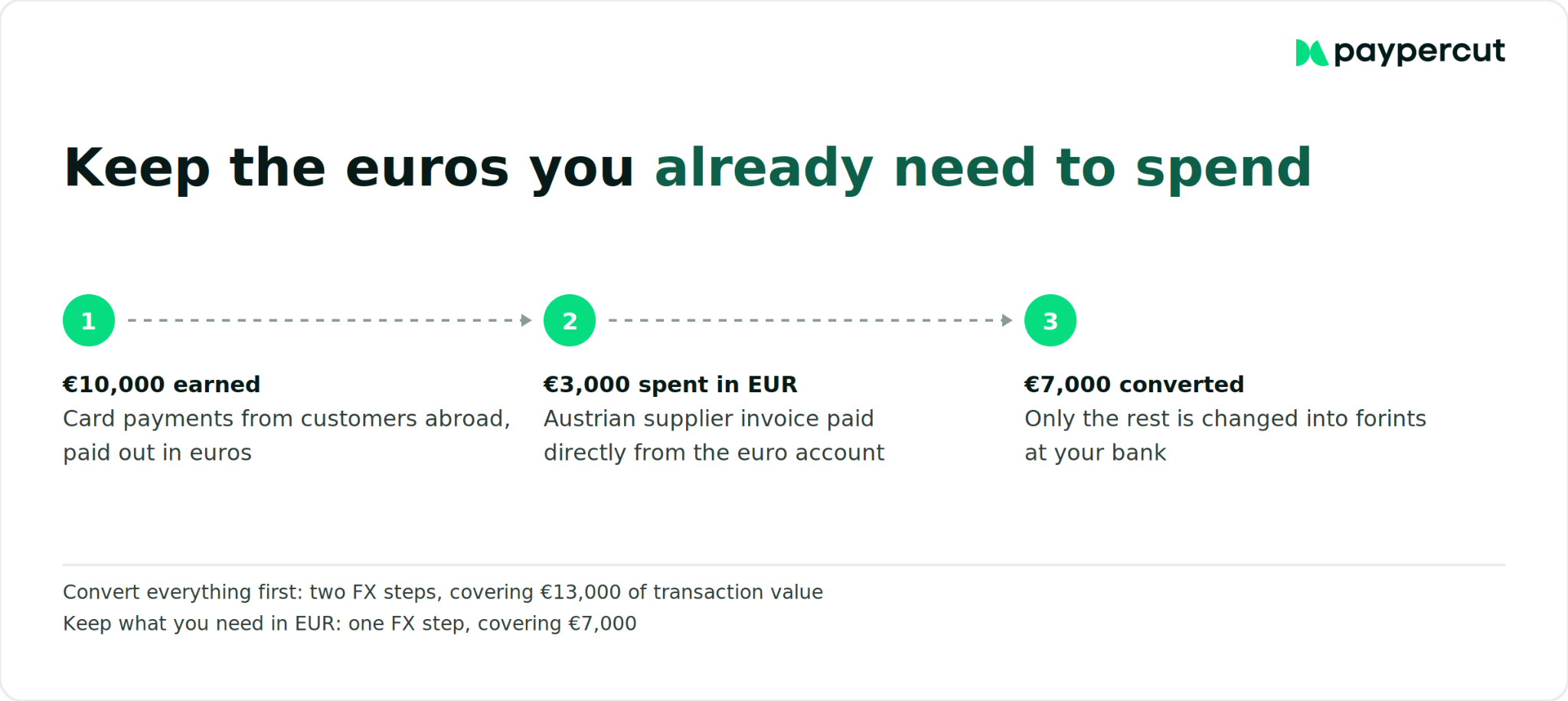
If most of your operating costs are in HUF, converting EUR revenue into forints may be the simplest setup. But if you regularly pay suppliers, contractors or other bills in EUR, converting every euro into HUF straight away can create an unnecessary second conversion when those expenses fall due.
The useful rule is simple: look at revenue and costs together.
If you regularly earn and spend the same foreign currency, keeping enough of that currency to cover those costs can reduce unnecessary FX.
6 things to compare in a multi-currency payment provider
For a Hungarian startup selling internationally, we would recommend focusing on six things:
- Currencies: what your customers actually pay in
- Payment methods: cards, wallets and important local methods
- FX: who converts the money and what it costs
- Card pricing: whether foreign cards cost more
- Settlement: which currencies you can receive and where
- Expansion: what adding another market requires
1. The currencies your customers use
Don't switch on every currency a provider offers. Look at where your orders come from and prioritise the currencies that already matter:
- Austria, Slovakia, Slovenia, Croatia, Germany → EUR
- UK → GBP
- US → USD
- Czechia → CZK, Poland → PLN, Romania → RON
Your currency setup should follow your actual sales, not the length of a provider's currency list.
2. Familiar ways to pay
Currency is only one part of the checkout. The other is how customers prefer to pay.
Cards, Apple Pay and Google Pay cover a lot of international purchases, but some markets have strong local preferences too. Poland is a good example, where BLIK is widely used alongside cards.
If you are entering several CEE markets, compare local payment habits alongside currency support, rather than assuming the same checkout will work equally well everywhere.
3. Who converts, and at what cost
Ask whether the provider converts foreign payments into HUF before payout.
If it does, check the exchange rate or conversion charge. If it doesn't, find out which currency reaches your bank account and what your bank would charge to convert it later.
4. What foreign cards cost you
This is separate from FX.
Stripe's Hungarian pricing, for example, lists:
- 1.5% + HUF 85 for standard EEA cards
- 2.5% + HUF 85 for UK cards
- 3.15% + HUF 85 for other international cards
So the same order value can cost you more depending on where the customer's card was issued.
Ask for pricing by card region, not just one headline transaction rate.
5. How the money reaches you
Check three things:
- which currencies you can receive
- whether conversion happens before payout
- whether funds go straight to your bank or sit with the provider first
Providers handle this differently.
- SimplePay can settle in EUR and USD as well as HUF, and can convert EUR or USD payments into HUF before payout using OTP Bank's published daily foreign-currency buying rate.
- Barion supports multiple currencies and keeps them in separate currency balances. It does not convert between them.
- Stripe supports additional settlement currencies, with separate pricing depending on the setup.
- Paypercut settles payments in the same currency they are made in and pays out to your existing bank account. It does not convert the funds into HUF before payout, so you decide if and when to convert them through your bank.
6. What adding your next market involves
Ask whether adding another market means:
- enabling another currency
- opening another payout account
- signing another contract
- adding another integration
A setup that works for Hungary and Austria today may become cumbersome if Germany, Poland and the UK are next.
How SEPA helps when business customers pay in euros
Hungary hasn't adopted the euro, but it is part of SEPA, the Single Euro Payments Area. That means euro transfers to and from Hungary can use the same SEPA standards as transfers between eurozone countries.
SEPA doesn't affect card payments. It matters when a business customer pays your invoice by bank transfer.
Under EU cross-border payment rules, your bank must charge the same for a cross-border euro payment as it charges for the corresponding domestic payment of the same value in Hungary. Currency conversion is separate, so a euro payment arriving in a HUF account can still trigger an FX cost.
Receiving euros into a euro account can avoid an unnecessary conversion into HUF. Under EU rules, a bank must charge the same for a cross-border euro payment as for a corresponding domestic payment of the same value. Currency conversion and account-related charges are separate.
Multi-currency payments with Paypercut
If you’re selling from Hungary into several markets, the payment setup needs to work for both sides: customers should be able to pay in familiar ways, while you still need clear settlement, predictable pricing and a setup that can grow with you.
Planning your next market?
If we match the way you want to sell across markets, talk to our team about the currencies and settlement setup that fit your business.
FAQs
Do I need to settle in HUF, or can I receive other currencies?
You don't have to settle every payment in HUF. Depending on your provider and bank setup, you can receive currencies such as EUR or USD into matching accounts. If you also have costs in that currency, keeping some of the revenue there can avoid an unnecessary conversion.
How does SEPA help a Hungarian startup accept euro payments?
Hungary is part of SEPA, so businesses can send and receive euro bank transfers across participating European countries. EU rules require cross-border euro payments to be priced like the corresponding domestic payment of the same value. Currency conversion is separate, so FX costs can still apply if the payment reaches a HUF account.
What's the cost of not supporting multiple currencies for international customers?
If you charge only in HUF, customers abroad may need their bank or card issuer to convert the payment. That can mean an unfamiliar price, an issuer FX charge and a different converted amount if the payment is later refunded.
Should I display local prices or just accept multiple currencies at checkout?
If a market generates regular sales, setting prices directly in its local currency gives you more control over what customers see. Automatic currency conversion can be useful when testing a new market, but the displayed price can move with exchange rates.
How can I reduce FX conversion costs when selling internationally from Hungary?
Start by finding out who converts each payment: your provider, your bank or the customer's bank. Compare the conversion mark-up against a reference rate such as the MNB or ECB rate, avoid unnecessary multiple conversions, and consider keeping revenue in currencies you also regularly spend.