
W 2023 roku średni wskaźnik porzucania koszyków w Europie wynosił około 73%. Oznacza to, że prawie trzech na czterech klientów dodaje produkty do koszyka, ale nigdy nie finalizuje zakupu.
Wiele przyczyn tego oszałamiającego wskaźnika wynika z niespełnionych oczekiwań na ostatnim etapie zakupu, takich jak nieoczekiwane dodatkowe koszty, wymuszone utworzenie konta lub opóźnienia w dostawie.
Jednak równie wiele przyczyn wiąże się bezpośrednio z samym doświadczeniem związanym z dokonywaniem płatności.
Klienci rezygnują z zakupów, gdy proces realizacji zamówienia wydaje się skomplikowany, gdy strona działa wolno lub nie działa płynnie na urządzeniach mobilnych albo gdy nie widzą metod płatności, którym ufają.
Dla sprzedawców jest to wyraźny dowód na to, jak ważne jest wybranie odpowiedniej konfiguracji płatności.
Aby Ci w tym pomóc, porównamy rozwiązania kasowe z linkami płatniczymi pod kątem najważniejszych czynników, dzięki czemu będziesz mógł zminimalizować utrudnienia i zamienić więcej porzuconych koszyków w sfinalizowane transakcje.
Najważniejsze wnioski
- Rozwiązania kasowe i linki płatnicze sprawdzają się w różnych scenariuszach sprzedaży
Wbudowana kasa jest przeznaczona do sprzedaży internetowej opartej na ustrukturyzowanym procesie zakupowym. Linki płatnicze zapewniają elastyczność, umożliwiając pobieranie płatności bez konieczności posiadania strony internetowej – za pośrednictwem poczty elektronicznej, mediów społecznościowych, komunikatorów lub kodów QR. - Twoja decyzja powinna zależeć od kanału sprzedaży
Jeśli Twoja strona internetowa jest głównym motorem sprzedaży, wbudowana funkcja realizacji transakcji zapewnia płynną obsługę zgodną z wizerunkiem marki. Jeśli prowadzisz sprzedaż poprzez rozmowy, faktury lub kanały zdalne, linki płatnicze zmniejszają utrudnienia i pomagają szybciej finalizować transakcje. - Wymagania dotyczące szybkości i konfiguracji znacznie się różnią
. Linki płatnicze nie wymagają integracji i można je uruchomić w ciągu kilku minut. Wbudowana kasowa wymaga konfiguracji technicznej, ale zapewnia większą kontrolę nad wizerunkiem marki, wieloetapowymi procesami oraz zaawansowanymi funkcjami, takimi jak subskrypcje. - Doświadczenie klienta wpływa na współczynnik konwersji
Wbudowana funkcja realizacji transakcji zapewnia spójną ścieżkę zakupową w witrynie, co może zwiększyć zaufanie klientów i wskaźniki finalizacji transakcji. Linki płatnicze umożliwiają szybką realizację płatności bez rozpraszania uwagi, co jest szczególnie skuteczne w przypadku użytkowników urządzeń mobilnych oraz transakcji jednorazowych. - Nie musisz wybierać jednej opcji kosztem drugiej
Dla wielu firm najskuteczniejszym rozwiązaniem jest połączenie obu tych metod. Dzięki Paypercut możesz oferować wbudowane procesy realizacji transakcji i linki do płatności w ramach jednej platformy, obsługiwać karty, portfele elektroniczne oraz opcję „kup teraz, zapłać później” (BNPL), a także zarządzać wszystkim za pomocą jednego panelu kontrolnego. Zapewnia to elastyczność pozwalającą dotrzeć do klientów niezależnie od tego, gdzie się znajdują, i przekształcić więcej możliwości płatniczych w sfinalizowane transakcje.
Czym są rozwiązania w zakresie realizacji transakcji?
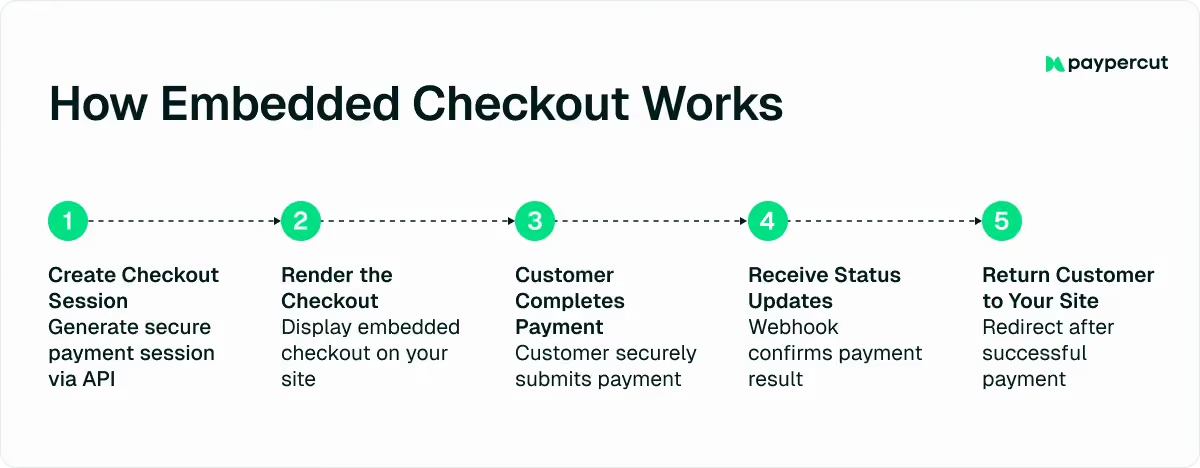
Rozwiązania kasowe to narzędzia, które umożliwiają przyjmowanie płatności online bezpośrednio na Twojej stronie internetowej poprzez zintegrowanie gotowej strony płatności lub formularza kasowego.
To gotowe rozwiązanie zajmie się za Ciebie całym procesem płatności, w tym przebiegiem transakcji, bezpieczeństwem oraz przetwarzaniem transakcji.
Wiarygodni dostawcy usług płatniczych, tacy jak Paypercut, zazwyczaj oferują w tym zakresie kilka opcji:
- Hostowana strona płatności – gotowa strona płatności, na którą klienci są przekierowywani w celu sfinalizowania zakupu
- Wbudowana kasowa – formularz płatności zintegrowany bezpośrednio z Twoją stroną internetową lub aplikacją, dzięki czemu klienci pozostają na Twojej stronie od początku do końca
- Wtyczki e-commerce – gotowe do instalacji rozwiązania integracyjne dla platform takich jak Shopify czy WooCommerce
- Ekspresowa płatność – opcja płatności jednym kliknięciem, która pozwala klientom dokonać płatności bezpośrednio ze strony produktu za pomocą portfeli cyfrowych
W niniejszym przewodniku skupimy się na wbudowanej kasie, ponieważ jest to opcja, którą firmy najczęściej porównują z linkami płatniczymi.
Czym są linki do płatności?
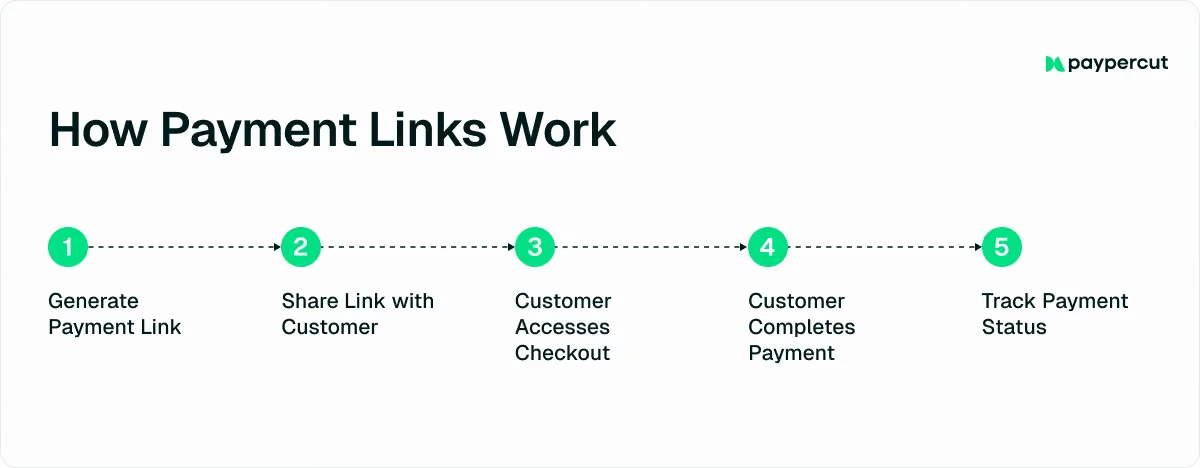
Linki do płatności to bezpieczne adresy URL, które można udostępniać i które przekierowują klienta bezpośrednio na stronę płatności dotyczącą konkretnego produktu, subskrypcji, faktury lub darowizny.
To, co zasadniczo odróżnia linki płatnicze od wbudowanego procesu realizacji transakcji, to fakt, że do korzystania z nich nie jest potrzebna strona internetowa.
Zamiast wbudowywać formularz płatności w swój sklep internetowy, wystarczy utworzyć link i wysłać go klientowi. Klient klika w link i dokonuje płatności na bezpiecznej, zewnętrznej stronie.
Porównanie rozwiązań kasowych z linkami płatniczymi: 10 kluczowych różnic
Zarówno wbudowane przyciski do realizacji transakcji, jak i linki do płatności umożliwiają przyjmowanie płatności online, ale działają one w zupełnie inny sposób.
Aby ułatwić wybór odpowiedniej opcji, przedstawiliśmy 10 kluczowych różnic, które mają największe znaczenie dla małych i średnich przedsiębiorstw.
1. Dystrybucja kanałowa
Dzięki wbudowanej funkcji realizacji transakcji płatności są przetwarzane bezpośrednio przez Twoją stronę internetową lub aplikację.
Klienci odwiedzają Twój sklep internetowy, dodają produkty do koszyka i tam finalizują zakup.
Ruch na stronie można również generować za pomocą reklam, kampanii e-mailowych lub linków bezpośrednich, ale transakcja i tak odbywa się na Twojej stronie.
Linki do płatności działają inaczej.
Zamiast kierować klientów na swoją stronę internetową, przenosisz proces realizacji transakcji bezpośrednio do nich, co pozwala Ci sprzedawać swoje produkty lub usługi w dowolnym miejscu.
Linki do płatności można udostępniać za pośrednictwem:
- SMS
- Aplikacje do wysyłania wiadomości, takie jak WhatsApp czy Messenger
- Kody QR na materiałach drukowanych i fakturach
- Rozmowy na czacie dotyczące zamówień ręcznych lub niestandardowych
- Platformy społecznościowe, takie jak Facebook czy Instagram
Ta elastyczność jest szczególnie cenna dla sprzedawców działających w Europie Środkowej i Wschodniej (CEE), gdzie popularność mediów społecznościowych wciąż rośnie w każdym kraju.
Linki do płatności można jednak udostępniać również osobiście.
Na przykład sprzedawcy mogą umieszczać kody QR podczas wydarzeń, w sklepach typu pop-up, na straganach lub w innych tymczasowych punktach sprzedaży, umożliwiając klientom dokonywanie płatności na miejscu bez konieczności korzystania z tradycyjnego terminala POS lub SoftPOS.
2. Dostęp klientów
W przypadku wbudowanej funkcji realizacji transakcji dostęp mają wyłącznie osoby odwiedzające Twoją stronę internetową. Klienci muszą wejść do Twojego sklepu lub aplikacji, aby rozpocząć i sfinalizować zakup.
Dzięki linkom do płatności każdy, kto posiada taki link, może dokonać płatności. Możesz wysłać go do konkretnego klienta w przypadku zamówienia na zamówienie lub udostępnić publicznie dla wielu nabywców.
Pierwsza opcja jest szczególnie przydatna w przypadku sprzedaży produktów lub usług dostosowanych do indywidualnych potrzeb, które nie znajdują się w standardowym katalogu. Dzięki linkom możesz pobierać opłaty za te produkty lub usługi bez konieczności tworzenia nowej strony i publikowania jej na swojej witrynie, gdzie każdy mógłby ją zobaczyć.
Ta różnica sprawia, że linki płatnicze są bardziej elastyczne w przypadku sprzedaży bezpośredniej, natomiast wbudowana kasowa sprawdza się najlepiej, gdy Twoja strona internetowa jest głównym kanałem sprzedaży.
3. Złożoność wdrożenia
Wbudowana funkcja realizacji transakcji wymaga integracji z Twoją stroną internetową lub aplikacją.
Nawet jeśli chodzi o rozwiązanie typu „low-code”, nadal potrzebna jest konfiguracja techniczna obejmująca:
- Łączenie interfejsów API
- Konfiguracja sesji
- Zarządzanie adresami URL sukcesu lub anulowania
Jeśli chodzi o linki do płatności, nie jest wymagany żaden kod ani integracja ze stroną internetową.
W panelu administracyjnym generujesz link i udostępniasz go; zadaniem tym mogą zająć się zespoły ds. sprzedaży lub operacyjne bez pomocy programistów.
Oznacza to, że linki płatnicze stanowią lżejsze rozwiązanie dla sprzedawców, dla których najważniejsza jest szybkość i minimalny nakład pracy związany z konfiguracją.
4. Szybkość wprowadzenia na rynek
Jeśli zależy Ci przede wszystkim na szybkości, linki płatnicze są najszybszym rozwiązaniem. Możesz utworzyć link i zacząć przyjmować płatności w ciągu kilku minut, co idealnie sprawdza się w przypadku prostych ofert lub jednorazowych transakcji.
Wbudowana funkcja realizacji transakcji jest nadal znacznie szybsza niż tworzenie niestandardowego systemu płatności od podstaw, ale wymaga czasu na programowanie, integrację i testowanie przed uruchomieniem.
5. Obsługiwane formy płatności
Obsługiwane metody płatności zależą od wybranego partnera płatniczego lub agregatora.
Dzięki Paypercut zarówno wbudowana funkcja realizacji transakcji, jak i linki do płatności obsługują najpopularniejsze metody płatności już od pierwszego dnia:
6. Możliwość ponownego wykorzystania
Linki płatnicze charakteryzują się dużą elastycznością, jeśli chodzi o ponowne wykorzystanie.
Możesz utworzyć standardowy link z ustaloną kwotą i udostępnić go wielu klientom. W razie potrzeby możesz również ustawić te linki jako jednorazowe, przeznaczone do jednej konkretnej płatności.
Wbudowana kasowa działa inaczej, ponieważ jest powiązana z przebiegiem procesu na Twojej stronie internetowej.
Klienci uzyskują do niego dostęp za pośrednictwem Twojego sklepu, więc każda transakcja stanowi część ustrukturyzowanego procesu realizacji transakcji. W związku z tym wbudowana funkcja realizacji transakcji jest wielokrotnego użytku w tym sensie, że jest zawsze dostępna na Twojej stronie internetowej, ale nie można jej wykorzystać jako samodzielnego żądania płatności.
7. Dostosowywanie interfejsu użytkownika
Jeśli chodzi o projektowanie interfejsu użytkownika, wbudowana funkcja realizacji transakcji zapewnia większą elastyczność.
Ponieważ jest zintegrowany z Twoją stroną internetową, może dostosować się do istniejącego układu, kolorystyki i ogólnego wrażeń użytkownika.
Nawet bez zaawansowanej wiedzy z zakresu programowania możesz dostosować proces realizacji zamówienia do stylu swojej marki.
Dla porównania, możliwości dostosowywania linków płatniczych są bardziej ograniczone.
Zazwyczaj można dodać swoje logo, dostosować kolory firmowe oraz wyświetlić nazwę firmy, ale ogólny układ hostowanej strony płatności pozostaje w dużej mierze niezmieniony.
8. Elastyczność przepływu
Wbudowana kasowa lepiej sprawdza się w przypadku ustrukturyzowanych, wieloetapowych ścieżek zakupowych, ponieważ obsługuje takie funkcje jak:
- Podsumowanie koszyka
- Opcje wysyłki
- Kody rabatowe
- Promocje
- Konta klientów
Jeśli Twój proces sprzedaży składa się z wielu etapów lub obejmuje mechanizmy sprzedaży dodatkowej, wbudowana funkcja realizacji transakcji daje Ci większą swobodę w tworzeniu tego schematu.
Linki do płatności są zazwyczaj prostsze.
Zazwyczaj są one tworzone z myślą o jednym produkcie, usłudze lub stałej kwocie. Klient klika link i dokonuje płatności na prostej stronie, bez konieczności korzystania z pełnej funkcji koszyka.
9. Doświadczenia klientów
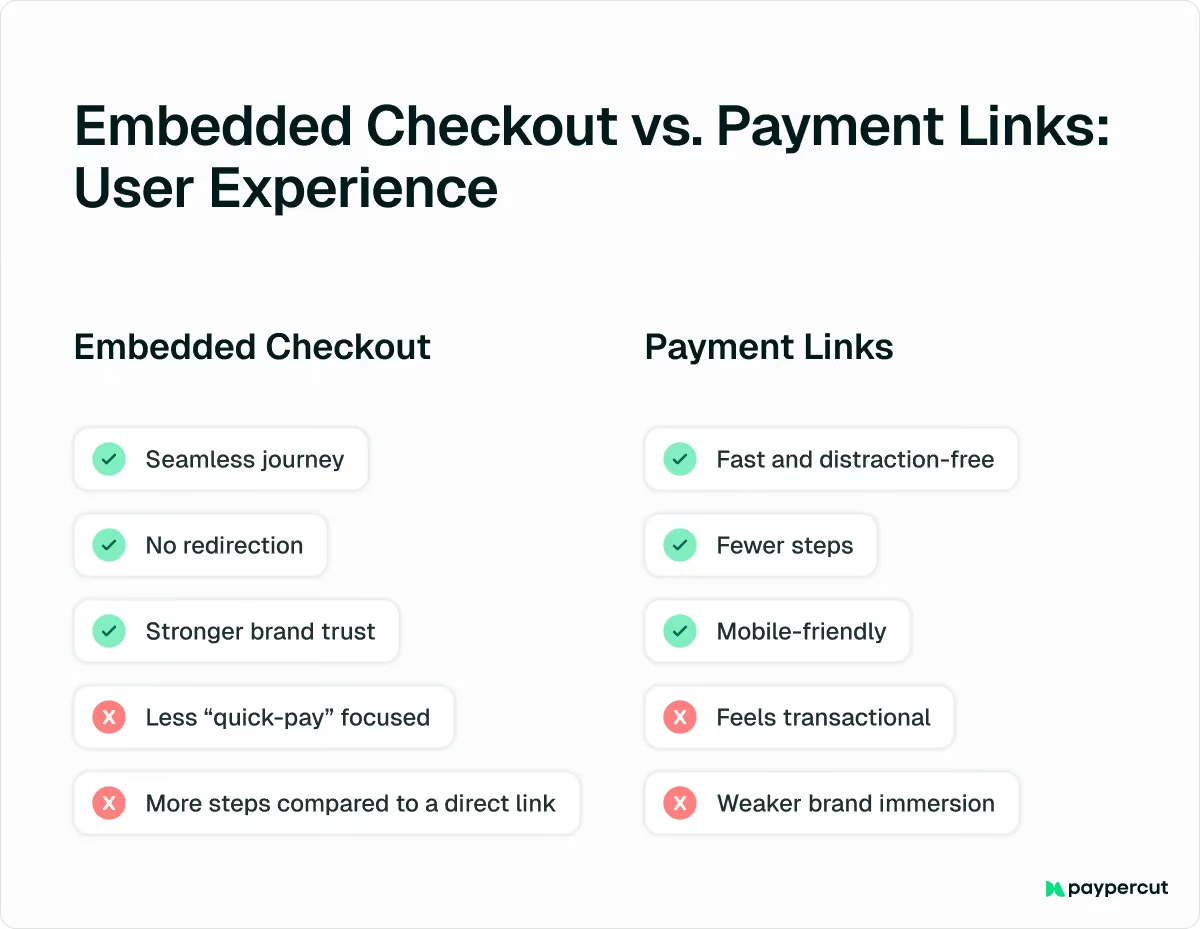
Wbudowana funkcja realizacji transakcji zapewnia klientom większy komfort, ponieważ cały proces odbywa się na Twojej stronie internetowej.
Klienci przechodzą od wyboru produktu do płatności i potwierdzenia bez konieczności przekierowywania na inną stronę. Daje to wrażenie, że jest to naturalna część Twojego sklepu, co może zwiększyć zaufanie klientów i wskaźniki finalizacji transakcji.
Jeśli chodzi o linki do płatności, zapewniają one szybki i nieodwracający uwagi proces płatności.
Klient nie musi przeglądać strony internetowej ani przechodzić przez cały proces realizacji zamówienia. Wystarczy, że kliknie link, a zostanie przekierowany bezpośrednio na bezpieczną stronę płatności.
Pozwala to ograniczyć liczbę czynności i zaoszczędzić czas, co jest szczególnie przydatne w przypadku faktur, rezerwacji, płatności alimentacyjnych czy sprzedaży w mediach społecznościowych. Rozwiązanie to działa również bez zarzutu na urządzeniach mobilnych, co ma duże znaczenie, ponieważ coraz więcej klientów dokonuje płatności za pomocą telefonów.
Jednocześnie, ponieważ płatność odbywa się na stronie zewnętrznej, a nie w całości w ramach Twojej witryny, całość sprawia wrażenie raczej szybkiej transakcji niż pełnej, spójnej z wizerunkiem marki podróży zakupowej.
10. Lokalizacja
Lokalizacja nie stanowi uniwersalnej różnicy między linkami płatniczymi a wbudowaną procedurą realizacji transakcji. Zależy to raczej od wybranego dostawcy usług płatniczych.
W przypadku Paypercut obie opcje są dostosowane do rynków europejskich.
Waluty lokalne, zasady uwierzytelniania oraz dostępni dostawcy usług „Kup teraz, zapłać później” (BNPL) są stosowane automatycznie w zależności od kraju, z którego pochodzi klient.
Oznacza to, że nie musisz ręcznie konfigurować oddzielnych ustawień dla różnych rynków. Niezależnie od tego, czy korzystasz z wbudowanej funkcji realizacji transakcji, czy z linków do płatności, klienci widzą opcje płatności dostosowane do ich lokalizacji.
Porównanie rozwiązań kasowych z linkami płatniczymi: które z nich lepiej pasują do Twojej firmy?
Wybór między wbudowaną kasą a linkami do płatności nie sprowadza się do tego, które rozwiązanie jest „lepsze”. Chodzi o to, w jaki sposób i gdzie prowadzisz sprzedaż.
Oto jak podejść do tego z praktycznego punktu widzenia.
1. Prowadzenie dobrze zorganizowanego sklepu internetowego
Jeśli prowadzisz pełnoprawną witrynę e-commerce, na której klienci przeglądają produkty, dodają je do koszyka i finalizują zakupy zgodnie z ustalonym schematem, lepszym rozwiązaniem jest zazwyczaj wbudowana kasowa.
Najlepiej sprawdza się w przypadku:
- Sklepy internetowe oferujące wiele produktów
- Platformy oparte na subskrypcji lub SaaS
- Usługi cyfrowe
- Sprzedaż biletów na wydarzenia
- Przedsiębiorstwa oparte na członkostwie
W takich przypadkach proces realizacji zamówienia stanowi część ogólnego doświadczenia.
Chcesz, aby klienci pozostawali na Twojej stronie, płynnie przechodzili od wyboru produktu do płatności i finalizowali zakup bez żadnych zakłóceń.
2. Sprzedaż poprzez rozmowy lub kanały zdalne
Linki płatnicze są często lepszym rozwiązaniem dla firm prowadzących sprzedaż poza tradycyjnym sklepem internetowym.
Dotyczy to sytuacji, gdy:
- Wysyłaj faktury pocztą elektroniczną
- Realizuj transakcje sprzedaży w wiadomościach bezpośrednich lub aplikacjach do przesyłania wiadomości
- Pobieranie zaliczek za rezerwacje
- Oferuj usługi takie jak naprawy, konsultacje czy konserwacja
- Obsługa płatności za pośrednictwem działu obsługi klienta
- Sprzedawaj bezpośrednio w mediach społecznościowych
3. Sprzedaż na różne sposoby
Dla sprzedawców prowadzących sprzedaż za pośrednictwem strony internetowej oraz poprzez rozmowy, faktury lub media społecznościowe najlepszym rozwiązaniem jest często połączenie obu tych metod.
Wbudowany system realizacji transakcji może obsługiwać Twój główny sklep internetowy, w którym klienci przeglądają produkty i dokonują uporządkowanych zakupów. Jednocześnie linki płatnicze mogą służyć do obsługisprzedaży zdalnej, wpłat, produktów i usług na zamówienie, zgłoszeń do pomocy technicznej oraz jednorazowych pobrań.
Paypercut: Ujednolicone podejście do płatności internetowych
Wybierając między wbudowaną funkcją realizacji transakcji a linkami do płatności, warto również wziąć pod uwagę preferencje klientów.
Niektórzy klienci po prostu wolą przeglądać Państwa stronę internetową i dokonywać zakupów bezpośrednio na niej, podczas gdy inni wolą odpowiedzieć na wiadomość, fakturę lub skorzystać z szybkiego linku w czacie.
Jeśli obsługujesz tylko jeden proces płatności, prawdopodobnie tracisz szansę na zwiększenie sprzedaży.
Dzięki połączeniu wbudowanej funkcji realizacji transakcji oraz linków do płatności w ramach jednej platformy, Paypercut pozwala dotrzeć do klientów niezależnie od tego, gdzie się znajdują: na Twojej stronie internetowej, w skrzynce odbiorczej lub w aplikacji do przesyłania wiadomości.
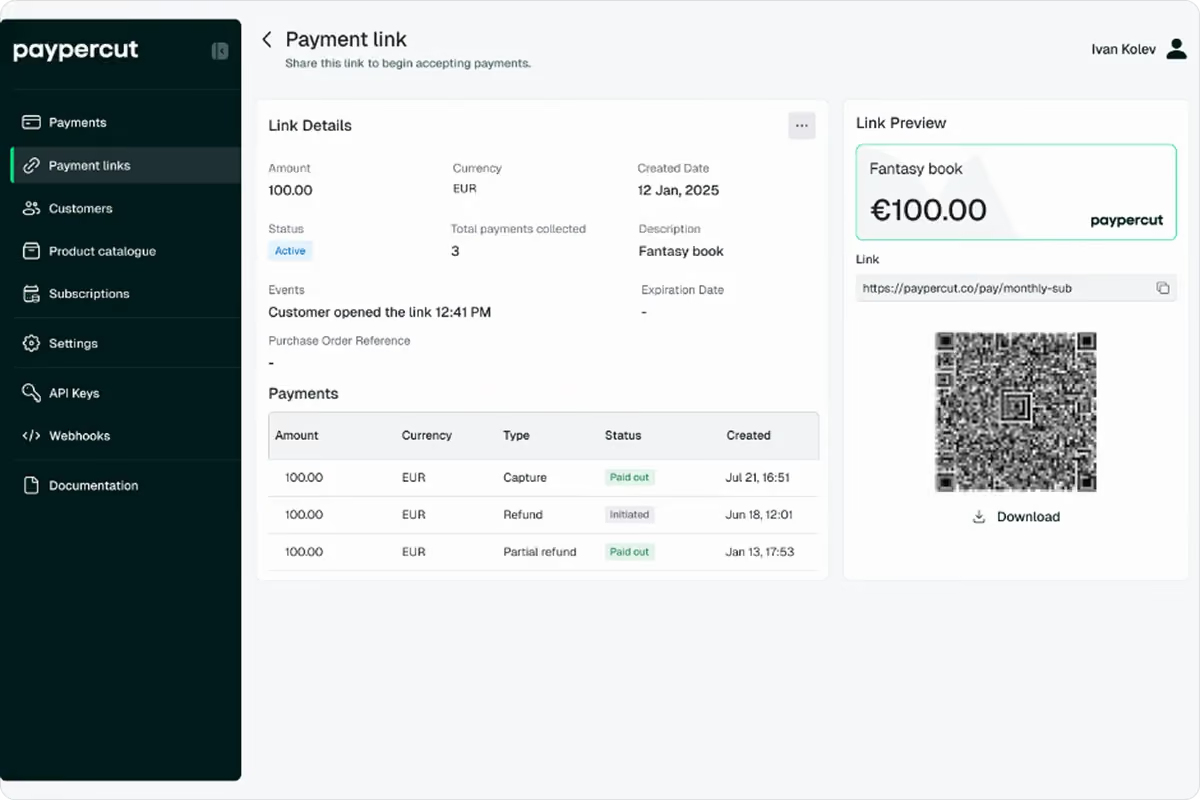
Paypercut sprawia, że płatności zdalne stają się proste i elastyczne, umożliwiając:
- Twórz bezpieczne linki płatnicze lub kody QR w ciągu kilku sekund
- Udostępniaj je za pośrednictwem czatu, poczty elektronicznej, faktur, materiałów drukowanych lub ekranów cyfrowych
- Domyślnie używaj linków do ponownego wykorzystania lub ustaw je jako płatności jednorazowe
- Śledź każdą transakcję na swoim pulpicie nawigacyjnym
- Otrzymuj wypłaty bezpośrednio na swoje dotychczasowe konto bankowe
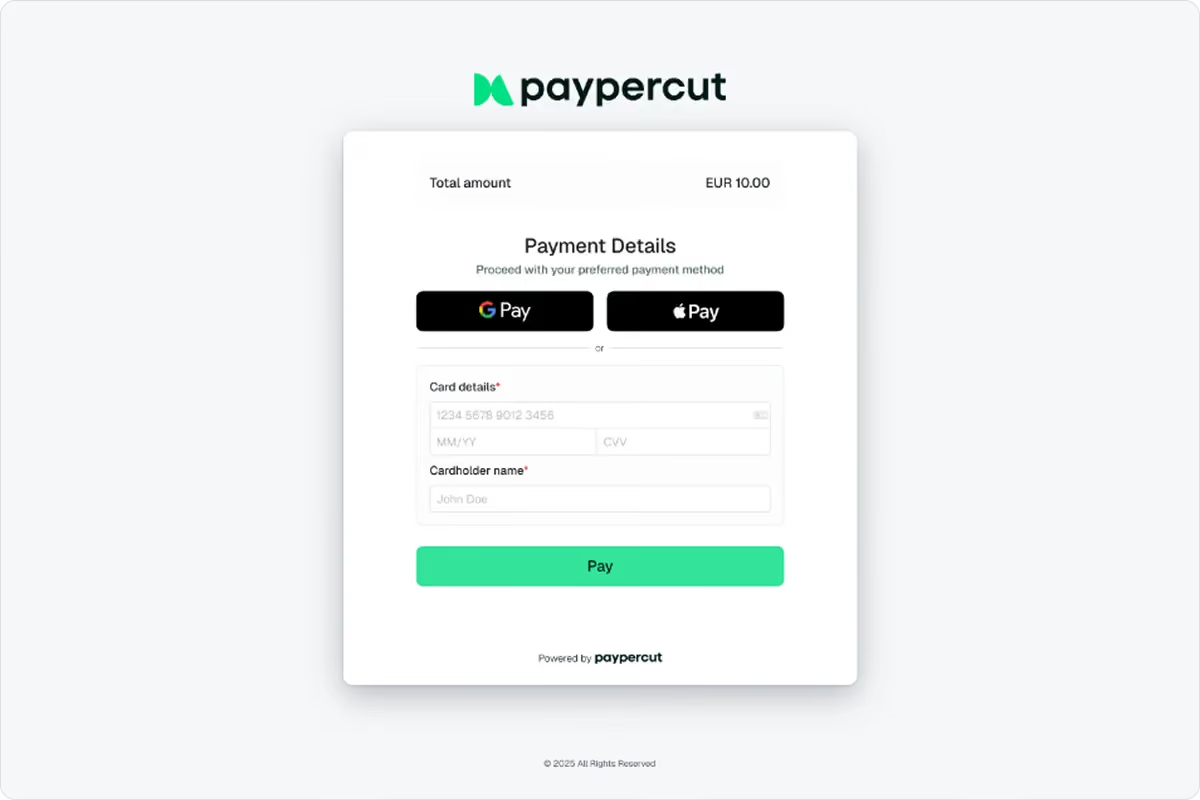
W przypadku sprzedaży internetowej Paypercut oferuje wbudowany system realizacji transakcji, który:
- Zatrzymuje klientów na Twojej stronie od początku do końca
- Obsługuje karty, portfele, BNPL, subskrypcje oraz rozliczenia cykliczne
- Jest w pełni zoptymalizowana pod kątem urządzeń mobilnych
- Dostosowuje się do stylu Twojej marki bez konieczności skomplikowanego tworzenia
- Automatycznie stosuje lokalne przepisy europejskie i waluty
Proces rejestracji odbywa się całkowicie online, cennik jest prosty i przejrzysty, a wypłaty trafiają bezpośrednio na Twoje istniejące konto bankowe.
Niezależnie od tego, czy prowadzisz sprzedaż za pośrednictwem strony internetowej, w ramach rozmów z klientami, czy też w obu tych formach, Paypercut zapewnia narzędzia umożliwiające łatwe przyjmowanie płatności i skalowanie działalności bez zbędnych komplikacji.
Aby jak najszybciej uzyskać dostęp do tych narzędzi, zarejestruj się w Paypercut już dziś i przejdź przez prosty proces rejestracji online.
Jeśli potrzebujesz więcej informacji, umów się na 30-minutowe spotkanie z jednym z naszych kierowników ds. sprzedaży, aby dowiedzieć się, w jaki sposób Paypercut może wesprzeć Twoją firmę i pomóc w realizacji celów związanych z płatnościami.