

Your payment provider was chosen for the store you launched, not necessarily the one you run today. As you add markets, payment methods and orders, limitations that barely mattered at launch can start costing you time and money.
The clearest signs show up in six places: market coverage, payment methods, pricing, payouts, integrations and support.
One problem may be fixable with your current provider. But when the same limitations keep affecting your costs, cash flow, expansion or day-to-day work, it's worth comparing alternatives.
Each sign comes with a quick test you can run on your own setup. And if switching does make sense, the good news is you don't have to replace your current provider overnight.
Key takeaways
- One problem doesn't mean you need a new provider; a pattern that keeps costing you does.
- Compare what you actually pay, not the headline card rate.
- Selling into new markets exposes payment limits faster than anything else.
- You don't have to switch overnight. Running a new provider alongside your current setup lets you test it before committing.
The six signs at a glance
Sign 1: You sell abroad, but your provider was built for one country
At launch, a provider that handles one currency and one country's cards is all you need. Then orders start arriving from Austria, the UK or a neighbouring market, and small frictions pile up:
- Foreign customers see your price converted by their bank and pay a conversion fee they didn't expect.
- You're about to sign a second contract because your provider can't take payments properly in the new market.
- Foreign cards cost you noticeably more, and you're not sure by how much.
That last point has a clear cause. Under Regulation (EU) 2015/751, interchange consumer card transactions covered by the regulation is capped at 0.2% for debit and 0.3% for credit.
Commercial cards and some cards issued outside the EEA fall outside those caps, which is one reason they can cost merchants more to accept.
For you as a merchant, the real cost of this sign isn't the fee. It's the second integration, with another contract, dashboard, payout run and plugin to maintain.
The test
Count how many payment contracts you run and how many countries you sell into.
- If adding the next market means adding the next provider, your setup won't scale with you.
- If nearly all your orders stay in one country and that isn't about to change, this sign isn't yours, and a good local provider may well be the simpler setup.
Before you sign with a second provider for a new market, ask your current one two things: which currencies can you settle in, and what exactly do you charge on non-EEA cards? If the answer is "competitive rates" rather than a number, you've learned what you needed to.
If you're staying in one market, this may not be a problem at all. It becomes one when expansion keeps adding contracts, integrations and operational work.
Sign 2: Your customers can't pay the way they want to
On mobile, wallets like Apple Pay and Google Pay save customers from typing in their card details. Local payment preferences vary too.
BLIK is widely used in Poland, qvik is now part of the everyday payment methods Hungarian shoppers use, while RoPay, which is slowly spreading through Romania.
So, a checkout that works well in one country can therefore feel limited in another.
The sign isn't that you're missing one payment method today. It's that keeping up with what customers expect means adding another contract, integration or system to manage.
The test
Search last month's support inbox and chat logs for phrases like "pay with", "Apple Pay" or the local payment methods in your markets. If you track checkout behaviour, look at where customers leave around payment selection too.
Then check what's already available in your current setup. You may already support a payment method that simply isn't enabled or visible where customers expect to find it.
If something genuinely is missing, find out what adding it involves: a setting in your existing integration, or another contract and technical setup.
Sign 3: You can't explain your own fee statement
As your store grows, statements pick up extra lines: monthly gateway fees, PCI charges, payout fees, conversion margins, a different rate once you cross a volume tier or break a pricing condition.
None of that is unusual. The sign is that you can no longer predict next month's cost from next month's orders.
The test
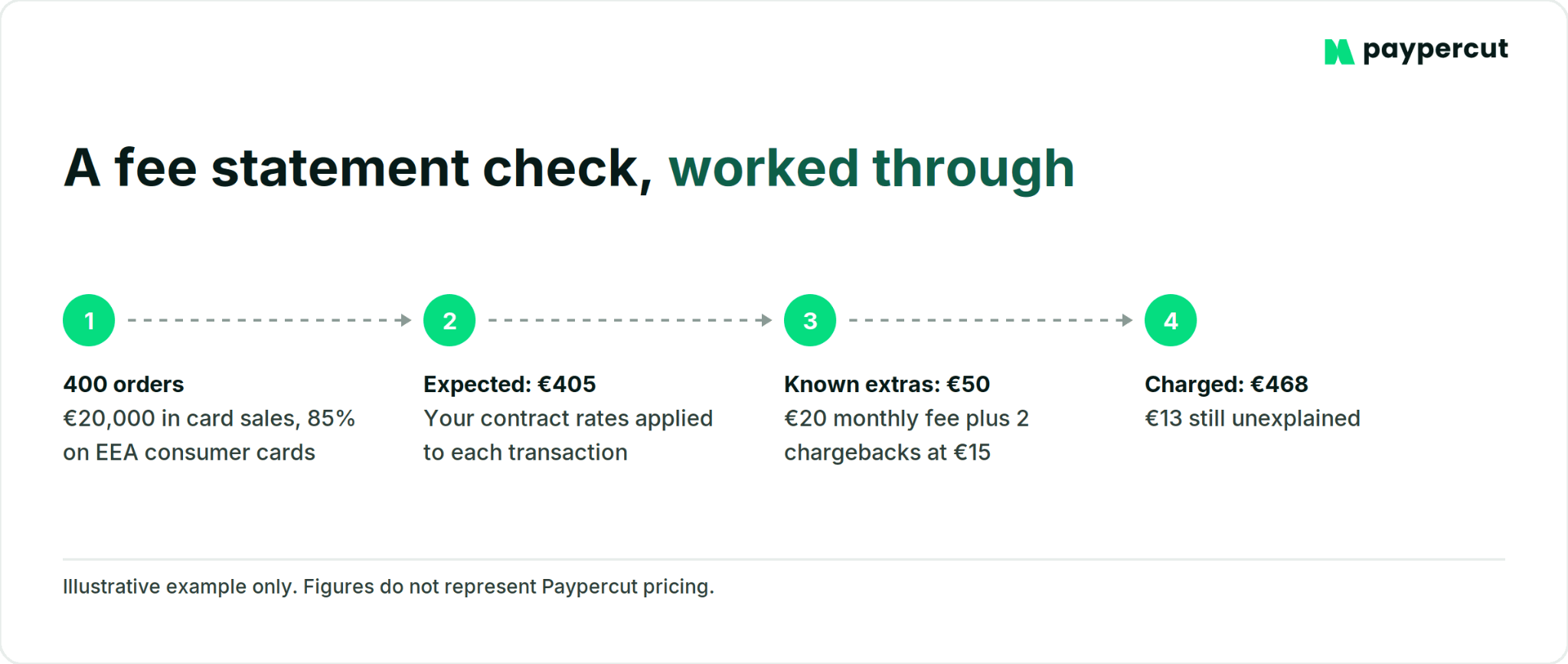
Take last month's orders and apply the rates in your contract. Split domestic and foreign cards if your data allows it. Add chargebacks and refunds. Then compare your total with what you were actually charged.
If the totals don't match, work through the difference until you know what caused it. Charges you can't trace back to your agreement are worth questioning.
Ask two separate refund questions too: do you pay a fee to issue a refund, and do you get the original transaction fee back?
Opaque doesn't always mean expensive. An interchange-plus quote can cost you less at your volume and still be harder to read. The problem isn't the pricing model. It's not knowing what you'll pay.
Sign 4: Your money arrives on the provider's timetable
As order volumes grow, payout timing starts to matter more. If you're waiting for sales revenue to reach your bank before you can reorder stock or pay suppliers, even a few extra days can become an operational problem.
You might notice that:
- You plan stock orders around payout dates instead of around demand.
- A rolling reserve has appeared, but you aren't clear on how much is being held or when it will be released.
- Your money lands in a provider balance first, so transferring it to your business bank account becomes another step.
Card disputes can arrive weeks or months after the original payment, and the time limit depends on the dispute reason and the card-scheme rules.
That's one reason providers may use reserves to manage chargeback risk. A reserve isn't necessarily a problem in itself. What matters is knowing why it's there, how much is being held and when it will be released.
The test
Pick ten recent orders and check how long it took for the money from each one to reach your business bank account.
Also check whether payouts go directly to the account you already use or whether you need to move the money from a separate provider balance.
Sign 5: Every change needs a developer, or a workaround
Provider costs aren't limited to transaction fees. The time your team spends maintaining the setup matters too.
You postpone a platform update because nobody is sure the payment plugin will survive it. You run a separate tool for subscriptions, another for payment links on phone orders, and a spreadsheet to connect them. Seeing one day's revenue takes three logins.
The test
Check when your payment plugin was last updated, and who maintains it. A plugin the provider updates with each platform release is a different thing from a community one nobody has touched in two years.
Keep a staging copy of your store and update the payment plugin there first. Ten minutes of test orders on staging is cheaper than finding out on a Saturday that checkout broke.
If you've recently delayed a change to your store because of payments, look for a provider that covers more of what you run in one place: checkout, payment links and subscriptions under one integration and one login.
Sign 6: Support disappears when something breaks
Slow support becomes a much bigger problem when customers can't pay.
You may find yourself waiting a day for a ticket response, repeating the same issue to different agents or struggling to reach someone who can actually resolve it.
Disputes make this more important. Card schemes set deadlines for different stages of the dispute process, so a late notification can leave you with less time to gather evidence and respond.
The test
Look at your last three support requests. How long until a person replied, and how long until the problem was solved?
When you can wait before making a change
Not every payment issue needs a new provider straight away. Some are worth investigating first, especially when the rest of your setup is still working well.
- Declines have suddenly increased. Check the decline codes and whether Strong Customer Authentication is affecting certain payments. A short-term change in approval rates doesn't necessarily mean the provider itself is the problem.
- Checkout conversion has dropped. Look at what else has changed around the same time. Shipping costs, account requirements and longer forms can all affect checkout conversion.
- Your card fees have gone up. Check whether your card mix has changed. A higher share of commercial or non-EEA cards can increase your costs even if your provider's pricing hasn't changed.
If the issue is isolated and your provider can explain or fix it, it’s okay to postpone. It's when the same limitations keep coming back, or start affecting several parts of the business, that comparing alternatives becomes more useful.
Ask, add or switch: which move fits the problem
Ask your current provider first when the underlying setup still works and the problem looks fixable: unclear pricing, a support escalation or a feature that exists but isn't switched on.
Add a second provider when you want to test a new payment method, cover a new market or compare performance without replacing your setup straight away. Running both for a while gives you real transaction data before a bigger decision.
In our experience, some merchants prefer to run payment providers in parallel before moving all their transactions to the new setup.
Consider a full switch when the problems are structural rather than isolated: each new market means another provider, payouts no longer fit your cash flow, essential payment methods aren't supported, or workarounds keep multiplying.
How to switch payment providers without disrupting your store
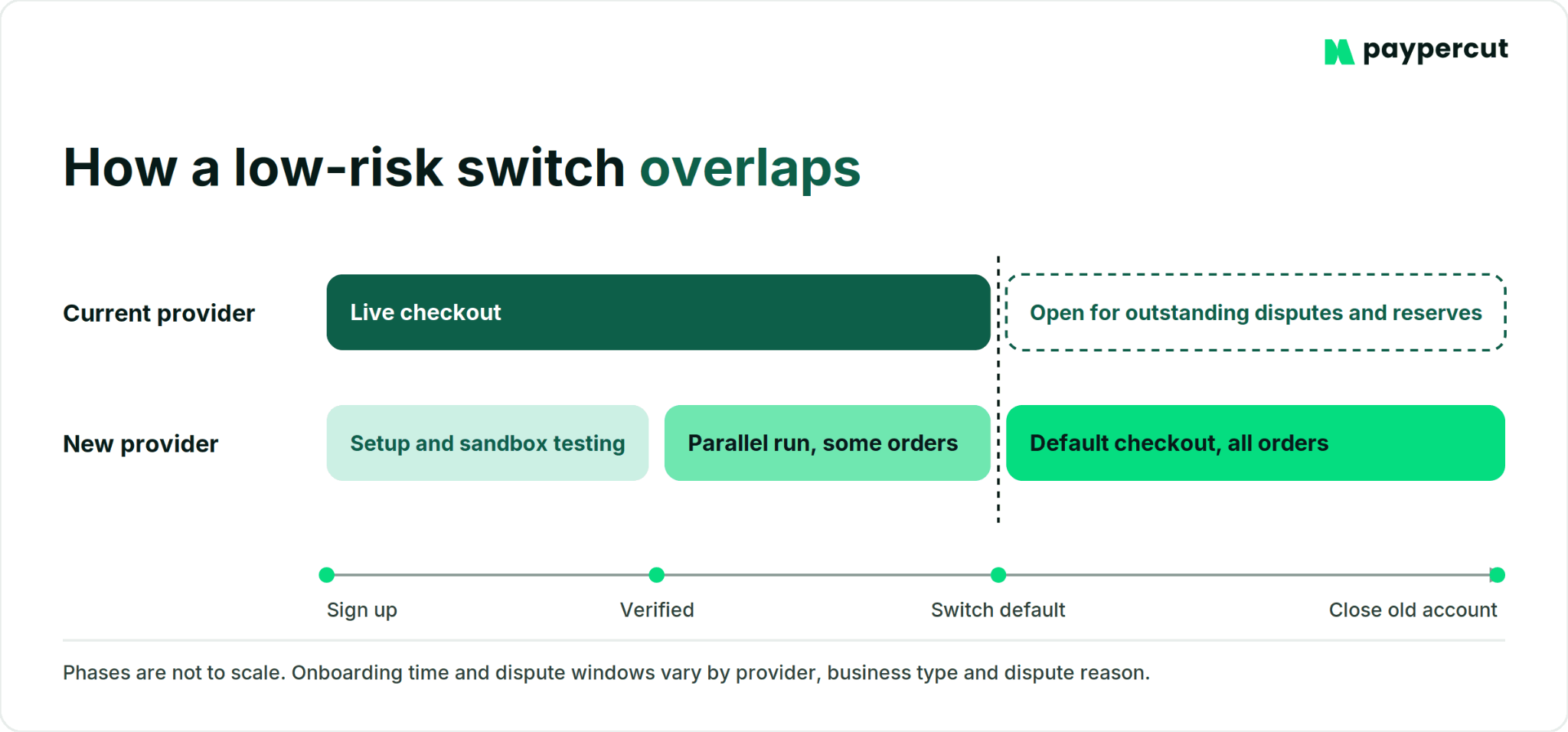
The safest way to switch is to keep your current provider running while you set up and test the new one. Once you've seen real payments go through successfully, you can move over gradually.
Check your current contract first. Look for the minimum term, notice period, early termination fees and what happens to any reserve after you leave.
Export your payment data while you still have access. Save your transaction history, payouts, refunds and disputes in a format your team or accountant can use.
Set up the new provider before changing your live checkout. If you get access to a sandbox during verification, use that time to build the integration and run test payments.
Check what happens to saved cards. This matters if you have subscriptions or returning customers with stored payment details. Whether card data can be migrated depends on both providers and their PCI DSS requirements, so confirm what can be exported and imported before you close anything. If migration isn't possible, customers may need to enter their card details again.
Run the two setups in parallel for a while. Put some real transactions through the new provider and check that payments, payouts and refunds work as expected before moving everything across.
Make the new provider your default before closing the old account. Keep access to the old one long enough to deal with outstanding disputes and any reserve that still needs to be released.
If you're ready for a change, here’s where Paypercut fits
By now, you should have a clearer idea of what you'd actually want from a different payment setup. Maybe it's easier expansion into new markets. Maybe it's fewer integrations to manage, clearer costs or simply getting payouts into the bank account you already use.
Your exact rates depend on your market, customers and agreement, so make sure to check the current pricing for your business.
See if Paypercut fits your setup
Explore the checkout or create an account to try the platform before going live.
FAQs
How do I switch payment providers without disrupting my store during the transition?
Run the two providers side by side instead of swapping one for the other. Integrate the new provider, test it in a sandbox, then add it as an extra payment option or route part of your traffic to it. Once real payments, payouts and refunds work, make it your default. Keep the old account open until late disputes have arrived and any reserve is released.
What documents do I need to set up a new payment provider account?
Expect your company registration details, identification for the legal representative, and details of the people who own or control the business, which EU anti-money laundering rules require providers to verify. Providers also usually ask for your business bank account and a live website showing your products, prices, contact details, terms and refund policy. Some ask for more depending on what you sell.
How long does onboarding typically take once I decide to switch?
It depends on the provider and on how complete your documents are. Bank merchant accounts often take longer because underwriting involves more manual review, while fully digital verification can move faster when your documents are ready. Ask whether you get to test the integration in a sandbox environment while completing verification for live payments.
Will I lose my transaction history or reporting data when I switch providers?
Not if you export it first. Your old provider keeps the history, but some only give you access while the account is open. Before closing it, download transactions, payouts, refunds and disputes in a format your accountant can use. Saved customer cards are separate. Whether stored payment details can be migrated depends on both providers and their PCI DSS requirements, so ask your new provider whether it accepts card data imports before you close the old account.
Is there a contract or minimum commitment period I should watch for when switching?
Yes. Check your current agreement for a minimum term, notice period, early termination charges and what happens to any reserve after you leave. Also check whether fees or other obligations continue while the account is being closed. Terms vary by provider and merchant agreement, so treat your own contract as the source of truth.