
A customer messages you on Viber, agrees the price and asks how to pay. You send your IBAN. Later, you are checking the bank account to see whether the transfer has arrived and trying to work out which payment belongs to which order.
A payment link gives you another option. You create a payment request, send the customer a link and they pay online through a hosted payment page.
For a small Bulgarian business, that can be much simpler than building an entire online checkout. But the link itself is the easy part.
You still need to think about how you identify each payment, what it costs, when the money reaches you and how the sale should be documented in Bulgaria.
Key takeaways
- Payment links let you accept card payments online without building a full website checkout or custom integration.
- They work best when you already know what the customer is buying and exactly how much they need to pay.
- For catalogue-based e-commerce, a full checkout is usually more practical because customers need to build the order themselves.
- Bulgarian businesses also need to consider how card payments through links fit their invoicing and sales-reporting obligations under local rules.
- Before choosing a provider, compare the full transaction cost, payout timing, refund terms, security and how easily you can match each payment to an order or invoice.
What is a payment link and how does it work?
A payment link is a shareable URL that opens a hosted payment page. You create the payment request, send the URL to the customer and they complete the payment on their own device.
There is no need to build a payment form into your website just to send the link. Paypercut, for example, allows payment links to be created from its Merchant Dashboard without code, while an API is available for businesses that later want to automate the process.
The basic flow is:
- Create the payment request with the amount and other relevant details.
- Add a short product or service description so the customer can see what they are paying for before they pay.
- Generate the link through your payment platform.
- Send it to the customer through email, SMS, Viber, WhatsApp or another channel you already use.
- The customer opens the hosted page and pays.
- Check the transaction status in your merchant dashboard or payment system.
That makes payment links especially useful for businesses where the sale happens before the payment.
Imagine you run a photography studio in Sofia and require a €100 deposit to confirm a booking. Once the client agrees on the package and date, you already know exactly what they owe. Sending a €100 payment link is much simpler than building an entire booking checkout solely to collect that deposit.
That is where the benefits of payment links for businesses are clearest: the sale has already been agreed and you simply need an efficient way to collect the money.
If you know the final amount before the customer pays, a payment link may fit. If the customer needs to build the total themselves, you probably need a checkout.
Which Bulgarian businesses are payment links actually useful for?
Payment links work particularly well when you agree the price through a conversation, quote, booking or invoice and then need a convenient way to collect it.
The common factor is not the industry. It is the way the sale happens.
An accountant, beauty studio and furniture maker may have very different businesses, but all three can reach a point where they already know who the customer is, what they are buying and what they owe.
Payment links become less attractive when the customer needs to create the order themselves.
A conventional online store with hundreds of products, variants, delivery methods and discount codes should not normally rely on manually sending individual links as its primary purchase flow.
In that situation, the bigger decision is choosing a payment gateway for your Bulgarian business that can support the full checkout rather than trying to replace it.
What changed for payment links after Bulgaria adopted the euro?
Bulgaria adopted the euro on 1 January 2026 at the fixed conversion rate of €1 = BGN 1.95583. Mandatory dual display of prices in lev and euro applied until 8 August 2026.
If you were already taking remote payments before the changeover, check any old fixed-amount payment links, templates and printed QR codes that still show lev amounts before you reuse them.
That is particularly easy to overlook with QR codes printed on:
- invoices;
- counter cards;
- menus;
- event materials;
- packaging;
- posters or flyers.
If the customer-facing amount or information is outdated, update or replace the payment request before using it again.
For most domestic sales, the move to EUR also removes the old BGN-to-EUR conversion question. Currency conversion can still matter when customers pay in other currencies or you sell internationally, so it is worth checking when FX applies and how your provider charges for it.
What happens to the invoice or fiscal receipt when someone pays by link?
A payment link handles the payment. It does not automatically determine how the underlying sale needs to be documented under Bulgarian fiscal and accounting rules.
That depends on how you sell and how the payment fits into your wider setup.
If you sell through an electronic shop
The National Revenue Agency defines an electronic shop as software accessed through a browser or mobile application through which distance sales are made. Customers can select goods or services and provide information such as their contact details, delivery address, and payment method.
Businesses selling through an electronic shop and accepting payments for which a fiscal receipt is required have specific information-reporting obligations to the NRA.
Bulgarian Ordinance H-18 also provides an alternative regime for certain electronic-shop sales paid remotely by credit or debit card, subject to specific conditions.
Under that regime, qualifying businesses can register the sale through a prescribed document rather than a standard fiscal or system receipt. The document must contain specified information, including the customer-order number, payment-transaction reference and a QR code, and it must be provided to the customer electronically.
Businesses using the regime also submit a standardised audit file to the NRA by the 15th day of the following month. Paypercut also works with Take a NAP through its billing and payouts setup, which can prepare and submit the required NRA reports based on your online payments.
The important distinction is that paying through a link does not automatically make the alternative regime applicable. The business and sales setup still need to meet the conditions.
What if you take orders through chat, email or another direct channel?
Whether a particular sales flow falls within the NRA's definition of an electronic shop depends on how the order itself is placed and what functionality the customer uses, not simply on whether the final payment happens online.
That makes a direct-service business sending an occasional payment link different from a conventional online store, but the correct treatment for your business should be confirmed against your actual setup.
Before payment links become a regular sales channel, ask your accountant:
- Do my sales fall within the NRA definition of an electronic shop?
- What document should I issue when a customer pays remotely by card?
- If the alternative H-18 regime is available to me, does it make sense for my setup?
- Does anything change because I also accept cash, cash on delivery, bank transfers or other payment methods?
Sorting this out early is considerably easier than trying to reconstruct the correct treatment after hundreds of transactions.
How do you create and send a payment link?
Once your merchant setup is active, creating a payment link should be one of the simpler parts of taking a remote payment.
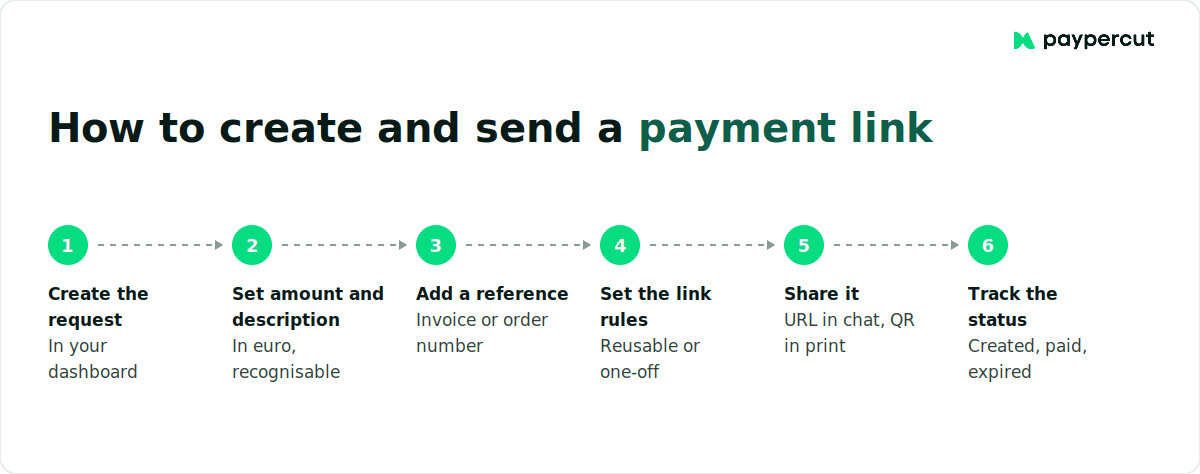
The process is usually:
- Create the payment request
- Set the amount and customer-facing description
- Add an internal reference if useful
- Set the link rules
- Generate and share the link
- Track the payment status
The reference sounds like a small detail until your volume increases.
Keep in mind that payment links do not always have to be created for a single transaction. With Paypercut, you can also create reusable links that remain active until you disable them, which can be useful when you collect the same type of payment repeatedly.
If three customers all pay €50, three €50 transactions do not tell you which payment belongs to which invoice. A reference such as INV-2026-114 or BOOKING-0831 does.
Reconciliation often becomes difficult before payment collection does.
If you start creating the same type of request repeatedly, check whether the provider can generate payment links automatically from your booking system, CRM or order-management software.
At that point, automation becomes more useful than simply making the manual process marginally faster.
What should you ask a payment link provider before signing up?
Almost any payment-link product can generate a URL. The meaningful differences appear around cost, payouts, refunds, disputes, security and what you can see after the transaction happens.
Compare the fixed fee as well as the percentage
For smaller transactions, the fixed component can have a surprisingly large effect on what you actually pay.
A fixed €0.10 charge, for example, is:
- 0.5% of a €20 payment
- 0.1% of a €100 payment
- 0.05% of a €200 payment
If you mainly take €20 deposits, a fixed charge matters considerably more than it does on €200 invoices.
Compare providers against your real average payment value and expected monthly volume, rather than choosing whichever headline percentage looks lowest.
Refunds are two separate questions
When you compare refund terms, ask: Is there an additional charge for issuing the refund?
Then ask: Is the original transaction fee returned to me?
Those are different things. A provider can charge nothing for initiating the refund while still retaining the fee from the original transaction.
Ask for the payout schedule as a number
The customer seeing “payment successful” does not mean the money has reached your business bank account.
Payment confirmation and payout are separate stages.
Ask how many days the normal payout takes, whether different circumstances can extend it and whether funds arrive directly in your bank account or first sit in another balance that you have to withdraw.
For a small business managing cash flow, that answer can matter more than a small difference in the headline card rate.
Are payment links secure enough for small business transactions?
Payment links can provide a secure way to accept card payments when the customer pays through a properly secured hosted payment environment.
With a fully hosted payment page, the card-entry elements are supplied by the payment service provider rather than being built and operated by the merchant.
PCI SSC recognises fully outsourced arrangements, including setups where a merchant sends customers a link to a third party's website to pay, although a merchant's exact PCI DSS validation obligations still depend on the complete setup and applicable eligibility criteria.
European online payments are also subject to the Strong Customer Authentication requirements introduced under PSD2 where applicable. SCA is intended to make online payments safer and reduce fraud, with detailed rules and exemptions set by the regulatory framework.
Technical security is only part of the picture, though.
A legitimate payment link can still be imitated in a phishing message.
Make genuine requests easier for customers to recognise:
- send the link through a channel the customer already uses with your business;
- make the amount and reason for payment clear;
- use a recognisable business name;
- never ask the customer to send card details back through chat or email;
- check printed QR codes regularly if you use them in physical locations.
A secure payment page cannot make a fraudulent message pretending to come from your business secure.
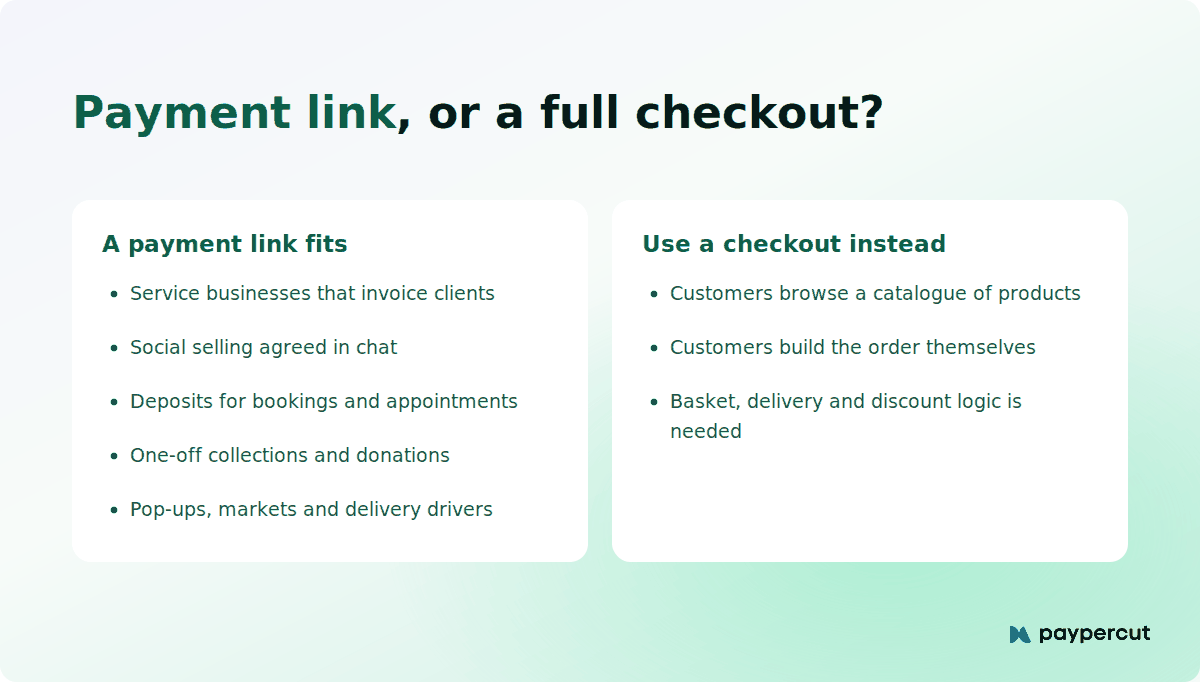
Payment link, checkout or both?
The right setup depends on how customers actually buy from you.
Use payment links if
You normally agree the product, service and amount with the customer before collecting payment.
Bookings, invoices, deposits, custom work and social selling are the clearest examples.
Use a checkout if
Customers need to browse, choose products, build a basket, select delivery options, apply discounts or complete an order without speaking to you first.
In that situation, checkout is not unnecessary infrastructure. It is doing part of the sales work.
The practical difference between checkout solutions and payment links is therefore less about which payment technology is “better” and more about who constructs the order before payment happens.
Use both if
You run a normal online store but also take:
- phone or chat orders;
- invoices;
- deposits;
- custom orders;
- payments at events or pop-ups.
Checkout can handle repeatable self-service purchases while payment links handle the cases where the order has already been agreed.
If you expect to use both, check whether the provider can keep those transactions within the same merchant setup so you are not creating unnecessary reporting and reconciliation work.
Start with payment links with Paypercut, then add checkout when you need it
If your customers already know what they owe, you can start with payment links without building a full checkout first.
Create the link from your Paypercut dashboard, set the amount and add a short description of the product or service so the customer knows what they are paying for. You can also add a reference to help match the payment to the right order or invoice later.
Once they pay, you can check the transaction status from the same dashboard.
You can also keep using your existing business bank account for payouts, so there is no separate Paypercut account you need to open. For smaller or seasonal businesses, there is no minimum monthly transaction volume, activation fee or monthly subscription to justify before you start taking payments.
Current Bulgarian card pricing is:
You can check all our latest terms on our pricing page.
And if payment links eventually become too manual, you do not have to start your payment setup again. You can add online checkout or an e-commerce integration when customers need to browse, build their own orders and pay without speaking to you first.
See what the payment experience looks like in action
Try the customer side before deciding which payment setup fits the way you sell.
FAQs
What's the difference between a payment link and a full online checkout?
A payment link takes the customer to a hosted payment page for an amount you already know. A full checkout lets customers choose products, quantities, delivery options and other details before the final total is calculated. Payment links suit bookings, invoices and direct sales; checkout suits self-service e-commerce.
Are payment links secure enough for small business transactions?
Yes, when the customer pays through a properly secured hosted payment environment. PCI DSS covers payment-card data protection, while relevant European electronic payments are also subject to PSD2 Strong Customer Authentication requirements. Your exact compliance obligations still depend on the provider and setup.
How do I create and send a payment link to a customer?
Create the request in your provider's dashboard, enter the amount and currency, and add a short description of what the payment is for. You can also add an order or invoice reference for your own reconciliation. Then generate and send the link by email, SMS or chat and check the payment status once the customer pays.
Do I need a business account to start using payment links in Bulgaria?
You generally need to complete merchant onboarding and business verification before accepting live card payments. You do not necessarily need a separate account with the payment platform; with Paypercut, payouts can go to your existing business bank account.
How quickly do I receive funds after a customer pays via a payment link?
A successful payment and the payout to your bank are separate steps, so the money may not arrive immediately. Provider schedules vary, so compare the standard payout time and whether funds go directly to your bank or to a separate balance first. With Paypercut, standard payouts take 24–48 hours and go to your existing business bank account.