

To accept online card payments from customers in Bulgaria, start with a provider that supports your business’s registration country and the way you sell. You’ll also need business and ownership documents, clear customer information and a tested payment setup.
Whether your company is registered in Bulgaria or elsewhere, distinguish the requirements for onboarding your business from those for selling to Bulgarian customers. Your registration documents come from your home jurisdiction; your customer-facing setup needs to account for the market you sell into.
Depending on your provider, setting up card acceptance may involve a merchant account, but it doesn’t necessarily mean opening another business bank account. The checklist below explains what to prepare, what to compare and what to test before launch.
Key takeaways
- Prepare your business and ownership documents before applying.
- Check your website policies and sales-reporting requirements.
- Compare total costs, payment methods, integrations and payouts.
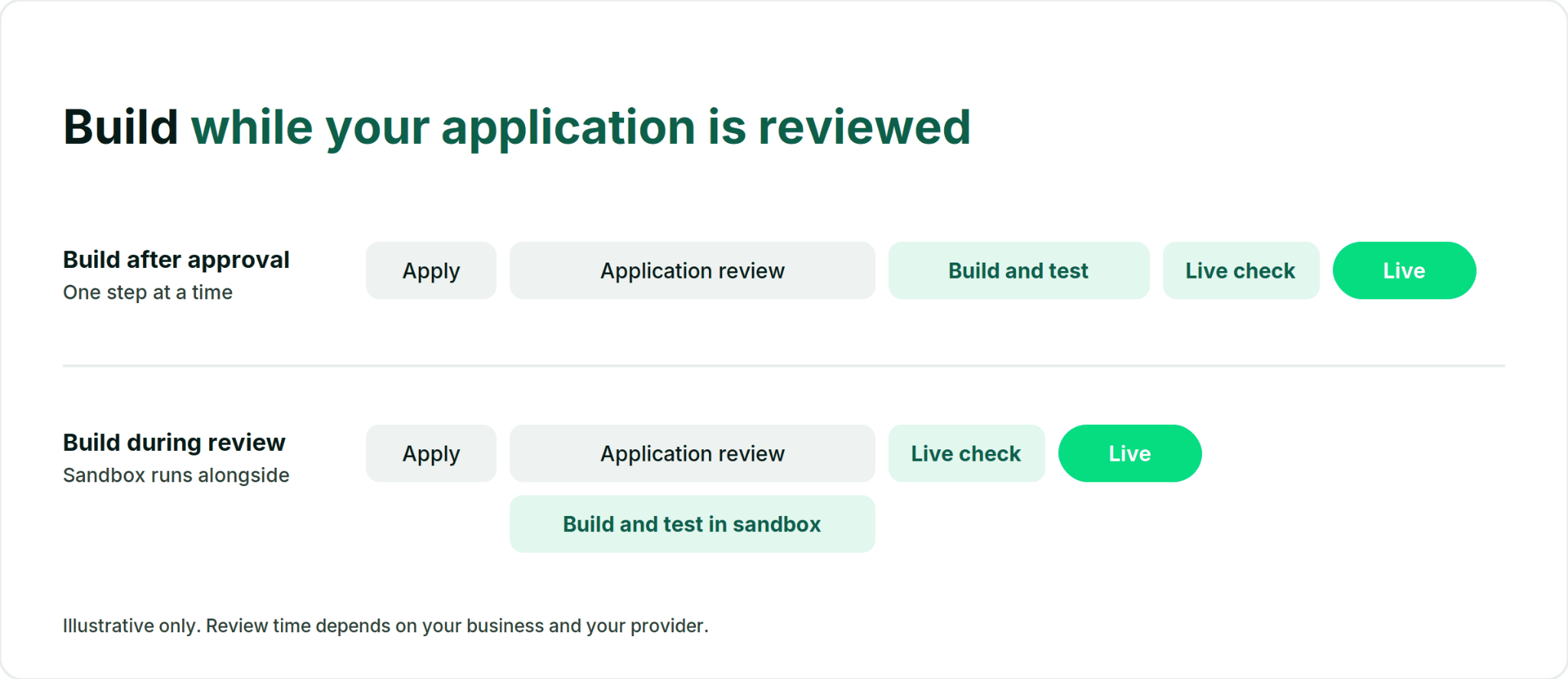
- With Paypercut, you can build and test while verification runs.
What you need to accept online payments in Bulgaria at a glance
1. A business and payout account your provider supports
Your provider’s eligibility rules depend on where your business is registered, its legal form and its activity. Selling to Bulgarian customers does not, by itself, mean you must register a Bulgarian company or open a Bulgarian bank account.
Before applying, check that the provider supports your registration country and intended sales markets.
Have ready:
- Business registration details: your legal name, registration number and registered address.
- A VAT or tax identification number, where applicable.
- A payout account that meets the provider’s account-holder and currency requirements.
- Supporting documents, such as registration or founding documents, proof of address and proof of the payout account, if requested.
Registered in Bulgaria? Companies and sole traders use their Commercial Register details and EIK. Freelancers generally use BULSTAT registration; provider eligibility varies.
Registered elsewhere? Prepare the equivalent documents from your home jurisdiction. Check whether the provider requires translations or additional verification.
Bulgaria adopted the euro on 1 January 2026, replacing the Bulgarian lev. If you’re setting up payments for Bulgarian customers, check that your checkout supports EUR and clearly displays the payment currency. Your payout currency depends on your provider and account setup; currency conversion may apply if it differs from EUR.
Confirm your business and payout-account eligibility before preparing the full application.
2. ID and ownership (UBO) details
Every provider has to know who represents your business and who ultimately owns or controls it. That's a legal requirement under anti-money-laundering rules, not a provider preference.
You'll typically need:
- A valid ID or passport for each legal representative, clear, uncropped and in date
- Details of every beneficial owner (UBO), and their ID where the provider requires it
- Proof of address, if the provider asks for it
The ownership information and supporting documents required depend on your business’s jurisdiction and the provider’s verification rules.
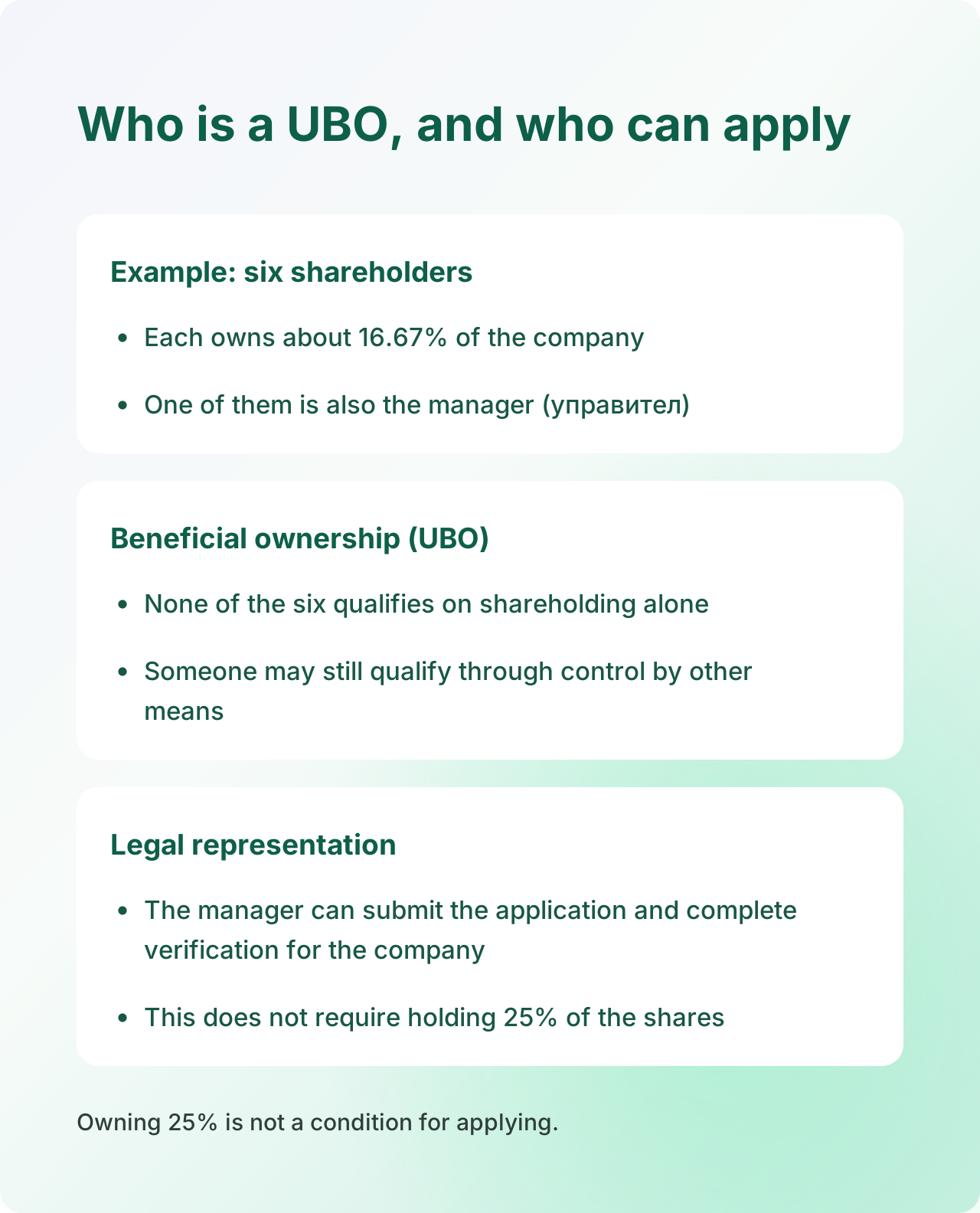
For Bulgarian companies, holding at least 25% of the shares or ownership interest is an indication of beneficial ownership under Bulgaria’s Measures Against Money Laundering Act. Control through other means can also qualify.
A company’s manager can submit the application and complete verification on its behalf without owning 25% of the shares.
Bulgarian companies record their beneficial owners with the Registry Agency unless the relevant ownership information is already recorded as required. Companies registered elsewhere should use the applicable records and documents from their own jurisdiction.
Keep your application consistent with current official records. Outdated ownership information can lead to follow-up questions.
3. A website and sales setup that meet Bulgarian rules
Your provider will review your website as part of the application. If you sell to Bulgarian consumers, check which consumer, privacy and tax requirements apply to your business and sales model, including any cross-border obligations.
Before applying, make sure customers can find:
- Business details: legal name, registration number, address and contact information; EIK for Bulgarian-registered businesses.
- Products and prices: clear descriptions, prices including applicable VAT, and delivery charges.
- Delivery information: available methods and expected timelines.
- Terms, returns and refunds: including the usual 14-day withdrawal right and applicable exceptions.
- Privacy and cookie information.
- Payment methods and subscription terms, where relevant.
These requirements draw on Bulgaria’s Consumer Protection Act and other applicable rules, including the EU Consumer Rights Directive.
Check your checkout buttons
Order button: Make the payment obligation clear. “Pay €49.00” works; “Continue” doesn’t.
Withdrawal function: Where applicable, customers must be able to exercise their withdrawal right online. Bulgaria’s Consumer Protection Act includes this requirement in Article 52a. If your business is registered elsewhere, confirm the applicable national rules for your cross-border sales.
Publish all required policy pages. “Coming soon” pages leave your application incomplete.
Confirm how you’ll document sales
Ask your accountant which sales documents and reporting your setup requires. For businesses subject to Bulgaria’s Ordinance H-18, this includes checking eligibility for the alternative regime for remote card payments. Overseas businesses should confirm their own invoicing, VAT and reporting obligations when selling to Bulgarian customers.
Before your first online sale, check with your accountant whether your store must be registered with Bulgaria's National Revenue Agency under Ordinance H-18. If you use the alternative reporting regime, Paypercut integrates with Take a NAP to automate electronic receipts and generate the monthly audit files required for tax reporting.
Using payment links without a website? Ask your provider what business information and online presence it requires.
4. A clear description of what you sell
Every application asks what your business does. It sounds like a formality, but it's where many reviews slow down.
A complete answer covers:
- What you sell, in plain words that match what's on the site
- How customers receive it, whether that's shipping, booking, download or subscription
- Your expected monthly volume and average order value, as an estimate
If your registered activity is "consulting" and your site sells supplements, expect questions. The same goes for a store that has moved into new product lines since it registered.
Give an honest volume estimate, even if you're just starting. Providers use it to set up your account, and a figure far below what you actually process can trigger a review later.
Some business types get extra review as standard, often including supplements, digital goods and subscription services. That doesn't rule you out. It usually means a few more documents, so it helps to have them ready.
5. A bank or a payment provider
There are two main routes. A bank vPOS is a virtual card terminal you get through a bank. An online payment provider gives you checkout, payment methods and onboarding through its own platform.
Both routes vary a lot from offer to offer, and some banks now offer remote onboarding, electronic signing and wallets. So compare the specific offer, not the category.
Already accepting payments in another country?
Start with your existing provider. Ask whether your account supports sales to Bulgarian customers, EUR checkout and the payment methods you want to offer.
You may be able to use your current setup. Compare another provider if you need different payment options, integrations, pricing or payout arrangements.
The UniCredit figures are the bank's published standard tariff, checked October 2026. The bank also advertises promotional terms, and individually agreed terms may differ.
Many providers price EEA consumer cards lower than other cards. EU rules cap the interchange fee on EEA consumer cards at 0.2% for debit and 0.3% for credit. Business cards and cards issued outside the EEA sit outside those caps, though what you actually pay depends on each provider's tariff.
Bulgarian stores also use ePay.bg and a range of local and international providers. If you're already on one and outgrowing it, there are alternatives to ePay.bg for growing stores, and a broader comparison of payment providers in Bulgaria.
Whichever route you look at, ask each provider the same questions in writing:
- What does one average order cost me, including fixed fees and any annual or monthly charge?
- Where do payouts go, and do they cost extra?
- Which methods are live for my integration today?
- Is there a plugin for my platform, and who maintains it?
- What does leaving involve, including minimum terms?
6. Choose your payment methods
Cards are the minimum. Everything else is a choice based on how your customers pay.
Options to consider when selling to Bulgarian customers:
- Visa and Mastercard, debit and credit
- Apple Pay and Google Pay, so mobile customers can pay without typing card details
- Payment links or QR codes, for orders taken by phone, chat or social media rather than through the site
- Cash on delivery, as an optional extra channel alongside card payments. If you rely on it, it's worth knowing about changes to how Econt handles postal money transfers
If you sell through Instagram or take orders by phone, payment links for small businesses let you take a card payment without building a full checkout.
Only show a method at checkout once it's live. A payment option that fails at the last step costs you the order and the customer's trust.
7. A checkout you've tested
Approval gives you live access. It doesn't tell you whether your checkout works the way a customer will use it.
Before you announce anything, run through:
- A successful card payment, from product page to confirmation email
- A declined payment, to check the customer sees a clear message and can try again
- 3D Secure, which supports Strong Customer Authentication under PSD2 where it's required. Some payments are exempt or authenticate without a visible challenge, so test both paths
- Wallet payments, on a phone that supports them
- A refund, so you know how it works before a customer asks
- The final amount, showing VAT, delivery and the currency before payment
- The withdrawal function, where required, including the acknowledgement email
A clumsy 3D Secure step or a vague error message is a common cause of checkout drop-off, so test on mobile as well as desktop.
From checklist to first payment with Paypercut
With Paypercut, start by checking that we support your business’s registration country and activity. You can then build and test your payment setup in a sandbox while your application is reviewed. Live payments begin after approval.
Here's how that maps to the checklist:
- Onboarding. You apply online and verify your identity digitally, with no branch visit.
- Building while we review. Sandbox access lets you work through step 7 before approval. Live payments start once your account is approved.
- Integration. Plugins for WooCommerce, Shopify, OpenCart, Magento and PrestaShop, plus hosted checkout and a documented API.
- Payment methods. Visa, Mastercard, Apple Pay and Google Pay, plus payment links and QR codes. Availability can depend on your integration.
- Payouts. Funds go directly to your existing business bank account, provided it meets the requirements for your settlement currency, with no separate payout fee.
- Current Bulgarian pricing. 1.29% + €0.05 for EEA consumer Visa and Mastercard cards, 2.69% + €0.05 for EEA business Visa and Mastercard cards and all Visa and Mastercard cards issued outside the EEA. Wallet payments cost the same as the underlying card. No activation fee, no monthly minimum and no maintenance fee.
- Currencies. Supported settlement currencies are configured during onboarding. Payments are processed and settled in the same currency, and a separate payout account may be required for each settlement currency.
Pricing checked October 2026. Rates depend on card type and issuing region, and may vary by business model and agreement.
Start your application today
Register online and build in the sandbox while we review your business, or talk to our team if you're not sure which setup fits your store.
FAQs
Do I need to open a separate merchant account, or can payouts go to my existing business bank account?
It depends on the offer. Some bank vPOS offers expect you to hold an account with that bank, while others and many payment providers can pay out to an account you already have. Some providers hold funds in a balance you withdraw yourself. With Paypercut, payouts go directly to your existing business bank account, provided it supports your configured settlement currency. A separate payout account may be required for each additional settlement currency.
How long does approval take, and what slows it down?
Approval time depends on your business type, the provider and how complete your application is. Common delays are an expired or unreadable ID and ownership details that don't match official records. Missing policy pages and a declared activity that doesn't match what you sell slow things down too.
Which should I choose, a bank or a payment service provider?
Compare specific offers rather than categories. Look at how you apply, which payment methods work with your integration, whether you need a new bank account, the total cost including annual and fixed fees, and plugin support for your platform. Some merchants prefer staying with their bank; others want one platform that covers checkout, wallets and payment links.
What should I do if my application is rejected?
Ask whether the decision relates to missing information or to eligibility. Missing information, like an unclear ID or outdated UBO details, can usually be fixed and resubmitted. A decision about your business activity or risk profile may not change with more documents, and providers can't always share detailed reasons. In that case, another provider may have different criteria.
Can a company registered outside Bulgaria accept payments from Bulgarian customers?
Yes, provided its payment provider supports the company’s registration country, business activity and intended sales. Selling to Bulgarian customers does not automatically require a Bulgarian company or bank account. Check EUR payment support, payout arrangements and the consumer, VAT and reporting requirements that apply to your setup. With Paypercut, confirm your registration country is supported before applying.