
If your customers leave your store for a bank payment page, take that journey yourself on your phone. Is it easy to pay? Can they use Apple Pay or Google Pay? What happens when they return to your store?
If that experience needs work, you can usually improve it without rebuilding your store. A payment provider with the right integration can add new checkout options to the platform you already use, while your products, design and existing orders stay where they are.
The practical part is finding a provider that works with your store, keeping the payment methods your customers use, and testing the new checkout before you switch.
Key takeaways
- You can usually upgrade checkout without changing your store’s design, products or existing orders.
- Hosted and embedded checkout can both support wallets, depending on the integration.
- Provider fit depends on platform support, payment methods, total costs, payouts and onboarding.
- IRIS, card instalments and saved cards need checking before you switch.
- Test payments, refunds and order updates before going live.
What a modern checkout looks like for an online store
"Modern checkout" gets used loosely, so it helps to be specific. For a store selling to Greek customers, it usually means three upgrades: buyers can pay with the wallets they already use, the payment step feels like part of your store, and it works properly on a phone.
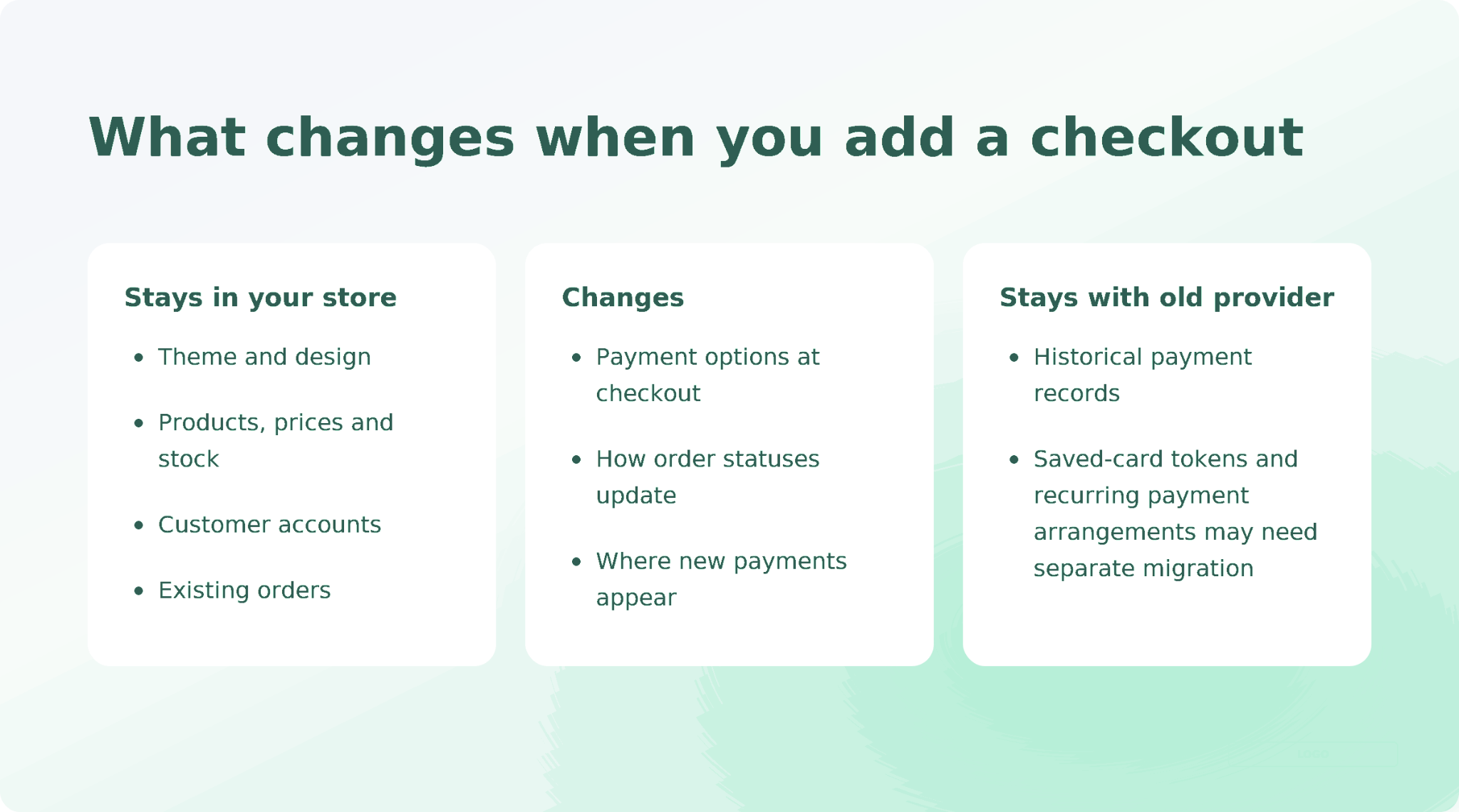
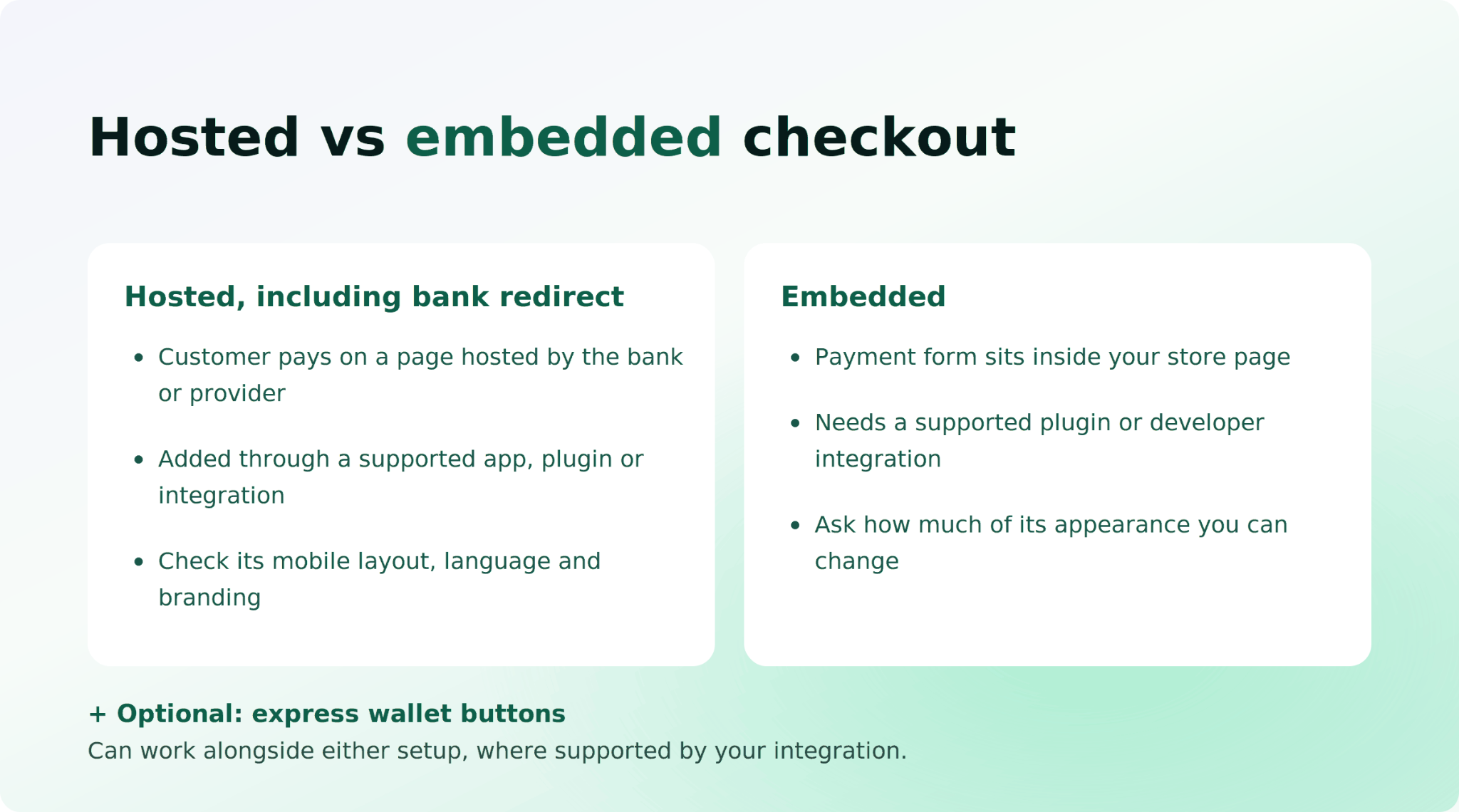
There are two common setups for the payment step:
Express wallet buttons can work alongside either setup. Where supported, Apple Pay and Google Pay let customers use their saved wallet details rather than type card information. Check where those buttons appear in your particular integration.
A redirect alone doesn't tell you whether a checkout is good. Try the actual page on mobile and check its language, payment options and branding.
Before comparing any prices, open each shortlisted provider's demo or sandbox checkout on your own phone. Two minutes of tapping tells you more about the customer experience than a feature list.
Why adding a checkout doesn't mean rebuilding your store
On every major e-commerce platform, payments are a module. WooCommerce calls them payment gateways, Shopify calls them payment providers, PrestaShop and OpenCart call them payment modules or extensions. Whatever the name, the payment step plugs into the store rather than being built into it.
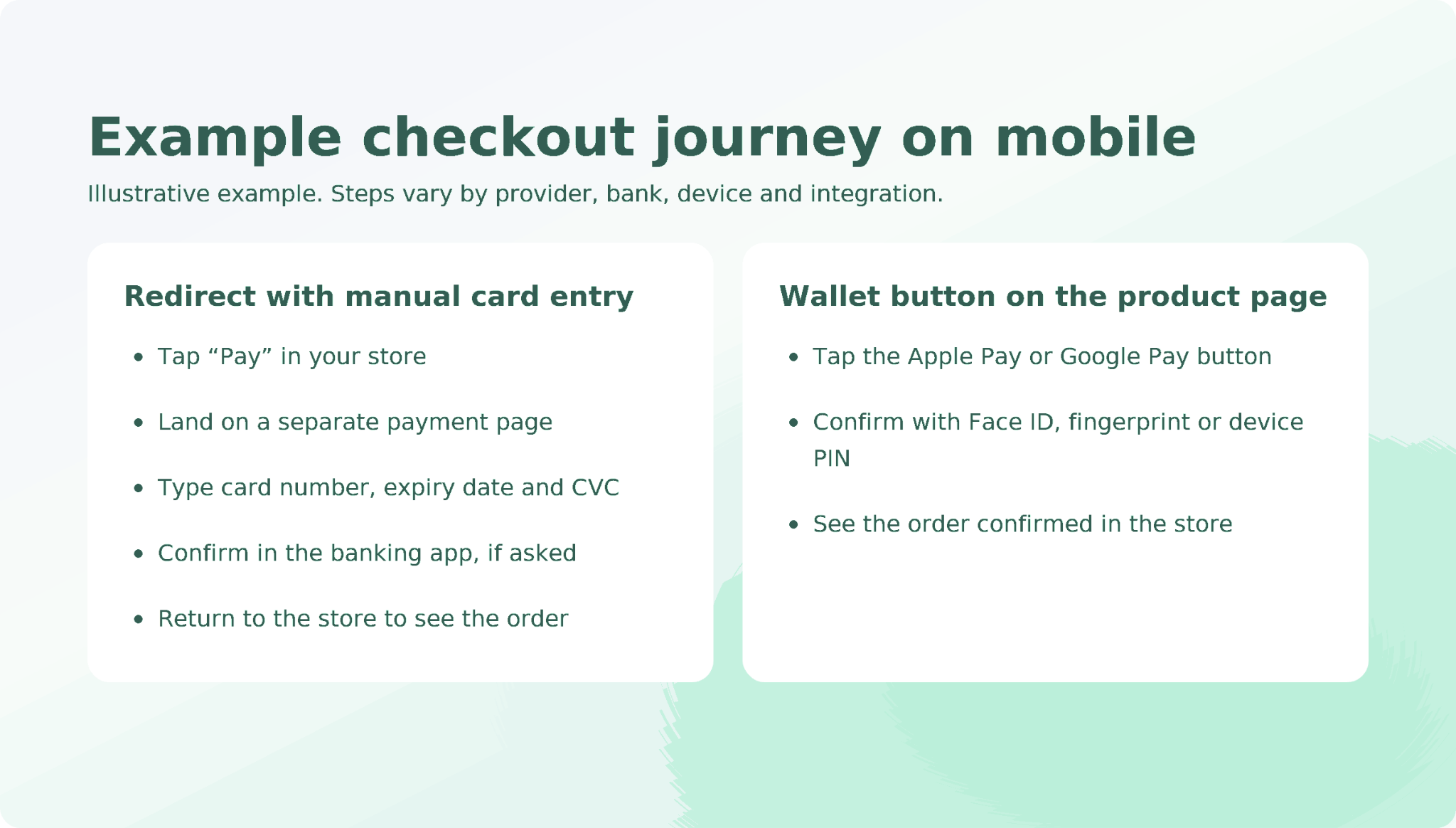
That's why the parts customers and your team rely on day to day don't change. Your theme, product pages, prices, stock, customer accounts and order history all stay inside your e-commerce platform.
You normally won't need to move your catalogue, redesign your store or recreate customer accounts. The work sits mainly in the payment integration and the way it updates your orders.
In practice, three things do change:
- The payment options at checkout. A new method appears in the list, or replaces an existing one.
- How order statuses update. The integration tells your store when a payment succeeds, fails or is refunded, so your store can update the order automatically.
- New payments appear in the new provider's dashboard. Your old payment records don't automatically follow them. Existing orders stay in your store, while historical payment details remain with the previous provider unless you arrange a separate migration.
For your business, this means an upgrade can run alongside your normal trading. Nobody needs to rebuild a product page, migrate a catalogue or ask customers to create new accounts.
How to choose the best payment gateway for online stores in Greece
Once you know only the payment layer is changing, the choice becomes a question of which payment provider fits your store. These five checks cover what decides whether the upgrade goes smoothly.
1. Support for the e-commerce platform you already use
Start with whether the payment provider works with your existing store and offers the checkout features you need on that platform. A familiar platform logo is only the starting point.
If you'll connect through a plugin, check who maintains it, when it was last updated and which features it supports. A plugin the provider updates alongside each platform release is a different thing from a community add-on that hasn't changed in two years.
For a custom store, check the API documentation and the development work involved.
2. The checkout experience you can offer customers
Look at what your customers will actually see. Does the provider offer hosted checkout, embedded checkout or both on your platform, and do express wallet buttons work in that integration? Open the checkout on a phone and check the layout, language and wallet options.
Then ask a second question that saves trouble later: can you start with hosted checkout and move to embedded without redoing your setup? Some providers let you switch with a setting. Others treat it as a new integration.
3. Support for the payment methods your customers use
Cards and wallets are the baseline, but the methods that matter most are the ones your customers already rely on.
If you already offer IRIS, check how you'll keep it available. AADE states that accepting instant account-to-account payments, such as IRIS, has been mandatory for B2C transactions since 1 December 2025. Before changing your setup, confirm whether the new provider supports the arrangement you need or whether you'll need a separate integration.
If your business is registered outside Greece, check which obligations apply to your business rather than assuming the same rules cover every seller serving Greek customers.
If customers use interest-free card instalments, put those on your checklist too. Ask whether the new setup supports the cards and instalment terms you currently offer. Don't remove a working option before you know what will replace it.
If you plan to keep IRIS or card instalments through your existing setup, confirm that your platform supports running that arrangement alongside the new provider before switching.
4. The total cost for your payment mix
A headline percentage rarely tells you what an order costs. Work it out on your own average basket, including any fixed fee per transaction, the higher rate for business cards and cards issued outside the EEA, chargeback fees, and any monthly or plugin charges.
Also check one cost that sits outside the provider. Some e-commerce platforms add their own transaction fee when you use a third-party payment provider. Look at your platform plan's terms and check whether that fee applies to the provider you're considering.
The full side-by-side of provider price lists, including Viva.com's, is covered in comparing Viva Wallet alternatives for Greek stores.
5. Payouts and getting ready to take payments
A few questions decide how the switch feels in your first month.
First, where does the money go, and when? Some payment providers pay straight into the business bank account you already use. Others hold funds in an account with them that you then transfer out yourself.
Neither is wrong, but the second adds a step to your reconciliation. Ask for the standard payout timing as a number of days, too, because it shapes your cash flow more than a small rate difference.
Second, how does onboarding work? Every provider checks your business before you take live payments, and how long that takes depends on where you're registered. If a sandbox (a test environment with fake card numbers) opens at signup, your integration work runs in parallel instead of waiting for approval.
Eligibility also depends on registration. Providers onboard businesses from specific countries. If you're registered outside Greece, confirm you can sign up from your country before comparing anything else.
Hosted or embedded checkout: which should you choose?
Choose hosted checkout if the supported integration gets you live with less development work. Customers leave your store to pay, so check the actual payment page before deciding: mobile layout, language, wallets and branding all matter.
Choose embedded checkout if keeping the payment form within your page matters and you can support the integration. Ask how much of its appearance you can change. "Embedded" doesn't necessarily mean you can style every detail.
With either option, check whether your platform supports the express wallet buttons you want.
Neither setup removes your PCI DSS responsibilities. Eligible hosted redirects and provider-hosted embedded forms can qualify for SAQ A, a shorter security self-assessment, but the implementation matters. Embedded forms also have an additional script-security eligibility condition. Ask your provider or acquiring bank which requirements apply to your setup
Some card payments ask customers to confirm their identity through their bank, for example in a banking app. Others authenticate in the background without an extra step. Before launch, test what happens when a customer completes, fails or cancels that confirmation.
How to test and switch on the new checkout without losing orders
Before you switch, check more than whether a payment goes through. A successful payment should also leave the right record in your store.
- Prepare a test setup. Back up your store and use a staging environment where available, with the provider's sandbox credentials.
- Test the customer journeys. Include a successful payment, a decline, completed and failed bank authentication, cancellation, a supported mobile wallet payment and a refund.
- Check the order after each test. Confirm that payment records and order statuses match. A paid order stuck on "pending" still needs fixing.
- Confirm approval for live payments. Sandbox access doesn't mean your merchant account is ready to accept real payments.
- Launch around your platform's limits. Run both gateways where supported. Where only one card provider is allowed, plan the cutover and have the previous configuration ready if you need to switch back.
- Monitor real orders. Check payments and order updates before treating the change as finished.
Check whether your platform lets you run both card gateways at once. If it does, you can keep the old option available while you check the new setup. Shopify, for example, allows only one active credit-card provider at a time, so you'll need to plan the switch instead.
Your existing orders and customer records don't move, because they live in your e-commerce platform, not with the payment provider. What does need attention is anything stored with the old provider: saved cards for returning customers, active subscriptions, and payment history you may need later for refunds or disputes.
Saved cards and subscriptions need a separate check. Ask both providers whether the tokens used for stored cards and recurring payments can be migrated. Installing the new integration won't transfer them automatically.
Before you close an old payment account, export its full transaction history and ask how refunds on past orders will be handled. A refund on an order taken through the old provider usually has to go back through that provider.
If you want a sense of what good looks like once you're live, the patterns in these checkout experiences worth learning from are a useful benchmark.
Adding Paypercut to your store
If you're weighing payment providers on those five checks, here is where we fit. Paypercut is an online payments platform, and you connect us to your store through a plugin or our API to get checkout and payment capabilities without rebuilding anything.
- Your platform. We offer ready-made integrations for WooCommerce, Shopify, PrestaShop, OpenCart and Magento. Check the installation steps and supported checkout options for your platform to see whether you’ll need developer help.
- Your checkout. You can choose hosted, embedded or express checkout. Before deciding, check with us which options your platform integration supports and where wallet buttons can appear.
- Getting ready. Verification is fully digital, and we open your dashboard and sandbox at signup, so you can install and test while we check your business.
- Pricing. Our published pricing is 1.29% + €0.10 on EEA consumer Visa and Mastercard, and 2.69% + €0.10 on EEA business and non-EEA Visa and Mastercard. There's no activation fee or monthly minimum.
- Payouts. We pay out directly to your existing business bank account, provided it meets the requirements for your settlement currency. Payments are processed and settled in the same currency. If you accept multiple currencies, additional payout accounts may be required.
- Where you're registered. Selling to Greek customers and being eligible for a merchant account are separate questions. If your business is registered outside Greece, check with us that we support your registration country before you start the integration.
If IRIS or interest-free instalments on Greek cards are part of your current checkout, talk to us about the supported arrangement before switching.
Not sure how it fits with IRIS or instalments in your current setup? Talk to our team →
Pricing checked October 2026. Rates vary by merchant country, customer location, business model and negotiated agreement.
Test the new checkout before you change anything live
Register online with fully digital onboarding and install the plugin in the sandbox while your verification goes through.
FAQs
Can I add a new payment gateway to my Greek online store without rebuilding it?
Yes. On WooCommerce, Shopify, PrestaShop, OpenCart and Magento, adding a gateway usually means setting up a supported app, plugin or payment integration. Your theme, products, customer accounts and existing orders stay in your platform. If you currently offer IRIS or card instalments, check how you'll keep them before changing your setup.
What should I check when choosing a payment gateway for a Greek online store?
Check five things: support for the e-commerce platform you already use, the checkout experience customers will get, support for the payment methods they use (including IRIS or card instalments if you offer them), the total cost for your payment mix, and payouts and onboarding. Also confirm the provider can onboard businesses registered in your country.
Should I choose a hosted checkout or an embedded checkout?
Choose hosted checkout if the supported integration gets you live with less development work, and check the actual payment page on mobile. Choose embedded checkout if keeping the payment form within your page matters and you can support the integration. How much you can style it, and whether express wallet buttons appear, depends on the integration.
How do I test a new checkout before going live?
Use a backup and staging environment where available, with the provider's sandbox credentials. Test successful and declined payments, completed and failed bank authentication, cancellation, a mobile wallet payment and a refund, and check each order status in your store. Then run both gateways where your platform supports it, or plan a cutover where it doesn't.
Will I lose existing orders or customer data if I switch payment gateways?
No, your orders and customer records stay in your e-commerce platform. Historical payment records stay with the previous provider unless you arrange a separate migration, so export them before closing the old account. Saved cards and subscriptions need their own check: ask both providers whether those tokens can be migrated, because a new integration won't transfer them.