
To accept card payments online in Bulgaria, your business needs an acquiring setup provided by a bank or payment platform. Some providers open a dedicated merchant account for your business, while others process payments through their infrastructure and settle the funds directly into your existing business bank account.
Online sales in Bulgaria are estimated at more than €2.69 billion in 2025, up 15% year-on-year, and the Bulgarian E-Commerce Association expects continued double-digit growth through 2026.
Since Bulgaria adopted the euro on 1 January 2026, local businesses now operate in euros, removing the need for BGN-to-EUR conversion and simplifying many domestic and euro-area transactions. Currency conversion may still apply when accepting or settling payments in other currencies.
This guide walks you through everything you need to know about opening a merchant account in Bulgaria, so you can get set up with confidence and start accepting payments without unnecessary delays.
Key takeaways
- The route you choose affects everything
Opening a merchant account through a bank takes longer and involves more paperwork. A payment service provider gets most businesses live within days, entirely online.
- Your documents need to be ready before you apply
Missing policies on your website or incomplete identity documents are the most common reasons applications get delayed. Sorting these out upfront saves significant back-and-forth.
- Banks and PSPs don't charge the same way, and the difference adds up
Banks often charge setup and monthly fees on top of transaction costs. With a PSP, you typically pay only for successful transactions, with no setup costs or lock-in.
- Higher-risk business types face stricter requirements
Some business models may require additional review depending on the products sold, fulfilment model, refund exposure, recurring-payment structure, and expected chargeback risk. Your provider may request additional documents before approving the account.
- Getting your payment setup right from day one saves you time later
Fully digital onboarding, no setup fees, and support for cards, wallets, and BNPL through a single integration. Paypercut is built for SMBs in CEE that want to go live quickly and accept payments across Europe.
What is a merchant account and how does it work?
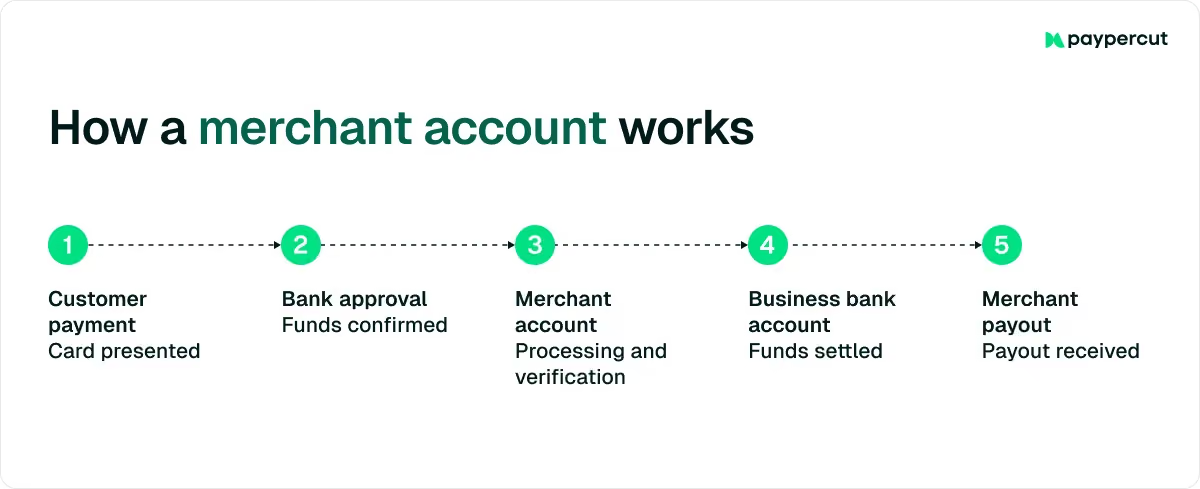
Unlike a regular business bank account, a merchant account does more than hold your money. It handles the transaction itself (authorization, processing, and settlement), getting the payment from your customer to you.
In practice, this means that when a customer pays by card, their bank checks that the funds are available and approves the transaction. The payment then passes through the card network and into your merchant account, where it's temporarily held before being transferred to your business bank account.
Who needs a merchant account in Bulgaria?
If you want to accept card payments online, you need a payment processing arrangement. With a platform like Paypercut, payouts go directly into your existing bank account, so there is no need to open a separate one. That covers most types of businesses, including:
- Online stores selling physical products and shipping to customers
- Service businesses taking deposits or full payments before work begins
- Hospitality and food businesses offering online reservations or pre-orders
- Health, beauty, and wellness studios accepting bookings and payments through their website
- Digital product sellers offering downloads, subscriptions, or online courses
It's worth noting that 45.7% of the Bulgarian ecommerce businesses surveyed reported online revenue growth in 2025, with more than half now highly dependent on digital channels as a primary revenue source.
If your business runs exclusively on cash or bank transfers, you may not need one right now. However, more and more shoppers in Bulgaria prefer to use online payment methods like cards and digital wallets, so without a merchant account, you can't complete those sales.
Two ways to open a merchant account in Bulgaria
The route you choose affects how quickly you can go live, how much paperwork is involved, and what payment methods you can offer.
1. Through a Bulgarian bank
Most banks require you to already hold a corporate account with them and go through an in-person application process.
This route tends to involve notarized documents and longer approval times, which can stretch to several weeks. It's a reasonable option if you already have a strong relationship with the bank or use it for other business purposes, such as credit facilities, payroll, or VAT payments.
2. Through a payment service provider (PSP)
With a payment service provider (PSP), the application is handled fully online, KYC verification is digital, and most businesses can go live within days.
The PSP connects your store to the card networks (Visa, Mastercard) and manages the flow of money between your customer's bank and yours. PSPs also tend to support a broader range of payment methods out of the box, all through one setup and without separate contracts for each method.
For most small and mid-sized businesses in Bulgaria, this is the faster and more practical route.
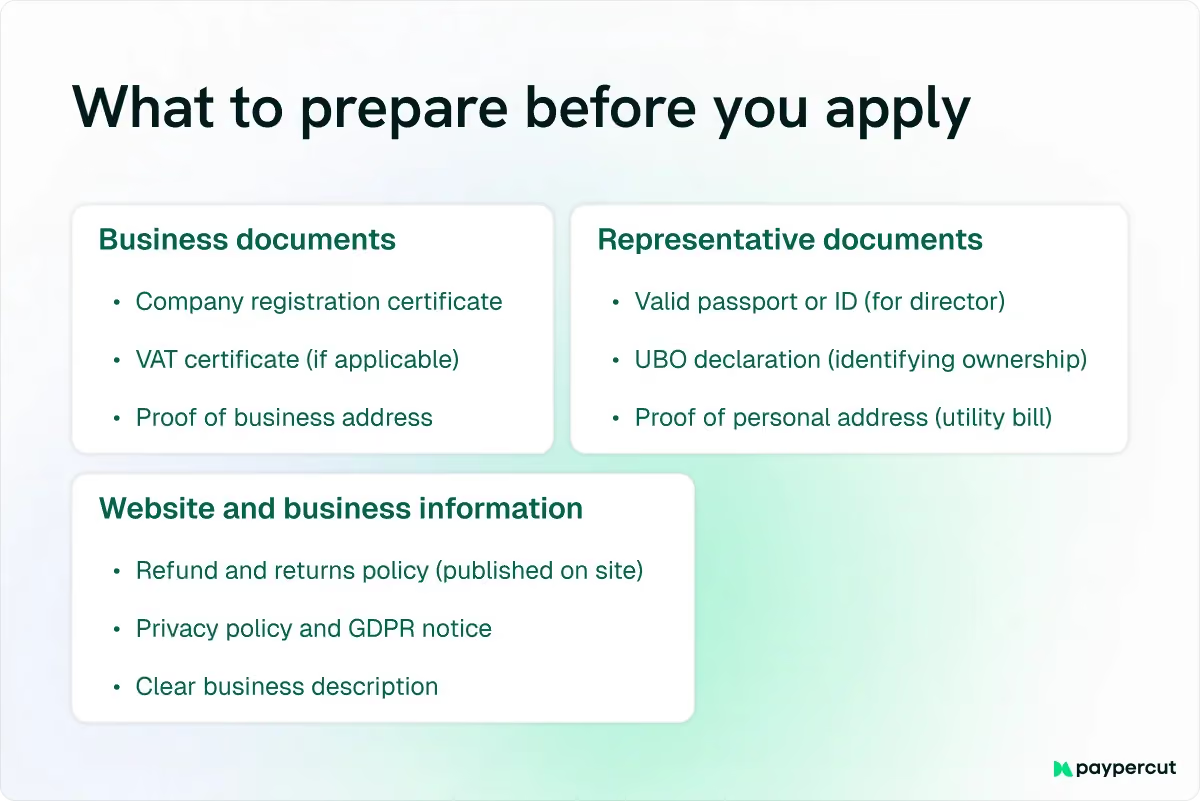
What documents do you need?
The exact list varies between banks and PSPs, but these are the standard requirements across most providers:
Business documents:
- Company registration certificate (Извлечение от Търговския регистър/UIC or EIK number)
- VAT registration certificate, if applicable
- Articles of Association or founding documents
- Proof of registered business address
- Bank account details for settlement payouts
Representative documents:
- Valid passport or national ID of the business owner or director
- Proof of address (utility bill or bank statement, typically not older than three months)
- UBO declaration identifying anyone who owns 25% or more of the business
Website and business information:
Before onboarding can be completed, an ecommerce website should clearly provide:
- The business's legal name, address, and contact information
- Clear descriptions and prices for products or services
- Terms and conditions of sale
- Delivery methods, costs, and estimated timelines
- Return, refund, and cancellation policies
- Information about the consumer's right of withdrawal, where applicable
- Privacy and cookie policies
- The transaction currency
- The payment methods accepted
- Any recurring-payment or subscription terms
This information should be easy to find before the customer completes the purchase.
Common reasons applications get rejected
Getting these right before you apply saves significant time, so make sure to check for:
- Incomplete or expired identity documents submitted by the business owner or director
- Missing refund policy or privacy policy on your website at the time of application
- Mismatch between your declared business activity and the actual products or services sold
- Unclear UBO information where ownership of at least 25% is not properly documented
How to open a merchant account in Bulgaria: A step-by-step guide
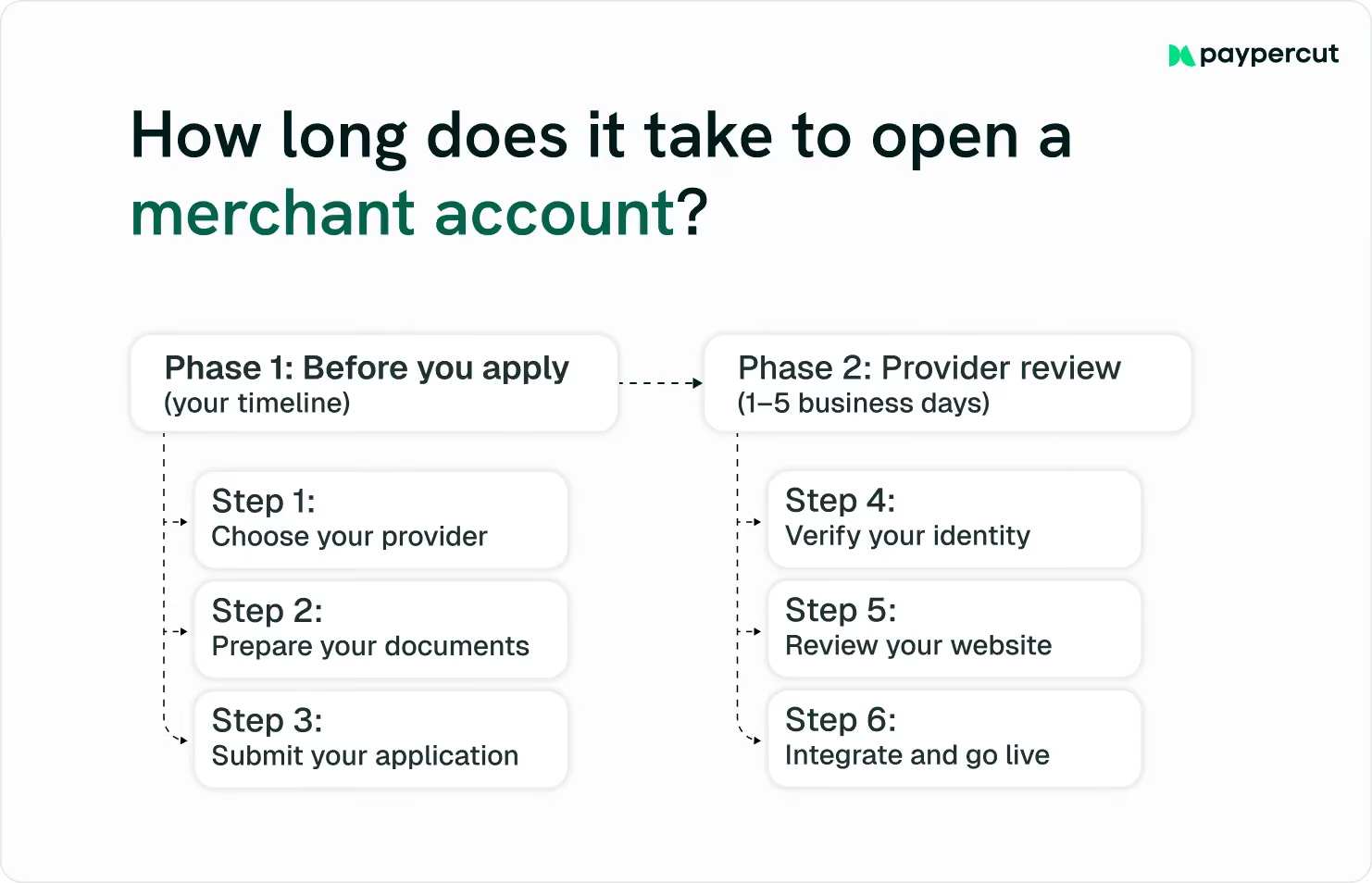
The steps below follow the PSP route, which is the most practical option for Bulgarian SMBs. If you go through a bank, the process is similar but will require in-person visits and may take longer.
Step 1: Choose your payment provider
Start by finding a provider that is already active in Bulgaria, supports EUR transactions, and covers the payment methods your customers actually use: cards, digital wallets, and ideally Buy Now, Pay Later (BNPL).
Also consider whether the provider can support other European markets if you plan to expand, and how much technical work the integration requires.
Some providers offer ready-made plugins for e-commerce platforms, like WooCommerce and Shopify, which means you can connect your store without any development work.
Step 2: Prepare your documents
Before you apply, gather your company registration certificate, ID documents, UBO information, and bank account details for payouts.
Your website also needs to be in order. Make sure your refund policy, privacy policy, and terms and conditions are clearly published before you submit your application. Missing or unclear website policies are common reasons for additional questions during onboarding.
Step 3: Prepare your checkout for card payments
Before going live, make sure customers can clearly understand how they will pay and what they are agreeing to. You should:
- Display accepted payment methods on the product page, cart or before the final payment step
- Use official Visa, Mastercard, Apple Pay and Google Pay acceptance marks where those options are available
- Do not recreate, distort or modify payment-brand logos
- Show the final amount, taxes, delivery fees and transaction currency before payment
- Make the return, refund and cancellation policies accessible from checkout
- Let customers review and correct their order before paying
- Use a clear payment button such as “Pay €49.00” rather than a vague label such as “Continue”
- Show wallet buttons only when the customer’s device and browser support them
- Provide clear validation messages when a card payment fails
When customers can see the available payment methods, final price and key policies upfront, they are more likely to feel confident, complete the purchase, and avoid abandoning the checkout because of unexpected information.
Step 4: Submit your application
Complete the provider's online onboarding form with your business details, document uploads, and a description of what you sell and your expected monthly volume.
If you're just starting out, give your best estimate. Providers use volume to assess risk, and if your actual volume is much higher than declared, it can trigger a review.
Step 5: Complete identity verification
Most PSPs use a digital KYC process where you verify your identity through your smartphone, typically by scanning your ID and completing a brief identity check. This usually takes just a few minutes.
Step 6: Website and risk review
The provider reviews your website and business model to check that they meet its onboarding, risk, acquiring, and card-scheme requirements. This review does not replace independent legal or compliance advice.
This step is usually quick for standard business types. However, if you operate in a higher-risk category, such as digital goods, supplements, or subscription services, you may be asked for additional documentation.
Step 7: Integrate and go live
Once approved, you receive your payment credentials and can connect your store using a plugin or API. Just run a few test transactions to confirm the payment flow works correctly.
Payouts settle directly into your existing business bank account, typically within a few business days of each transaction, so there is no need to open a separate account or change your current banking setup.
Costs and fees to expect
The fees you'll pay depend on whether you use a bank or a PSP and which payment methods you want to accept. Here are the main ones to be aware of:
- Transaction fees: A percentage of each completed payment, sometimes with a small fixed amount per transaction
- Setup or activation fees: A one-time charge some banks apply when opening the account
- Monthly or maintenance fees: A recurring charge for keeping the account active, common with banks
- Rolling reserve: Typically 5–10% of transactions, held for 90–180 days as a security buffer against chargebacks, more common for higher-risk businesses
- Currency conversion fees: Applicable when processing payments in currencies other than your settlement currency
With Paypercut’s payment platform, most of these don't apply. There are no setup fees, no monthly minimums, and no lock-in contracts. You only pay per successful transaction.
Start accepting online payments in Bulgaria with Paypercut
Getting set up with a merchant account doesn't have to be complicated. Paypercut is designed for small and mid-sized businesses across Central and Eastern Europe, with fully digital onboarding: apply online, verify your identity from your phone, and most businesses are live within days.
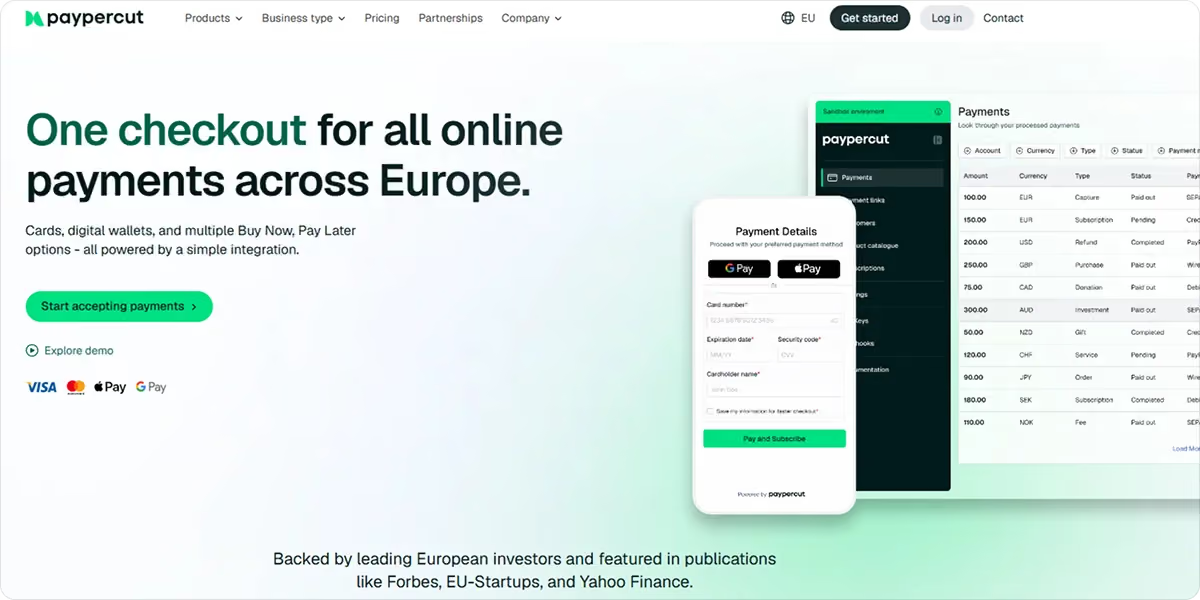
Through a single integration, you can accept:
- Debit and credit cards (Visa and Mastercard)
- Digital wallets including Apple Pay and Google Pay
- Buy Now, Pay Later (where available) through Paypercut's BNPL aggregator, the first of its kind in CEE
- Payment links and QR codes for taking payments without a full checkout
- Express Checkout for one-tap payments directly on the product page, no manual card entry required for customers using a supported Apple Pay or Google Pay wallet
Pricing is clear and pay-per-transaction: 1.29% + €0.10 for EEA consumer Visa/Mastercard cards, 2.69% + €0.10 for all other cards, and 5% per approved BNPL transaction.
Eligible new customers who complete onboarding and enter into Paypercut’s Merchant Terms by 31 July 2026 can receive a waiver of Paypercut transaction fees on their first €1,000 of processed volume. The fee-free allowance can be used within 12 months of account activation. Full promotional terms apply.
If you plan to sell beyond Bulgaria, the same setup works across multiple European markets, so you don't need to start from scratch each time you enter a new country.
Ready to get started?
Sign up for Paypercut and start accepting payments in Bulgaria today, or book a free call with the team to find the right setup for your business.
FAQ
Can a non-resident open a merchant account in Bulgaria?
Yes, though eligibility depends on several factors. Some payment providers can onboard companies registered in other EEA countries, but eligibility depends on the company's jurisdiction, ownership structure, business model, target markets, and the provider's licence coverage.
Non-resident owners may also be asked for additional identity or source-of-funds documents.
What is the VAT threshold for online sellers in Bulgaria?
Bulgaria's VAT registration rules and thresholds changed around the euro transition and depend on the type and location of supplies. Confirm the current national threshold and any applicable cross-border registration requirements with an accountant or the National Revenue Agency before registering.
Can I accept payments in multiple currencies through a Bulgarian merchant account?
Yes, though it depends on your provider. Paypercut supports multi-market payment flows and payouts in supported settlement currencies, depending on the merchant’s market and commercial setup. Banks typically offer a more limited range of currencies and may charge conversion fees for non-EUR transactions.
What should I do if my merchant account application is rejected?
Most providers will tell you what was missing or flagged, so the rejection reason is a good place to start. Common fixes include updating your website policies, clarifying your business description, or providing additional identity documentation. Once resolved, you can reapply with the same provider or try a different one.