
Did you know that about one-third of European small businesses still don’t accept credit or debit cards, missing out on a significant share of potential sales?
If you still don’t offer this payment method, that’s a lot of potential customers and revenue slipping through your fingers.
The good news is that getting set up to accept credit cards is far simpler than most people think, and with the right approach, you can start taking payments quickly and securely.
In this article, you’ll learn how to accept credit card payments and set your business up for faster, easier sales.
Основни изводи
- Accepting credit cards expands your customer base
As cash usage declines, taking card payments helps your business stay relevant, meet customer expectations, and capture more sales opportunities.
- Card payments boost revenue and efficiency
Customers tend to spend more when using credit cards, and digital payments improve cash flow with faster deposits and automated transaction tracking.
- Choose the right payment method for how you sell
Different tools fit different types of businesses. Use POS systems for in-store sales, online gateways for e-commerce, and mobile readers for on-the-go payments like markets or deliveries.
- Understanding fees and compliance is essential
Processing fees typically range from 1.5% to 3.5% per transaction. Look for transparent pricing, PCI DSS compliance, and no hidden costs to protect profits and security.
- Paypercut simplifies credit card payments for growing businesses
Designed for small and mid-sized businesses in Central and Eastern Europe, Paypercut offers fast onboarding, local settlements, BNPL options, and all major payment methods in one easy platform.
Credit Card payment methods
Modern businesses can accept credit card payments in several ways. The best method (or combination of methods) for you depends on how and where you interact with customers.
1. In-Person payments (Point of Sale)
If you run a physical store or offer face-to-face services, you’ll likely need a card reader or point-of-sale (POS) system at checkout. These systems can range from simple countertop terminals to full setups with cash registers and inventory tracking.
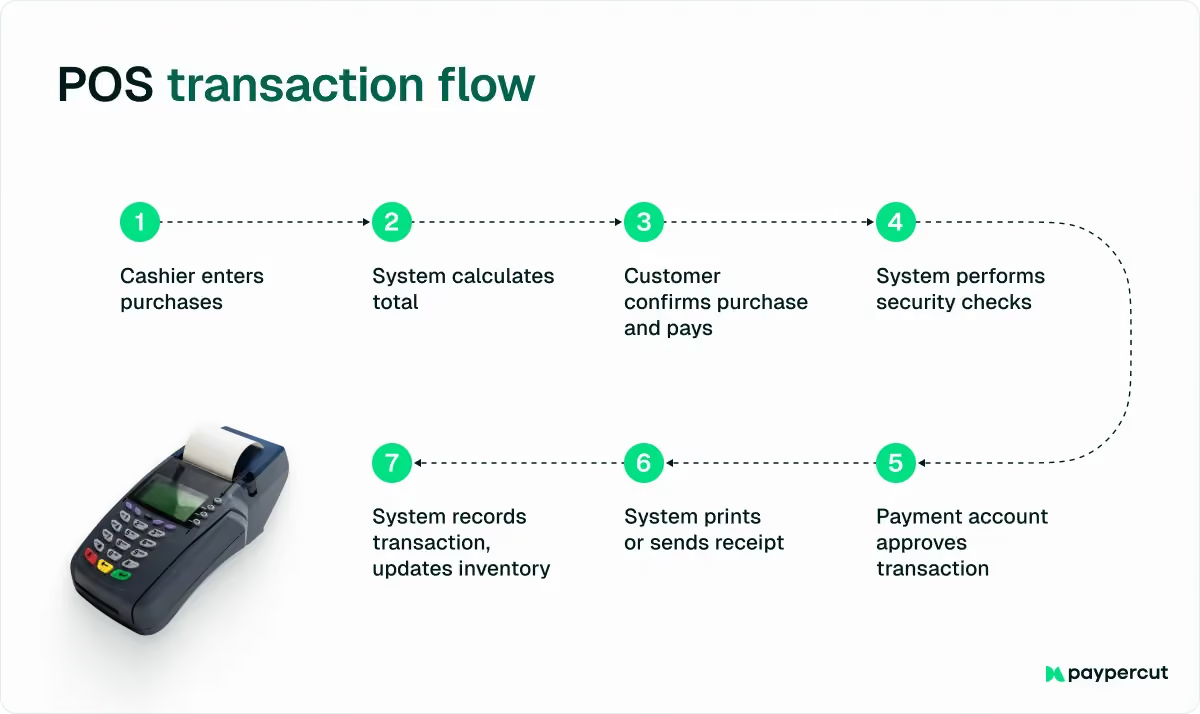
Key considerations:
- Support all payment types: Choose hardware that accepts swipe, chip (EMV), and tap/contactless cards so you never have to turn a customer away.
- Prioritize reliability: A hard-wired internet connection is usually the most stable option, especially for high-volume businesses.
- Match your traffic: You can install one or multiple terminals, depending on how many customers you serve.
2. Online Payments (E-Commerce)
If you sell products or services through a website or mobile app, you’ll need an online payment gateway or processor integration to handle digital transactions.
This could be an e-commerce platform with built-in payment features, or a separate gateway service that provides a secure checkout page on your site.
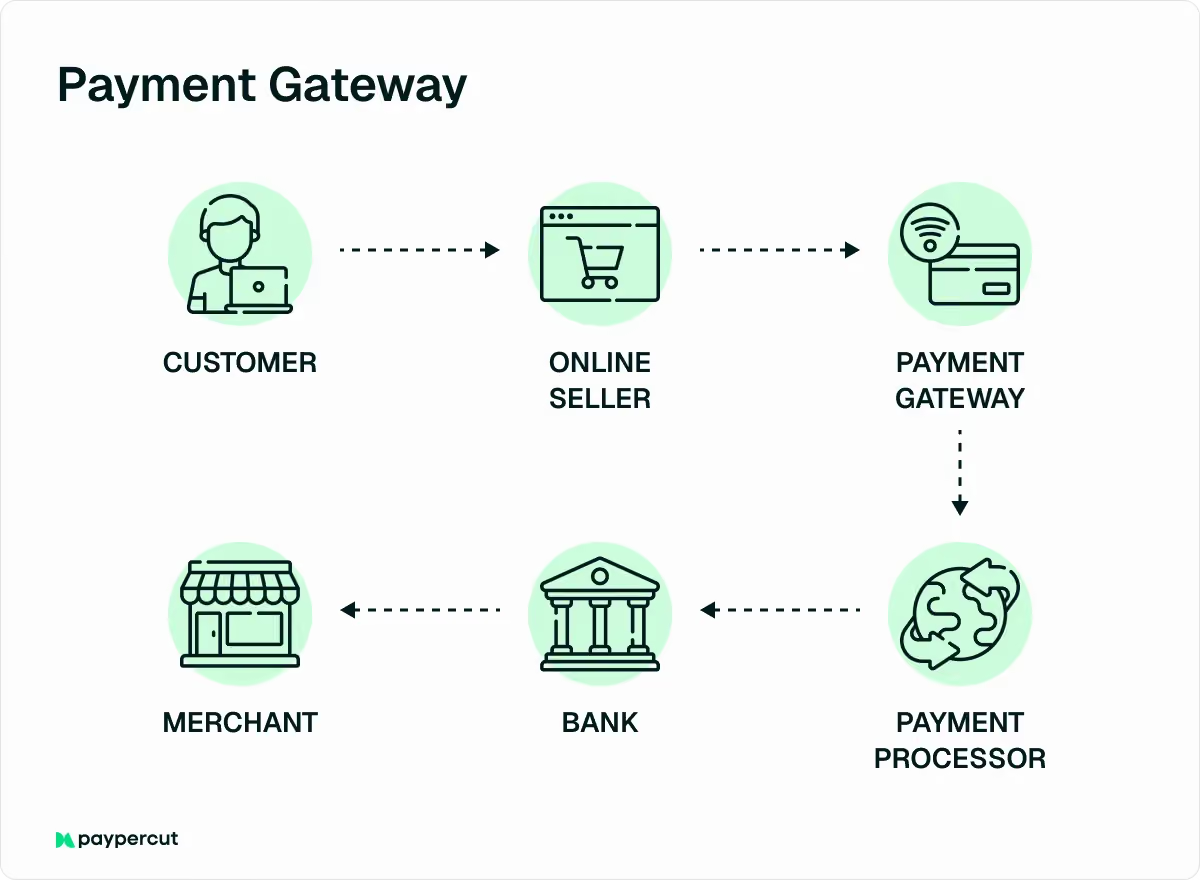
Customers simply enter their card and billing information on your website or app to complete the purchase.
3. Mobile Payments (Smartphone/Tablet)
For businesses on the move, such as food trucks, market vendors, contractors, or retail stores that want to speed up checkout lines, mobile credit card readers are an excellent option.
A mobile reader is a compact device that connects to your smartphone or tablet, either by plugging in directly or via Bluetooth.
With a mobile point-of-sale (POS) app, you can swipe, dip, or tap cards and process transactions anywhere you have a cell or Wi-Fi signal.
📌 Note – Be sure your reader supports all the payment types you need. Some basic models may only allow swiped transactions, while others handle chip and contactless payments.
Step-by-step guide: How to set up Credit Card payments for your business
Now that you understand the main ways to accept credit card payments and the benefits they bring, let’s walk through how to get your business set up.
Step 1: Evaluate your business needs
Start by determining how you want to accept payments and what kind of volume you expect. Ask yourself:
- Will you need an in-person terminal, an online checkout, mobile payments, or all three?
- What’s your average transaction amount and monthly sales volume?
These answers will help you choose the right payment processor. For example, if you’re a new or low-volume business, focus on simplicity and low upfront costs. If you’re processing a lot of transactions, prioritize lower transaction fees.
Step 2: Research and choose a payment processor
Your payment processor (also called a merchant service provider) is the company that handles your credit card transactions, moving money securely from your customer’s card to your business account.
Choosing the right one is a big deal, as you’re trusting them with your cash flow.
Here’s what to look for when comparing options:
- Fees: Review processing rates, plus any monthly or annual fees.
- Contracts: Check for long-term commitments or cancellation penalties.
- Payment types: Make sure they support the payment methods you need.
- Reputation and reliability: Read reviews to ensure they have solid customer support.
Step 3: Set up a merchant account or service account
There are two main ways to start accepting credit card payments, and the right one depends on the type of payment processor you choose.
Option 1: Traditional merchant account
This is a special type of bank account that temporarily holds funds from your credit card sales before transferring them to your business bank account.
- You’ll apply for this through your payment processor or bank.
- The application typically requests business details, including your EIN, business type, and estimated sales volume.
- Most approvals happen within a day or two, especially with online applications.
Option 2: Payment Service Provider (PSP)
If you’re using an all-in-one service like Paypercut or Stripe, you don’t need a separate merchant account.
You simply sign up on their platform, and they handle everything related to payment processing. The provider processes customer transactions, holds the funds securely, and then deposits them directly into your business bank account.
Step 4: Obtain and set up your card processing equipment or software
As we mentioned earlier, each payment method comes with its own set of tools. Your processor will guide you through selecting the right hardware or software, such as a card terminal, mobile reader, or online gateway.
Most modern systems are easy to install and use. Just follow your provider’s setup instructions, test a few transactions, and you’ll be ready to accept payments securely.
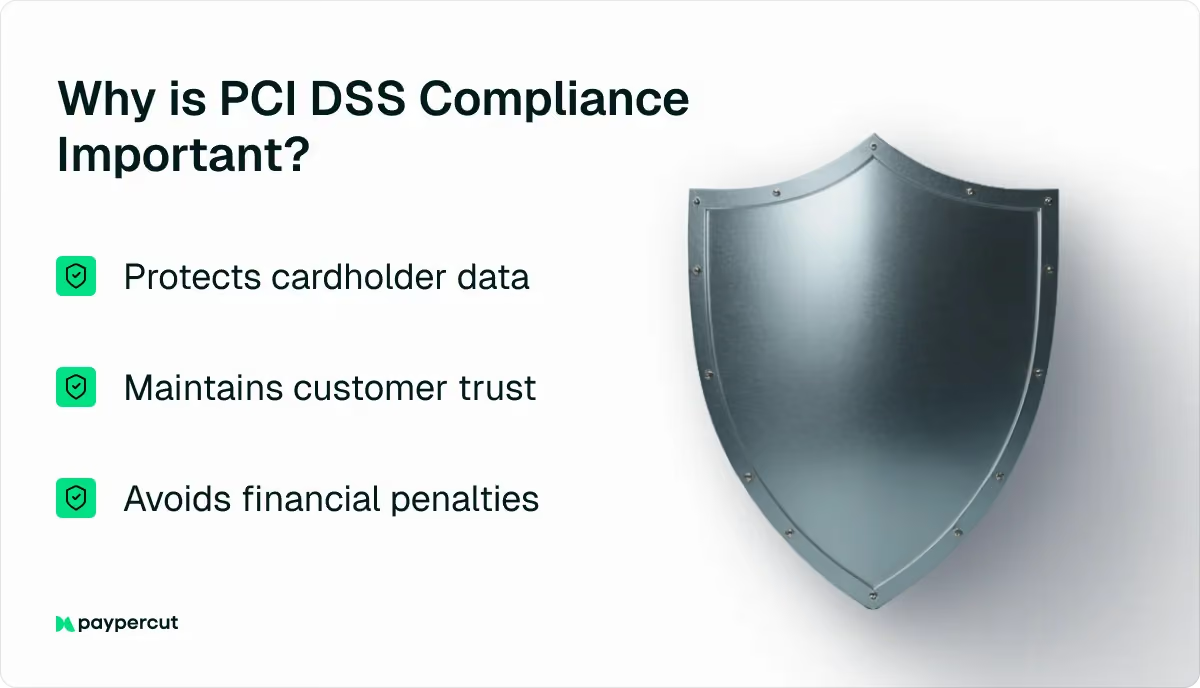
Step 5: Ensure security compliance
Before you start processing payments, make sure your system is secure and compliant with industry standards.
The main requirement is PCI DSS compliance – a set of rules designed to keep credit card data safe. Most payment processors will guide you through this step, which might include:
- Completing a PCI self-assessment questionnaire
- Confirming that your equipment and software are PCI-certified
In addition to PCI compliance:
- Set clear internal policies for who can access your payment systems.
- Be careful with customer information and never store sensitive card data yourself. Your processor’s system should handle all encryption and secure storage.
- Keep your equipment and software up to date to maintain security (e.g., use EMV chip readers and encrypted connections).
Credit card processing fees
While taking cards can boost sales and make life easier for customers, it does come with some fees. Here’s a breakdown of the most common fees:
Transaction fees (percentage + fixed fee)
Every time you accept a credit card payment, you’ll pay a processing fee. This fee usually includes a percentage of the sale plus a small flat amount per transaction.
Processing fees typically range from 0.5% to 1.5% per transaction, depending on a few factors:
- Card type: Premium or rewards cards usually cost more to process.
- Processing method: In-person, swiped transactions tend to have lower fees than keyed-in or online payments because there’s less fraud risk.
- Processor agreement: Your specific contract and pricing model also affect your rate.
In addition to the percentage, most processors charge a flat fee – often between €0.10 and €0.30 per transaction.
Pricing models
Different processors use different pricing structures. The main models you’ll encounter are:
- Flat-rate pricing: You pay the same rate for every transaction, usually a fixed percentage plus a small fixed fee. It’s simple and predictable, making it great for smaller businesses, though the rate is often a bit higher than other models.
- Interchange-plus pricing: You pay the actual interchange fee (set by Visa or Mastercard) plus a small markup from your processor. This model is transparent and can be cost-effective for higher-volume businesses, though it’s slightly more complex to read on statements.
- Tiered pricing: Transactions are grouped into tiers like Qualified, Mid-Qualified, and Non-Qualified, each with different rates. It’s less transparent and often ends up costing more overall, so many small businesses prefer flat or interchange-plus pricing.
Other fees that may apply:
- Monthly service fee – Some providers charge a flat monthly fee, often €3.50 to €25, for maintaining your account or offering customer support. Many flat-rate processors advertise “no monthly fee,” so always confirm before signing up.
- Payment gateway fee – If you accept online payments, you may pay a separate fee for the secure network that transmits payment data. Many modern European providers now bundle this service into their standard processing rates, eliminating separate gateway charges altogether.
- PCI compliance fee – Processors may charge an annual or monthly fee (often €5-€20/month) to help you maintain required payment security standards. Others impose a “non-compliance” penalty if you don’t complete the required steps, so it’s important to ask how they handle PCI compliance.
- Setup or activation fee – Most providers waive this fee to stay competitive, but it’s always worth asking.
- Transaction-specific fees – You may be charged small fees for refunds (around €0.25-€0.50) and chargebacks (often €10-€25 per dispute). Good recordkeeping and customer service can help minimize these extra costs.
Benefits of accepting credit cards
For most small and mid-sized businesses, adding credit card payments is an important step toward growth and customer satisfaction. Here are some of the key benefits:
- Access to more customers – Cash usage is declining rapidly. Between 2019 and 2024, the share of cash used at physical point-of-sale locations fell from 72% to 52% in terms of volume.
Accepting credit cards helps you keep pace with this shift, meeting customer expectations and capturing more sales.
- Higher sales and larger purchases – Studies show that accepting credit cards can significantly increase revenue, as customers tend to spend more when paying with cards rather than being limited by the cash they have on hand.
- Improved cash flow and efficiency – Accepting card payments deposits funds directly into your bank account within a day or two, improving cash flow compared to waiting on cash or check deposits.
It also streamlines accounting and operations through automatic transaction tracking, easier reporting, and less manual cash handling.
- Enhanced professionalism and customer experience – Accepting credit and debit cards enhances your business’s credibility and gives customers confidence in your professionalism.
It also creates a smoother, more convenient payment experience that keeps customers satisfied.
How to choose the right payment partner
Once you understand how to accept credit card payments and what’s involved in setting them up, the next step is choosing the right partner to process them.
Your payment processor plays a crucial role in how fast you get paid, what fees you pay, and how smooth your customer’s checkout experience will be.
When choosing a provider, you should look for one that offers:
- Transparent and predictable pricing – Clear fees with no hidden charges or complex contracts.
- Fast and reliable payouts – Quick transfers to your business account to keep your cash flow steady.
- Security and compliance – PCI DSS–compliant systems and fraud protection to safeguard sensitive data.
- Flexible integration options – Easy setup, whether you’re selling in person, online, or both.
- Local support and settlement – The ability to accept payments and settle funds in your local currency.
- Room to grow – Support for modern payment methods like digital wallets and Buy Now, Pay Later (BNPL).
Still, not every payment processor truly understands local business needs, and that’s exactly where Paypercut makes a difference.
Designed specifically for small and growing businesses in Central and Eastern Europe, Paypercut combines card payments, digital wallets, and Buy Now, Pay Later (BNPL) in one simple platform.
It removes the usual barriers to online payments by offering local settlements, flexible integration options, and transparent, pay-as-you-go pricing.
Here’s what makes Paypercut stand out:
- Fast, simple onboarding – Get started in minutes with no lock-in contracts or lengthy approval processes, with competitive pricing (1.29% + 0.05 eur per transaction)
- All-in-one payment platform – Accept Visa, Mastercard, Apple Pay, Google Pay, and even Buy Now, Pay Later (BNPL) through a single integration.
- Localised experience – Enjoy settlements in your local currency (BGN, RON, HUF, PLN, CZK, EUR, and more) and access payment methods that fit your market.
- Гъвкави възможности за интеграция – Използвайте готови плъгини за WooCommerce, OpenCart или Shopify, вградете системата за плащане на Paypercut директно във вашия уебсайт или приемайте бързи плащания чрез платежни линкове и QR кодове.
- BNPL aggregator – As the first BNPL aggregator in Central and Eastern Europe, Paypercut lets you connect to multiple BNPL providers through one integration, boosting sales without added complexity.
- Recurring and subscription payments – Automate billing for memberships or repeat services to save time and keep revenue flowing.
- Clear merchant dashboard – Track payments, payouts, and performance in real time for full transparency.
Ready to start accepting card payments the easy way?
Get started with Paypercut today and bring secure, modern payment options to your customers!