
Many e-commerce merchants lose sales not because their product falls short or their price is too high, but because their checkout payments aren't set up for the customers they're actually selling to.
The Baymard Institute found that shoppers abandon over 70% of e-commerce carts before completing a purchase. Most of that drop-off comes down to payment-specific problems: missing payment methods, failed transactions, and payment experiences that don't meet customer expectations.
To help you fix the right aspects first, we break down the four decisions that actually matter when you optimize e-commerce checkout payments in 2026.
Key takeaways
- Most checkout payment problems are payment-specific
Abandoned carts often point to missing payment options, failed transactions, or broken 3D Secure flows rather than poor UX. Knowing the difference determines what you fix first.
- CEE is not one market
What works in Poland e-commerce won't automatically work in Romania or Hungary. Payment methods, BNPL providers, and customer expectations differ between countries enough to warrant a separate setup for each.
- Your checkout type is a business decision, not a technical one
Hosted, embedded, and plugin checkouts suit different store sizes and growth stages. Picking the wrong one early means revisiting a decision that should have been made once and made well.
- Most mobile shoppers drop off at the payment step, not before it
Card entry forms, 3D Secure redirects, and slow-loading payment pages are the real culprits on mobile.
- Managing payments across CEE markets doesn't have to mean managing multiple integrations
Paypercut connects merchants to local payment methods, multiple BNPL providers, and flexible checkout options through one setup, so expanding into a new market doesn't mean rebuilding from scratch.
What optimizing e-commerce checkout payments actually means
Optimizing e-commerce checkout payments means identifying and fixing the specific points in your store's payment flow where customers stop and leave.
Here's what that looks like in practice: A customer finds your product, adds it to the cart, and reaches checkout. Then one of the following happens:
- They look for their preferred payment method and don't see it.
- They try to pay, and the transaction fails.
- The checkout opens on an unfamiliar page with no recognizable payment logos, so they decide not to risk it.
In all three cases, the sale is gone, and most online sellers never find out exactly why.
This is different from general checkout optimization, which covers areas like form fields, page speed, and guest checkout. The focus here is specifically on the payment layer: which payment methods you offer, how you present them, how you handle failures, and whether your setup matches what customers in each market actually expect.
For e-commerce stores in CEE, this last point is especially important. Payment preferences vary significantly between countries, and getting the payment setup right for each market is a direct revenue decision.
Why shoppers abandon at the payment step
Research shows that the average e-commerce site has 39 addressable checkout issues, and fixing them can increase checkout conversion by up to 35%.
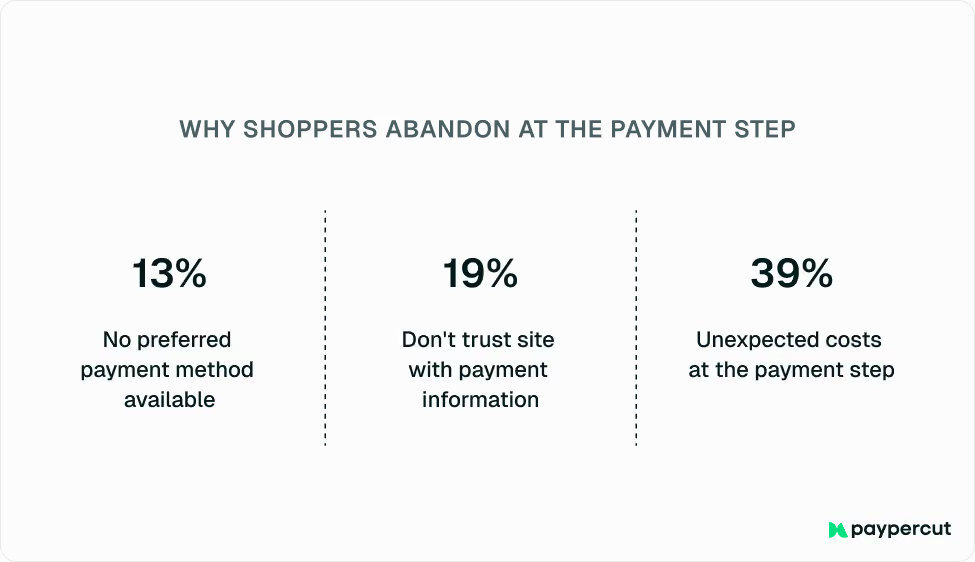
For e-commerce merchants, a good share of those issues comes down to payments specifically:
- 13% of shoppers abandon because their preferred payment method isn't available.
- 19% leave because they don't trust the site with their payment information.
- 39% abandon when unexpected costs appear at the payment step.
Payment failures are a separate and often invisible problem on top of this. Card declines, failed 3D Secure authentication, and high-risk blocks can make you lose customers who were ready to pay.
These don't show up separately in standard analytics, so the problem stays hidden until someone looks for it specifically.
A payment success rate above 95% is the benchmark for a healthy e-commerce checkout. Below that, revenue walks out the door with every declined transaction.
What is a good checkout conversion rate?
There is no single benchmark because conversion rates vary by industry, product category, device type, and market.
Most merchants track three related metrics:
- Checkout completion rate: The percentage of customers who start checkout and complete a purchase
- Cart abandonment rate: The percentage of customers who add products to their cart but do not complete the purchase
- Payment success rate: The percentage of attempted transactions that are successfully approved
Even small improvements in checkout conversion can have a meaningful impact on revenue because customers who reach checkout already show strong purchase intent.
How to get your e-commerce checkout payments right
Most checkout payment problems are solvable. But the fix depends on your platform, your store's setup, and the markets you operate in.
These are the four decisions that determine whether your checkout payments actually work:
1. Find where your checkout payments are losing customers
The starting point is separating payment-specific drop-off from general abandonment. Most analytics tools show you where customers leave, but not why.
Here's how to read the data correctly:
- Check your funnel step by step: Drop-off before checkout usually points to pricing transparency or account creation issues. Drop-off at the payment step is the number to watch before making any changes elsewhere.
- Pull your payment provider data: Your checkout analytics won't show you declined transaction rates or failed authentication attempts, but your payment provider dashboard will. Check which payment methods customers are selecting and abandoning most often.
- Compare the abandonment rate against the payment success rate: High abandonment is easy to misread. Most stores assume the checkout page needs work: simpler forms, fewer steps, better layout. But if your payment success rate is also low, the problem isn't the page. Customers are getting to payment and dropping off because a transaction failed or their preferred method wasn't there, and redesigning the checkout won't solve that.
- Look for patterns by market: If you sell across multiple CEE countries, check whether abandonment spikes in specific markets. If it does, look into which payment methods customers in that market are selecting and dropping off.
2. Choose the right checkout type for your store
The checkout type you use determines how payments are presented to your customers. Most e-commerce retailers make this decision once, at setup, without revisiting it as the business grows.
There are three main options. The right one depends on your store's size, technical resources, and where you are in your growth:
Before you decide, consider the following:
- You don't need to commit to one type permanently. Starting with hosted checkout and switching to embedded later doesn't require rebuilding your payment setup.
- If you sell across multiple CEE markets, make sure your provider automatically supports local payment methods and currencies across all three checkout types.
- The checkout type can affect how BNPL options are presented at the payment step. Check with your provider how BNPL integrates across each checkout type before deciding.
3. Match your payment mix to your market
Offering multiple payment methods is not enough if they're the wrong ones for your market. Most checkout guides stop at "add local payment methods." In CEE, that advice is too vague to act on.
Payment preferences across CEE vary significantly between countries, and a checkout that converts well in one market can underperform in another:
Besides the availability methods, you should also pay attention to approval rates. A customer who selects BNPL at checkout and gets rejected by a single provider will often abandon the purchase entirely rather than switch to a card. Store operators rarely see this in their data—it just registers as another lost sale.
Connecting to multiple BNPL providers through one integration means rejected customers receive offers from others in real time. That's the difference between a lost sale and a recovered one.
4. Build a checkout that actually works on mobile
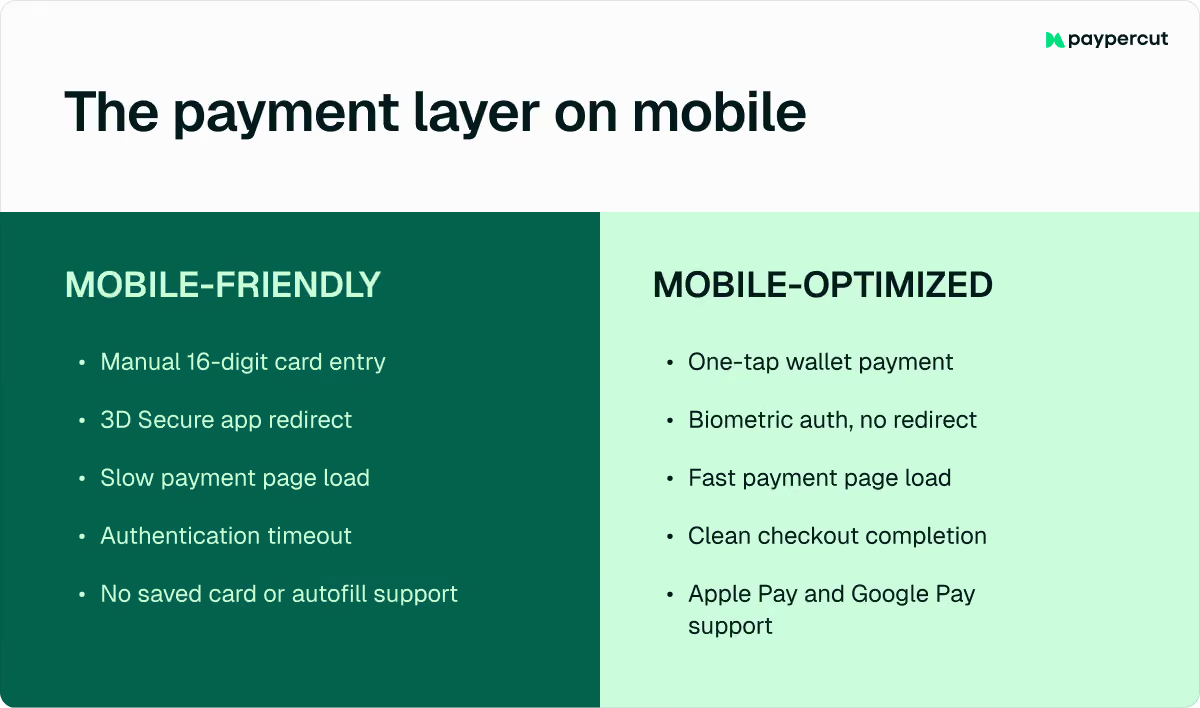
Mobile-friendly is not the same as mobile-optimized. For a checkout to be mobile-friendly, it just needs to load successfully on a phone and be readable on a smaller screen. Mobile-optimized, on the other hand, means customers can actually complete a payment with no significant issues that would make them want to switch to a desktop version. E-commerce stores that ignore the difference lose sales at the final step.
In CEE, 60–70% of e-commerce traffic comes from mobile devices. But mobile checkout abandonment is around 80% globally, significantly higher than on desktop. This is because the majority of checkouts were designed for desktop and adapted for mobile as an afterthought.
At the payment layer, the issue comes down to three things:
- Digital wallets vs. manual card entry: Apple Pay and Google Pay reduce payment to one tap. They manage 53% of global e-commerce transactions, yet many mobile checkouts still default to a card form that asks customers to type 16 digits on a small screen.
- 3D Secure on mobile: OTPs expire before customers find them. Banking app redirects don't always return cleanly to checkout. Authentication timeouts cut off transactions that were seconds away from completing.
- Payment page load speed: Every third-party script on your checkout page adds load time. On a variable mobile connection, a slow payment page loses customers faster than anything else in the flow.
A practical check: Open your own checkout payment flow on a mid-range Android device on a mobile connection, not in a browser emulator. What developers see in testing rarely matches what customers experience on a real device.
E-commerce checkout payment optimization checklist
Before changing your checkout design, review the payment layer first:
- Audit your payment success rate
- Review payment methods by market
- Test your checkout on a real mobile device
- Verify that 3D Secure works smoothly on mobile
- Measure checkout abandonment by payment method
This helps you separate general checkout friction from payment-specific issues, so you can fix the problems that are actually costing you completed orders.
How Paypercut helps e-commerce merchants optimize checkout payments
Selling across multiple CEE markets often means dealing with different payment methods, currencies, providers, and customer expectations in each country. There are different integrations for different markets, separate BNPL providers per country, and no single view of what's happening across all of them.
Paypercut is built to remove this complexity. One integration gives you access to the checkout types, payment methods, and BNPL providers that actually match your markets, without rebuilding your setup every time you expand.
This includes:
- Hosted checkout, embedded checkout, and free plugins for WooCommerce, Shopify, OpenCart, PrestaShop, Magento, and MerchantPro, all supported from a single account
- Local payment methods and currencies are applied automatically per market, so your checkout reflects what customers in each country expect
- Multiple BNPL providers through one integration. If a customer is rejected by one provider, they automatically see alternative offers without leaving the checkout
Payouts go directly to your existing bank account. There are no setup fees or lock-in contracts, and onboarding is fully digital.
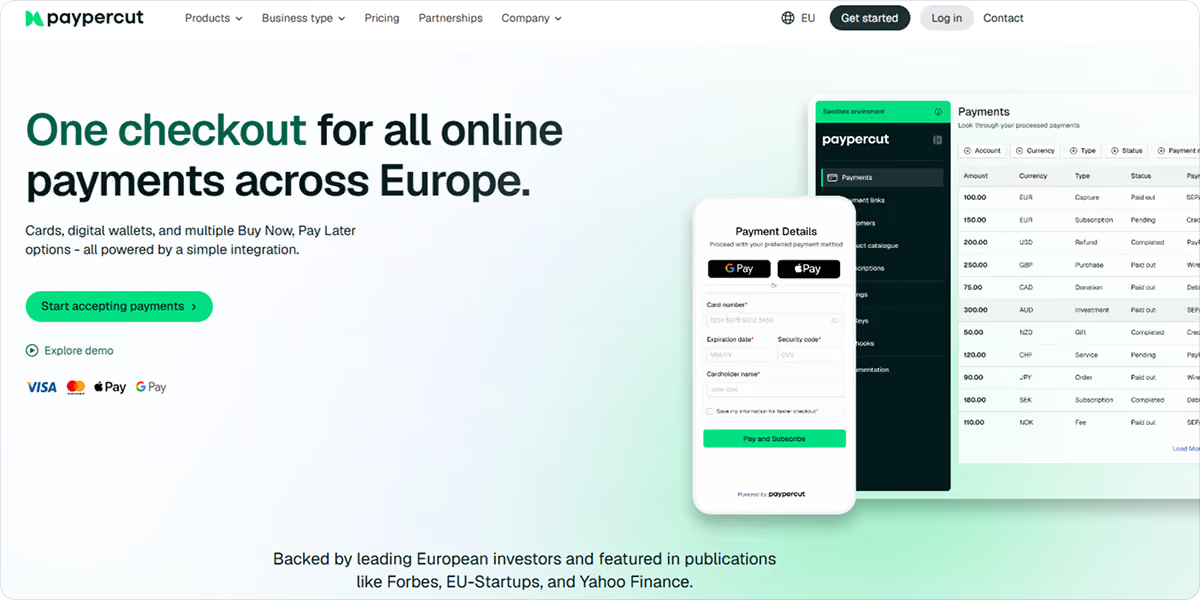
Get started with Paypercut to find the right payment setup for your store, or book a 30-minute consultation with the team for tailored guidance.
FAQ
What payment methods should an e-commerce store offer?
The right mix depends on the market. Most stores should support cards, digital wallets such as Apple Pay and Google Pay, and relevant local payment methods. In some markets, BNPL can also improve checkout conversion by giving customers more flexibility at the point of purchase.
How often should you review your checkout payment setup?
At a minimum, you should review your setup any time you enter a new market or a major payment provider in your region updates its offering. Payment preferences change, new local methods gain adoption, and a setup that worked last year may need to be adjusted to stay competitive.
Can I offer BNPL without switching my entire payment provider?
Yes. Paypercut's BNPL aggregator works as a standalone product, so you can add multiple BNPL providers to your existing checkout through one integration without replacing your current payment setup.
What is PSD2, and how does it affect e-commerce checkout payments?
PSD2 is an EU regulation that requires strong customer authentication for online card payments. For e-commerce retailers, this means most transactions trigger a 3D Secure check.
On mobile, poorly implemented 3D Secure flows (expired OTPs, banking app redirects that don't return cleanly) are among the most common causes of payment drop-off, which online retailers don't track separately from general abandonment.