
Checkout drop-off happens when a shopper starts the checkout process but leaves before completing the purchase.
This happens in roughly 69% to 70% of cases, making checkout abandonment one of the biggest challenges in e-commerce.
Even more challenging is the fact that this number has barely changed for years despite improvements in e-commerce technology and user experience.
However, that doesn’t mean merchants should accept checkout abandonment as an unavoidable part of selling online.
Research suggests that at least €227 billion out of the €4 trillion lost to checkout abandonment globally could be recovered if businesses improve their checkout experience and address common friction points.
With this in mind, this guide examines how to reduce conversion drop-off in checkout by looking at where customers leave during the checkout process and what merchants can do to remove the obstacles that prevent shoppers from completing their purchases.
Key takeaways
- Checkout abandonment usually happens at specific points in the buying process
Most drop-offs occur when checkout begins, while customers fill out forms, or during payment. Understanding these stages helps merchants identify where customers encounter obstacles and improve those moments. - Transparent pricing prevents many abandoned checkouts
Unexpected costs like shipping or taxes are one of the biggest reasons shoppers leave. Showing the full price early and avoiding hidden fees helps build trust and keeps customers moving through checkout. - A simple checkout experience significantly increases completion rates
Long forms, forced account creation, and too many steps can discourage buyers. Shorter checkout flows, guest checkout, autofill, and faster page loading make it easier for customers to finish their purchase. - Flexible payment options and mobile optimization are essential
Many shoppers abandon checkout if they can’t pay the way they prefer or if the experience is frustrating on mobile. Supporting cards, digital wallets, local payment methods, and BNPL while ensuring a mobile-friendly checkout can improve conversions. - The right payment infrastructure can recover more completed sales
Even well-designed checkouts fail if payments are unreliable or limited. A platform like Paypercut helps merchants offer multiple payment methods, embed checkout directly into their site, improve security, and manage payments in one place, making it easier for customers to complete their purchase.
Where checkout drop-offs actually happen
People often mix up cart abandonment and checkout abandonment, but they occur at different stages.
Cart abandonment happens when a shopper adds items to their cart but leaves the website before starting the checkout process.
Checkout abandonment happens later, when the customer has already clicked “checkout” and begun entering their details. Still, they leave before completing the purchase.
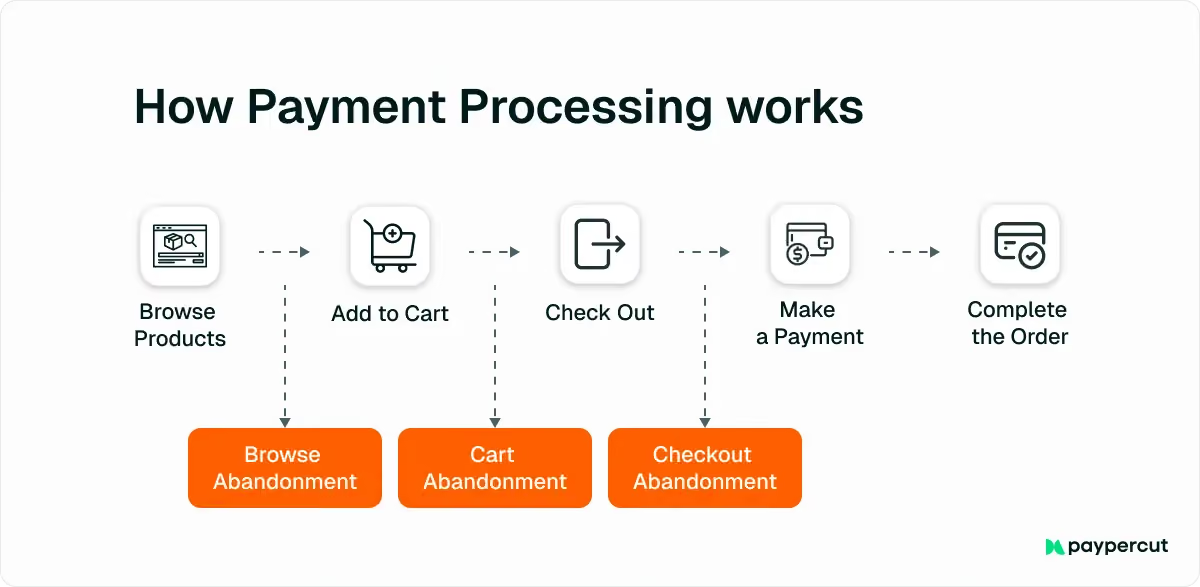
In most online stores, checkout drop-offs tend to happen at three key points in the checkout flow.
1. When checkout starts
The first drop-off point appears right after customers enter the checkout page.
At this stage, shoppers may leave if the process immediately looks complicated or time-consuming.
Common triggers include:
- Forced account creation
- Unclear checkout steps
- Lengthy forms
2. During checkout form completion
Even after customers begin checkout, friction in the form can cause them to abandon the process.
This often happens when:
- There are too many form fields
- The page is loading slowly
- The form isn’t optimized for mobile
3. At the payment stage
Even shoppers who are ready to buy may leave if the payment process feels unreliable or inconvenient.
This happens when:
- Their preferred payment method isn’t available
- The payment page doesn’t look secure
- Authentication steps feel confusing
- Their transaction is declined
How to reduce conversion drop-off in checkout: 8 proven strategies
Reducing conversion drop-off in checkout is mostly a matter of removing friction from the buying process.
When checkout is simple, clear, and reliable, more customers complete their purchase.
Some improvements happen before customers reach checkout, others during the checkout process itself, and some even after a shopper leaves without completing the purchase.
Here are eight ways to reduce conversion drop-off in checkout and help more shoppers finish their orders.
1. Be transparent about pricing from the start
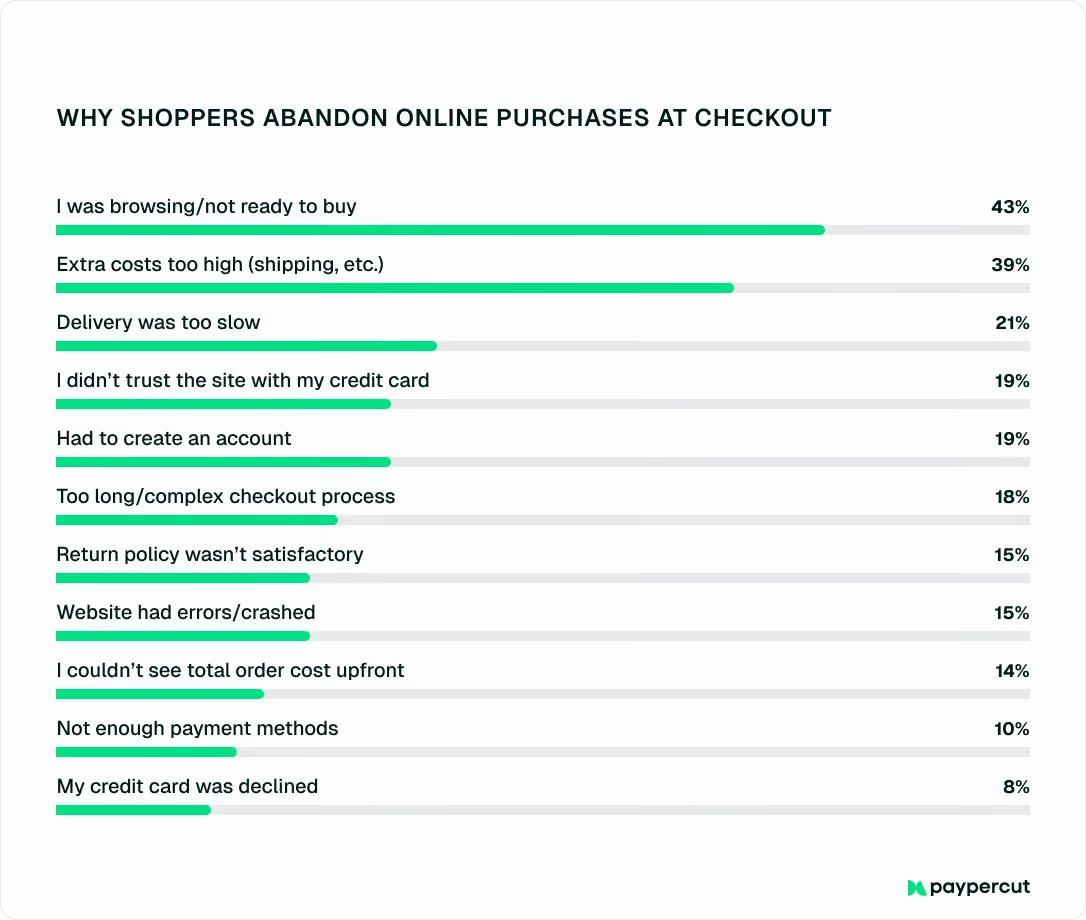
Unexpected costs are one of the most common reasons shoppers abandon checkout, accounting for as much as 39% of all abandoned purchases.
Shipping fees, taxes, and other additional charges that appear late in the process are often the biggest culprits.
Keep in mind that “late in the process” is the key phrase here.
When customers only see the full price at the final step, it can feel like the total suddenly increased.
Even if the costs are legitimate, the surprise often breaks trust and makes shoppers reconsider the purchase.
The good news is that this problem is relatively easy to fix. All you need to do is be clear about pricing from the beginning, and you’ll help customers understand the full cost before they invest time in checkout.
Being clear about pricing includes:
- Showing shipping costs early: Display shipping fees on product pages or in the cart so customers know what to expect before they start checkout.
- Displaying the total price upfront: Include taxes, fees, and other charges as early as possible in the buying journey.
- Avoiding hidden fees: Clearly explain any additional costs instead of introducing them at the final step.
You can also consider offering free shipping or free returns, as these policies reduce purchase anxiety and remove a common barrier to completing orders.
2. Streamline the checkout experience
Many checkout drop-offs are directly tied to the checkout experience itself.
For example, around 19% of shoppers abandon checkout if they’re forced to create an account, while 18% leave because the checkout process feels too long or complicated.
These numbers highlight how important it is to design checkout in a way that works in your favor, not against you. The simpler and faster the process is, the easier it is for customers to complete their purchase.
The table below outlines practical ways to streamline the checkout experience and turn more checkouts into confirmed orders:
If you want to go a step further, Express Checkout removes the checkout page entirely.
Apple Pay and Google Pay buttons appear directly on your product page, so customers pay in one tap using stored wallet data—no form, no steps, no navigation to a separate page.
It's the shortest possible path from intent to purchase.
3. Support customers during checkout
You can’t physically guide every customer to the checkout the way a store assistant might in a physical shop.
However, you can design the checkout experience so it answers questions, removes confusion, and keeps shoppers moving forward.
You can do so by:
- Showing progress indicators so customers can see how many steps remain in the checkout process
- Using inline validation and clear error messages to help shoppers correct mistakes immediately
- Offering live chat or quick access to support if customers have questions about shipping, products, or the process itself
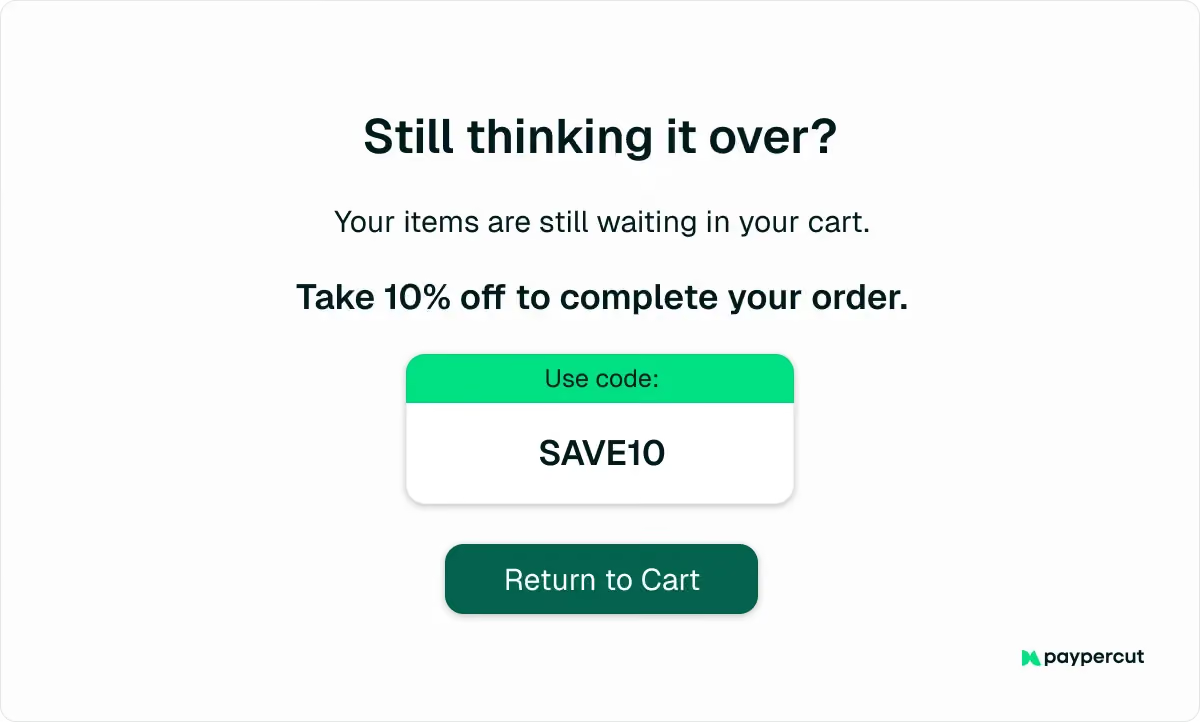
- Using gentle reminders or triggers if a shopper is about to leave the page
- Offering incentives at checkout, such as free shipping thresholds or small discounts, to encourage completion
4. Make checkout mobile-friendly
Checkout drop-off is typically even higher on mobile devices (around 77%), which makes it a major issue for online stores. This is especially important because mobile devices now account for more than 60% of web traffic in Europe.
That’s why your checkout experience should be optimized for all devices, with mobile users front and center.
To do this, you can:
- Use mobile-friendly input fields and large, easy-to-tap buttons
- Support autofill and digital wallets to reduce manual typing
- Consider Express Checkout to eliminate typing altogether and keep customers on the same page for the payment
- Keep forms short and ask only for essential information
- Ensure checkout pages load quickly on mobile networks
- Design the layout for small screens so shoppers don’t need to zoom or scroll excessively
5. Give customers flexible ways to pay
Around 10% of shoppers abandon checkout due to a lack of payment methods. In many cases, this means the website didn’t offer the payment option they usually use or one they trust enough to enter their details.
This problem is often easy to fix by expanding the number of payment methods you accept.
Payment preferences vary widely across markets, so offering familiar options can make customers more comfortable completing their purchase.
In most Central and Eastern European (CEE) countries, this usually means supporting:
- Card payments (Visa, Mastercard)
- Digital wallets (Apple Pay, Google Pay)
- Local bank transfers or regional payment methods
- Buy Now, Pay Later (BNPL) options
BNPL is particularly important for higher-value purchases.
For example, luxury and jewelry products have some of the highest abandonment rates, reaching over 80%. Giving customers the option to split payments into smaller installments can make expensive purchases feel more manageable.
But how can you offer all these options without integrating each one separately?
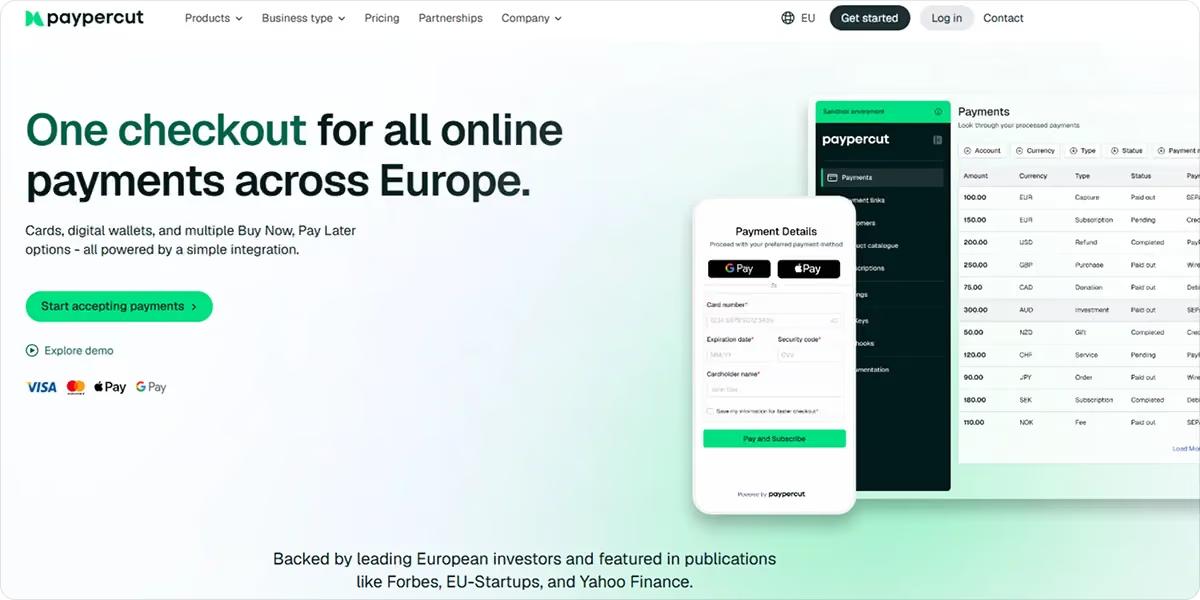
One solution is to use a payment aggregator like Paypercut, which allows merchants to access multiple payment methods through a single integration.
With Paypercut, you can support:
- Card payments and digital wallets
- Multiple BNPL options through a dedicated BNPL aggregator
- Payment links and QR codes
- Recurring payments and subscription billing for ongoing services
- Split payments for marketplaces or multi-vendor platforms
- Pre-authorisation and delayed capture, useful for bookings or services with adjustable pricing
This makes it easier to offer the payment flexibility customers expect while managing everything from one payment platform.
6. Build trust throughout the checkout process
Consumer behavior research consistently identifies trust as a key factor influencing people’s willingness to buy online, especially when it comes to payment security and reliability.
That’s why it’s not surprising that around one in five shoppers abandon checkout because they don’t trust the website with their payment information.
For merchants, this means doing everything possible to build confidence at every step of the buying journey, from shipping information to payment and final confirmation.
You can do this by:
- Displaying security badges and SSL certificates to show that transactions and customer data are protected
- Using trusted payment providers that customers recognize and feel comfortable using
- Showing accepted payment method logos early so shoppers know their preferred option is supported
- Providing clear shipping information and delivery options, including well-known carriers
- Making return and refund policies easy to find and understand
- Displaying customer reviews or trust badges to reinforce credibility
7. Reduce technical issues and payment failures
Sometimes, customers are ready to buy, but the website simply doesn’t let them. A page might load slowly, the checkout form may show an error, or a payment might be declined.
And this is far from uncommon.
As many as 35.4% of online shoppers in the European Union report encountering problems when making online purchases.
To avoid losing customers who are already willing to complete their order, you should:
- Ensure your website loads quickly, especially during checkout
- Use a stable payment infrastructure that minimizes technical failures
- Enable smart retries for failed payments, so customers can try again easily
- Optimize fraud and risk settings to avoid unnecessary payment declines
- Provide easy-to-understand error messages so customers know how to fix problems quickly
8. Follow up with checkout abandonment reminders
Not every abandoned checkout means the sale is lost. Sometimes customers simply get distracted or decide to finish the purchase later.
You can bring them back by sending checkout abandonment reminders through email, SMS, or messaging apps.
These messages can include a direct link back to checkout, a quick reminder of the items they selected, or a small incentive such as a limited-time discount.
How the right payment partner helps reduce checkout drop-off
Your payment infrastructure is often the most important factor behind successful checkouts.
If your payment system is reliable, flexible, and built for the markets you sell in, customers are far more likely to complete their purchase. If it isn’t, even highly motivated buyers may abandon the process.
Besides allowing you to offer multiple payment methods through a single setup, Paypercut helps you secure more completed sales by:
- Enabling Express Checkout, which puts Apple Pay and Google Pay buttons on your product page so customers pay in one tap, before they ever reach a checkout form
- Offering embedded checkout, which keeps customers on your website and creates a smoother checkout experience
- Providing simple plugins and integrations for platforms like WooCommerce, Shopify, and other e-commerce systems
- Handling multi-currency payments and local settlement, making it easier to sell across Europe
- Protecting transactions with bank-level security, including PCI-DSS infrastructure, encryption, and PSD2-compliant authentication
- Managing payments, payouts, and performance in one dashboard, so merchants can track everything in real time
In practice, this means fewer payment issues, more flexibility for customers, and a checkout experience that’s easier to complete.
If you’re ready to simplify how you accept payments, register online in just a few minutes. Or, if you’d prefer to discuss the best setup for your store, book a 30-minute consultation with our team.
FAQ
How to improve checkout conversion rate?
You can improve the checkout conversion rate by simplifying the checkout process, showing all costs upfront, supporting mobile users, offering trusted payment methods, and ensuring your payment system is reliable.
Is a 2.5% conversion rate good?
Yes. The average e-commerce conversion rate is usually between 2% and 3%, so 2.5% is considered a solid benchmark for many online stores.
Why is my conversion rate dropping?
Common reasons include slow checkout pages, unexpected costs, missing payment methods, technical errors, or a complicated checkout process that discourages customers from finishing their purchase.